
Heretic Taoist
อัปเดตเมื่อ
เวอร์ชันปัจจุบัน
ให้บริการโดย

เวลาคุณเล่น Heretic Taoist, คุณอาจรู้สึกว่ามือคุณอาจบังจอแล้วทำให้ไม่ได้เล่นแบบเต็มที่. เล่นแบบไร้ขีดจำกัดด้วยเม้าส์และคีย์บอร์ด. MEmu มีตัวเลือกหลายอย่างให้คุณใช้งานเกมที่คุณเล่นแบบที่คุณต้องการ. ดาวน์โหลดและเล่น Heretic Taoist บน PC. เล่นนานแค่ไหนก็ได้, ไม่ต้องชาร์จแบตเตอรี่, หรือเจอคนโทรเข้ามาระหว่างเล่น. MEmu 9 เป็นตัวเลือกสำหรับการเล่น Heretic Taoist บน PC. ทางทีมงานเราได้ปรับแต่งเกม, ปรับให้เล่นเกมบางเกมได้เหมือนเล่น Heretic Taoist เป็นเกม PC เช่นเล็งด้วยเม้าส์หรือใช้คีย์บอร์ด. ระบบของเรายังทำให้คุณสามารถเปิดเล่นได้มากกว่า 2 เกมพร้อมๆกันในคอมของคุณ. และที่สำคัญที่สุด, ระบบโปรแกรมของเราสามารถทำให้คุณใช้ระบบของ PC ทำให้เกมลื่นเหมือนกับใช้โทรศัพท์รุ่นล่าสุด. เราไม่ได้ดูแลเรื่องการเล่นเกม, แต่เราดูแลถึงความสนุกสนานที่คุณได้จากการเล่นด้วย.
แสดงเพิ่มเติม
ดาวน์โหลด Heretic Taoist บน PC ด้วย MEmu Android Emulator สนุกกับการเล่นบนหน้าจอขนาดใหญ่ Beyond the lantern-lit streets of an ancient town lies the boundary between the living and the dead.



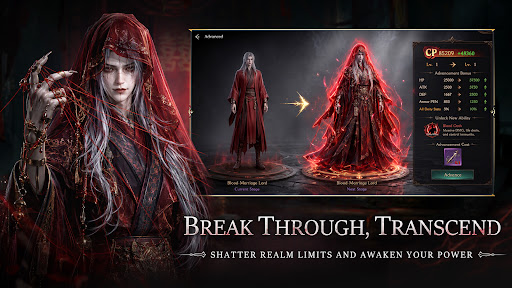
Beyond the lantern-lit streets of an ancient town lies the boundary between the living and the dead. Spirits possess lifeless bodies, and monsters draw near at the sound of a voice.
Armed with talismans and a sword, enter a land haunted by wandering ghosts. Refine your mystic weapons and hone your Taoist arts through every trial. With your little jiangshi beside you, each perilous encounter reveals a supernatural mystery hidden in the mortal world.
The balance of yin and yang has shattered—but why? Banish evil with your talismans and carve a path to the truth with your blade.
◆ No Evil Can Stand Against My Blade
Wield talismans and a sword against the fiends lurking between life and death. Banish evil with Taoist arts and test your blade against formidable foes.
◆ Upgrade Mystic Weapons, Unlock New Forms
Refine your mystic weapons to unlock different forms, strengthening their power to banish evil as you advance in your cultivation.
◆ Roam the Spirit Realm with Your Little Jiangshi
Befriend and nurture little jiangshi companions. Journey together through ancient towns and untamed wilds, facing sinister creatures and supernatural mysteries along the way.
◆ Ascend to New Heights, Fear No Ghost
Deepen your cultivation through trials, overcome the barriers to your growth, and reach higher realms of power to face the challenges ahead.
แสดงเพิ่มเติม

1. ดาวน์โหลดตัวติดตั้ง MEmu และสิ้นสุดการติดตั้ง

2. เริ่ม MEmu จากนั้นเปิด Google Play บนหน้าแรก

3. ค้นหา Heretic Taoist ใน Google Play
Install
4. ดาวน์โหลดและติดตั้ง Heretic Taoist
5. เมื่อติดตั้งเสร็จให้คลิกที่ไอคอนเพื่อเริ่มใช้งาน

6. สนุกกับการเล่น Heretic Taoist บนพีซีด้วย MEmu
MEmu App Player เป็นอีมูเลเตอร์ Android ที่ดีที่สุดและผู้คนกว่า 50 ล้านคนเพลิดเพลินไปกับประสบการณ์การเล่นเกม Android ที่ยอดเยี่ยม เทคโนโลยีการจำลองเสมือนของ MEmu ช่วยให้คุณเล่นเกม Android หลายพันเกมได้อย่างราบรื่นบนพีซีของคุณแม้แต่เกมที่ต้องใช้กราฟิกมากที่สุด
จอใหญ่และกราฟฟิกสวยกว่า; เล่นได้นาน, ไม่ต้องใช้แบตเตอรี่โทรศัพท์หรือเน็ตโทรศัพท์.
ระบบปรับแต่งปุ่มคีย์บอร์ดและเม้าส์ตามที่คุณเลือก
เล่นมากกว่าหนึ่งเกมบน PC ในเวลาเดียวกันด้วยระบบหลายจอหรือ Multi-Instance manager.
Play Heretic Taoist on PC by following steps: