Hypnospace Outlaw
อัปเดตเมื่อ
เวอร์ชันปัจจุบัน
ให้บริการโดย

เวลาคุณเล่น Hypnospace Outlaw, คุณอาจรู้สึกว่ามือคุณอาจบังจอแล้วทำให้ไม่ได้เล่นแบบเต็มที่. เล่นแบบไร้ขีดจำกัดด้วยเม้าส์และคีย์บอร์ด. MEmu มีตัวเลือกหลายอย่างให้คุณใช้งานเกมที่คุณเล่นแบบที่คุณต้องการ. ดาวน์โหลดและเล่น Hypnospace Outlaw บน PC. เล่นนานแค่ไหนก็ได้, ไม่ต้องชาร์จแบตเตอรี่, หรือเจอคนโทรเข้ามาระหว่างเล่น. MEmu 9 เป็นตัวเลือกสำหรับการเล่น Hypnospace Outlaw บน PC. ทางทีมงานเราได้ปรับแต่งเกม, ปรับให้เล่นเกมบางเกมได้เหมือนเล่น Hypnospace Outlaw เป็นเกม PC เช่นเล็งด้วยเม้าส์หรือใช้คีย์บอร์ด. ระบบของเรายังทำให้คุณสามารถเปิดเล่นได้มากกว่า 2 เกมพร้อมๆกันในคอมของคุณ. และที่สำคัญที่สุด, ระบบโปรแกรมของเราสามารถทำให้คุณใช้ระบบของ PC ทำให้เกมลื่นเหมือนกับใช้โทรศัพท์รุ่นล่าสุด. เราไม่ได้ดูแลเรื่องการเล่นเกม, แต่เราดูแลถึงความสนุกสนานที่คุณได้จากการเล่นด้วย.
แสดงเพิ่มเติม
ดาวน์โหลด Hypnospace Outlaw บน PC ด้วย MEmu Android Emulator สนุกกับการเล่นบนหน้าจอขนาดใหญ่ *NOTICE*: Game content is currently available in English only.
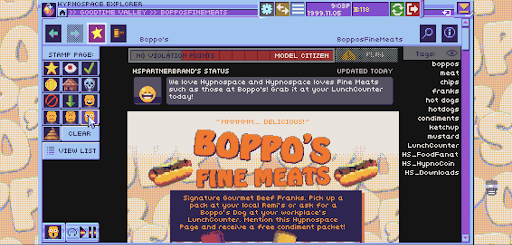
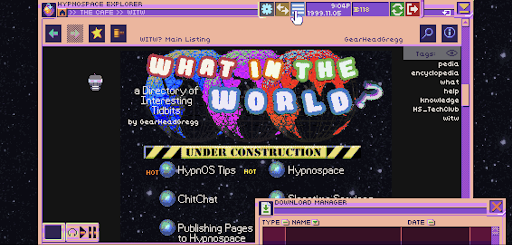
*NOTICE*: Game content is currently available in English only. Play the beginning for free. A one-time in-app purchase unlocks the full game. No ads.
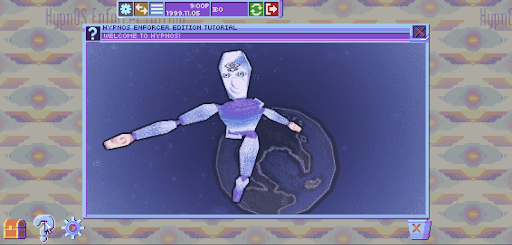
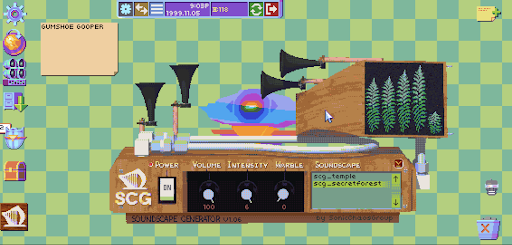
Hypnospace Outlaw is a '90s internet simulator in which you scour Hypnospace's wide variety of weird and wonderful websites to hunt down wrongdoers, while also keeping an eye on your inbox, avoiding viruses and adware, and downloading a plethora of apps that may or may not be useful.
As part of your job as a Hypnospace Enforcer, you'll be watching out for copyright infringement, internet bullying and more, with reports and rewards coming direct from the Hypnospace Patrol Department to your inbox. In your spare time, you can customize your HypnOS desktop however you see fit, with a variety of downloads, wallpapers, screensavers and helper bots to keep you company.
So slip on your Hypnospace Headband™, and keep these key directives in mind:
- Crawl through Cyberspace: Scour the darkest corners of the Web for scumbag users who violate Hypnospace law!
- Dangers and delights: Download groovy GIFS and MIDI files, but watch out for adware, toolbars and hackers!
- Treasure hunting: Do your job to earn HypnoCoins, or ignore your inbox and go hunting for hidden pages, downloads and secrets!
- Relive your childhood: Equip obnoxious screensavers and skins for your desktop, and wiggle your mouse pointer around to make pages load faster!
Optimized for mobile with full touch controls and revamped UI!
แสดงเพิ่มเติม

1. ดาวน์โหลดตัวติดตั้ง MEmu และสิ้นสุดการติดตั้ง

2. เริ่ม MEmu จากนั้นเปิด Google Play บนหน้าแรก

3. ค้นหา Hypnospace Outlaw ใน Google Play
Install
4. ดาวน์โหลดและติดตั้ง Hypnospace Outlaw
5. เมื่อติดตั้งเสร็จให้คลิกที่ไอคอนเพื่อเริ่มใช้งาน

6. สนุกกับการเล่น Hypnospace Outlaw บนพีซีด้วย MEmu
MEmu App Player เป็นอีมูเลเตอร์ Android ที่ดีที่สุดและผู้คนกว่า 50 ล้านคนเพลิดเพลินไปกับประสบการณ์การเล่นเกม Android ที่ยอดเยี่ยม เทคโนโลยีการจำลองเสมือนของ MEmu ช่วยให้คุณเล่นเกม Android หลายพันเกมได้อย่างราบรื่นบนพีซีของคุณแม้แต่เกมที่ต้องใช้กราฟิกมากที่สุด
จอใหญ่และกราฟฟิกสวยกว่า; เล่นได้นาน, ไม่ต้องใช้แบตเตอรี่โทรศัพท์หรือเน็ตโทรศัพท์.
ระบบปรับแต่งปุ่มคีย์บอร์ดและเม้าส์ตามที่คุณเลือก
เล่นมากกว่าหนึ่งเกมบน PC ในเวลาเดียวกันด้วยระบบหลายจอหรือ Multi-Instance manager.
Play Hypnospace Outlaw on PC by following steps: