Jump Ship
อัปเดตเมื่อ
เวอร์ชันปัจจุบัน
ให้บริการโดย

เวลาคุณเล่น Jump Ship, คุณอาจรู้สึกว่ามือคุณอาจบังจอแล้วทำให้ไม่ได้เล่นแบบเต็มที่. เล่นแบบไร้ขีดจำกัดด้วยเม้าส์และคีย์บอร์ด. MEmu มีตัวเลือกหลายอย่างให้คุณใช้งานเกมที่คุณเล่นแบบที่คุณต้องการ. ดาวน์โหลดและเล่น Jump Ship บน PC. เล่นนานแค่ไหนก็ได้, ไม่ต้องชาร์จแบตเตอรี่, หรือเจอคนโทรเข้ามาระหว่างเล่น. MEmu 9 เป็นตัวเลือกสำหรับการเล่น Jump Ship บน PC. ทางทีมงานเราได้ปรับแต่งเกม, ปรับให้เล่นเกมบางเกมได้เหมือนเล่น Jump Ship เป็นเกม PC เช่นเล็งด้วยเม้าส์หรือใช้คีย์บอร์ด. ระบบของเรายังทำให้คุณสามารถเปิดเล่นได้มากกว่า 2 เกมพร้อมๆกันในคอมของคุณ. และที่สำคัญที่สุด, ระบบโปรแกรมของเราสามารถทำให้คุณใช้ระบบของ PC ทำให้เกมลื่นเหมือนกับใช้โทรศัพท์รุ่นล่าสุด. เราไม่ได้ดูแลเรื่องการเล่นเกม, แต่เราดูแลถึงความสนุกสนานที่คุณได้จากการเล่นด้วย.
แสดงเพิ่มเติม
ดาวน์โหลด Jump Ship บน PC ด้วย MEmu Android Emulator สนุกกับการเล่นบนหน้าจอขนาดใหญ่ Jump Ship is an exciting mission-based cooperative first-person shooter (FPS) that immerses players in the intense life of a spaceship crew.
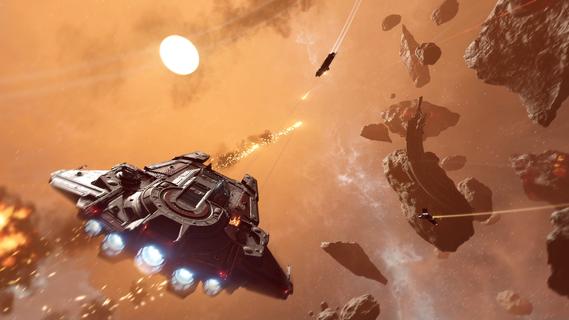
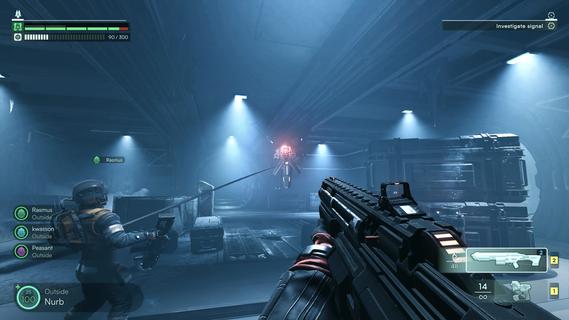
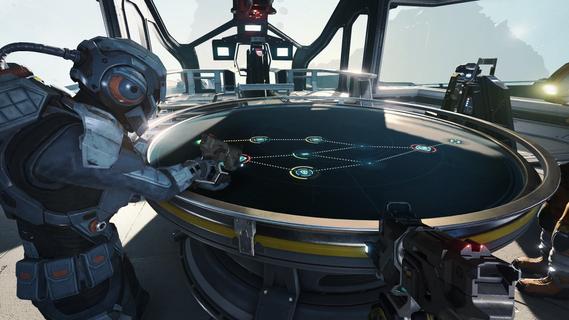
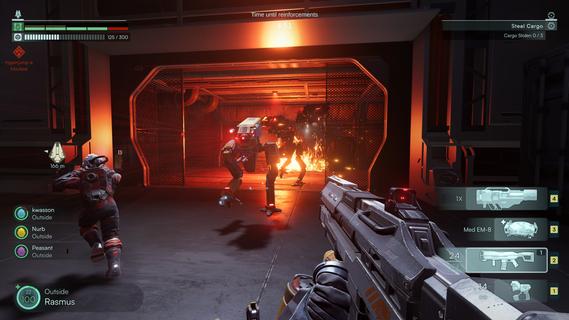
Jump Ship is an exciting mission-based cooperative first-person shooter (FPS) that immerses players in the intense life of a spaceship crew. Designed for up to four players, the game offers a unique blend of teamwork, tactical combat, and exploration, all set against the vast and dangerous backdrop of outer space. Players must work together to survive, complete missions, and keep their ship operational while facing threats both inside and outside their vessel. At its core, Jump Ship emphasizes seamless transitions between different gameplay modes. Players can switch effortlessly from manning the ship’s various stations—such as piloting, engineering, or weapons control—to venturing outside the ship on foot. This fluid movement between roles adds depth and variety to the gameplay, ensuring that every moment is engaging and dynamic. Whether you’re repairing critical systems during a crisis or engaging in a zero-gravity spacewalk, the game keeps players on their toes. The cooperative aspect is central to the experience. Each crew member has specific responsibilities, and success depends on effective communication and coordination. For example, while one player pilots the ship through an asteroid field, another might be managing shields or repairing damage caused by enemy fire. The teamwork required creates a strong sense of camaraderie and shared purpose that is rare in many FPS games. Combat in Jump Ship is intense and varied. Players face threats both on the ship and on external missions. On-foot exploration often leads to hostile encounters on alien planets or derelict space stations, where players must utilize cover, strategic positioning, and their unique abilities to survive. Space battles add another layer of excitement, with players manning turrets or piloting the ship in dogfights against enemy vessels. The combination of ground and space combat ensures that players must master different combat styles and tactics. Upgrading and maintaining the ship is a crucial part of the gameplay loop. Players gather resources and complete objectives to enhance their vessel’s capabilities, from improving weapon systems and shields to repairing structural damage. A well-maintained ship not only increases the crew’s chances of survival but also unlocks new mission opportunities and exploration zones. The ship itself becomes a character in the story, evolving alongside the crew’s journey. The mission-based structure provides clear goals and a sense of progression. Each mission presents unique challenges, whether it’s rescuing stranded allies, retrieving valuable cargo, or defending against waves of enemy attackers. The variety of mission types keeps the gameplay fresh and encourages players to adapt their strategies. Success requires balancing exploration, combat, and ship management, making every decision impactful. Visually, Jump Ship offers detailed sci-fi environments that capture the vastness and mystery of space. The interiors of the ship are intricately designed, with functional consoles and realistic zero-gravity physics enhancing immersion. External environments, such as alien worlds and space debris fields, provide atmospheric and varied backdrops for the crew’s adventures. In summary, Jump Ship is a thrilling cooperative FPS that combines tactical teamwork, versatile combat, and immersive space exploration. Its seamless gameplay transitions, mission variety, and emphasis on ship management create a rich and engaging experience for players who enjoy sci-fi action and cooperative challenges. Whether you’re coordinating repairs during a crisis, battling enemies on alien terrain, or piloting your ship through hostile space, Jump Ship delivers an unforgettable journey among the stars.
แสดงเพิ่มเติม

1. ดาวน์โหลดตัวติดตั้ง MEmu และสิ้นสุดการติดตั้ง

2. เริ่ม MEmu จากนั้นเปิด Google Play บนหน้าแรก

3. ค้นหา Jump Ship ใน Google Play
Install
4. ดาวน์โหลดและติดตั้ง Jump Ship
5. เมื่อติดตั้งเสร็จให้คลิกที่ไอคอนเพื่อเริ่มใช้งาน

6. สนุกกับการเล่น Jump Ship บนพีซีด้วย MEmu
MEmu App Player เป็นอีมูเลเตอร์ Android ที่ดีที่สุดและผู้คนกว่า 50 ล้านคนเพลิดเพลินไปกับประสบการณ์การเล่นเกม Android ที่ยอดเยี่ยม เทคโนโลยีการจำลองเสมือนของ MEmu ช่วยให้คุณเล่นเกม Android หลายพันเกมได้อย่างราบรื่นบนพีซีของคุณแม้แต่เกมที่ต้องใช้กราฟิกมากที่สุด
จอใหญ่และกราฟฟิกสวยกว่า; เล่นได้นาน, ไม่ต้องใช้แบตเตอรี่โทรศัพท์หรือเน็ตโทรศัพท์.
ระบบปรับแต่งปุ่มคีย์บอร์ดและเม้าส์ตามที่คุณเลือก
เล่นมากกว่าหนึ่งเกมบน PC ในเวลาเดียวกันด้วยระบบหลายจอหรือ Multi-Instance manager.
Play Jump Ship on PC by following steps: