RPG Leingham Tavern Story
อัปเดตเมื่อ
เวอร์ชันปัจจุบัน
1.08g
ให้บริการโดย

เวลาคุณเล่น RPG Leingham Tavern Story, คุณอาจรู้สึกว่ามือคุณอาจบังจอแล้วทำให้ไม่ได้เล่นแบบเต็มที่. เล่นแบบไร้ขีดจำกัดด้วยเม้าส์และคีย์บอร์ด. MEmu มีตัวเลือกหลายอย่างให้คุณใช้งานเกมที่คุณเล่นแบบที่คุณต้องการ. ดาวน์โหลดและเล่น RPG Leingham Tavern Story บน PC. เล่นนานแค่ไหนก็ได้, ไม่ต้องชาร์จแบตเตอรี่, หรือเจอคนโทรเข้ามาระหว่างเล่น. MEmu 9 เป็นตัวเลือกสำหรับการเล่น RPG Leingham Tavern Story บน PC. ทางทีมงานเราได้ปรับแต่งเกม, ปรับให้เล่นเกมบางเกมได้เหมือนเล่น RPG Leingham Tavern Story เป็นเกม PC เช่นเล็งด้วยเม้าส์หรือใช้คีย์บอร์ด. ระบบของเรายังทำให้คุณสามารถเปิดเล่นได้มากกว่า 2 เกมพร้อมๆกันในคอมของคุณ. และที่สำคัญที่สุด, ระบบโปรแกรมของเราสามารถทำให้คุณใช้ระบบของ PC ทำให้เกมลื่นเหมือนกับใช้โทรศัพท์รุ่นล่าสุด. เราไม่ได้ดูแลเรื่องการเล่นเกม, แต่เราดูแลถึงความสนุกสนานที่คุณได้จากการเล่นด้วย.
แสดงเพิ่มเติม
ดาวน์โหลด RPG Leingham Tavern Story บน PC ด้วย MEmu Android Emulator สนุกกับการเล่นบนหน้าจอขนาดใหญ่ [Supported Devices].
[Supported Devices]
Requires higher specs than previous titles.
A trial version is available to test performance.
Recommended: Android OS 11+, 8 GB+ RAM.
[Story]
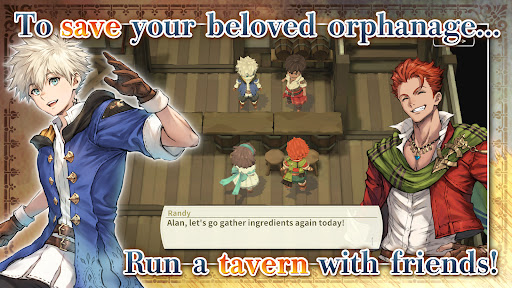
Save an orphanage from closure and build a thriving tavern in Leingham Tavern Story: Alan and the Time Goddess, a charming fantasy RPG combining cooking, tavern management, and dungeon exploration!
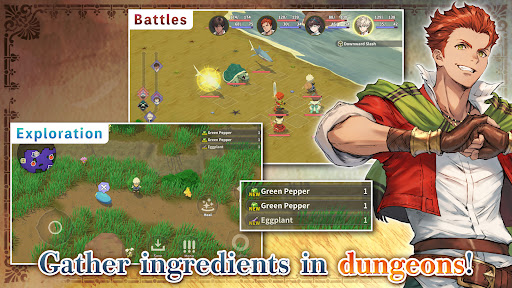
Join Alan and his friends as they venture into monster-filled dungeons in search of ingredients, discover new recipes, and serve delicious dishes to bring customers through the door. Along the way, meet the people of the Kingdom of Leingham and enjoy a heartwarming story where food, friendship, and adventure come together.
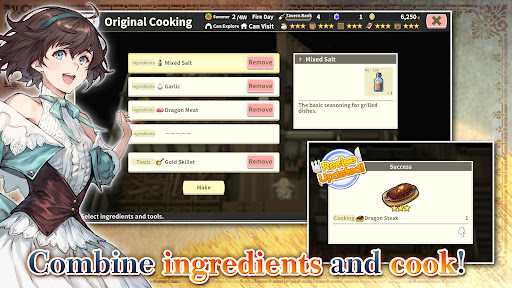
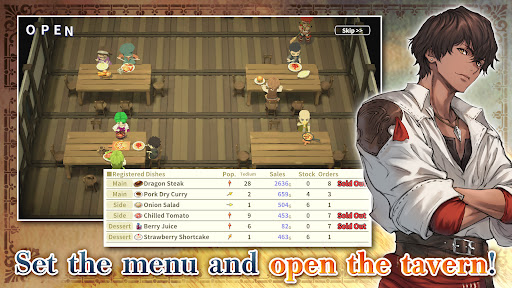
Explore dungeons, gather ingredients, and battle roaming monsters in classic turn-based RPG combat, then return to your tavern to create from over 800 different dishes. Experiment with ingredients, expand your recipe collection, adjust your menu to seasonal trends, and assign employees strategically to maximize sales. Grow vegetables on your farm, relax with a spot of fishing, and strengthen your characters by eating the meals you prepare instead of earning experience from battles.
From dungeon crawling and character progression to cooking and tavern management simulation, build your business and enjoy a deliciously different fantasy RPG adventure!
[IMPORTANT NOTICE]
Your use of the application requires your agreement to the following EULA and 'Privacy Policy and Notice'. If you do not agree, please do not download our application.
End User License Agreement: http://kemco.jp/eula/index.html
Privacy Policy and Notice: http://www.kemco.jp/app_pp/privacy.html
[Game Controller]
- Not Supported
[Languages]
- English (Coming Soon), Japanese
[Non-Supported Devices]
This app has generally been tested to work on any mobile device released in Japan. We cannot guarantee full support on other devices. If you have the Developer Options enabled in your device, please turn off the "Don't keep activities" option in case of any issue.
Get the latest information!
[Newsletter]
http://kemcogame.com/c8QM
[Facebook page]
https://www.facebook.com/kemco.global
*The actual price might differ depending on the region.
© 2024-2026 KEMCO/RideonJapan,Inc./Rideon,Inc.
แสดงเพิ่มเติม

1. ดาวน์โหลดตัวติดตั้ง MEmu และสิ้นสุดการติดตั้ง

2. เริ่ม MEmu จากนั้นเปิด Google Play บนหน้าแรก

3. ค้นหา RPG Leingham Tavern Story ใน Google Play
Install
4. ดาวน์โหลดและติดตั้ง RPG Leingham Tavern Story
5. เมื่อติดตั้งเสร็จให้คลิกที่ไอคอนเพื่อเริ่มใช้งาน

6. สนุกกับการเล่น RPG Leingham Tavern Story บนพีซีด้วย MEmu
MEmu App Player เป็นอีมูเลเตอร์ Android ที่ดีที่สุดและผู้คนกว่า 50 ล้านคนเพลิดเพลินไปกับประสบการณ์การเล่นเกม Android ที่ยอดเยี่ยม เทคโนโลยีการจำลองเสมือนของ MEmu ช่วยให้คุณเล่นเกม Android หลายพันเกมได้อย่างราบรื่นบนพีซีของคุณแม้แต่เกมที่ต้องใช้กราฟิกมากที่สุด
จอใหญ่และกราฟฟิกสวยกว่า; เล่นได้นาน, ไม่ต้องใช้แบตเตอรี่โทรศัพท์หรือเน็ตโทรศัพท์.
ระบบปรับแต่งปุ่มคีย์บอร์ดและเม้าส์ตามที่คุณเลือก
เล่นมากกว่าหนึ่งเกมบน PC ในเวลาเดียวกันด้วยระบบหลายจอหรือ Multi-Instance manager.
Play RPG Leingham Tavern Story on PC by following steps: