Toy Survivor : The War
อัปเดตเมื่อ
เวอร์ชันปัจจุบัน
0.1.0
ให้บริการโดย

เวลาคุณเล่น Toy Survivor : The War, คุณอาจรู้สึกว่ามือคุณอาจบังจอแล้วทำให้ไม่ได้เล่นแบบเต็มที่. เล่นแบบไร้ขีดจำกัดด้วยเม้าส์และคีย์บอร์ด. MEmu มีตัวเลือกหลายอย่างให้คุณใช้งานเกมที่คุณเล่นแบบที่คุณต้องการ. ดาวน์โหลดและเล่น Toy Survivor : The War บน PC. เล่นนานแค่ไหนก็ได้, ไม่ต้องชาร์จแบตเตอรี่, หรือเจอคนโทรเข้ามาระหว่างเล่น. MEmu 9 เป็นตัวเลือกสำหรับการเล่น Toy Survivor : The War บน PC. ทางทีมงานเราได้ปรับแต่งเกม, ปรับให้เล่นเกมบางเกมได้เหมือนเล่น Toy Survivor : The War เป็นเกม PC เช่นเล็งด้วยเม้าส์หรือใช้คีย์บอร์ด. ระบบของเรายังทำให้คุณสามารถเปิดเล่นได้มากกว่า 2 เกมพร้อมๆกันในคอมของคุณ. และที่สำคัญที่สุด, ระบบโปรแกรมของเราสามารถทำให้คุณใช้ระบบของ PC ทำให้เกมลื่นเหมือนกับใช้โทรศัพท์รุ่นล่าสุด. เราไม่ได้ดูแลเรื่องการเล่นเกม, แต่เราดูแลถึงความสนุกสนานที่คุณได้จากการเล่นด้วย.
แสดงเพิ่มเติม
ดาวน์โหลด Toy Survivor : The War บน PC ด้วย MEmu Android Emulator สนุกกับการเล่นบนหน้าจอขนาดใหญ่ เข้าสู่สนามรบที่ของเล่นต่อสู้เพื่อเอาชีวิตรอด.
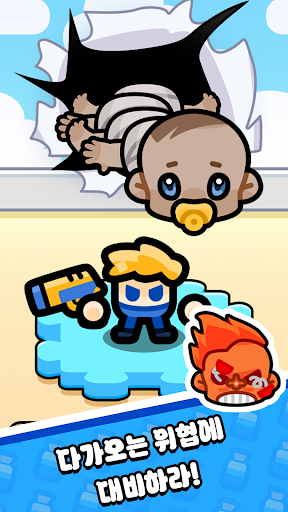
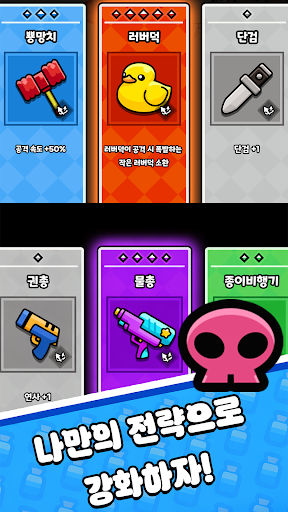
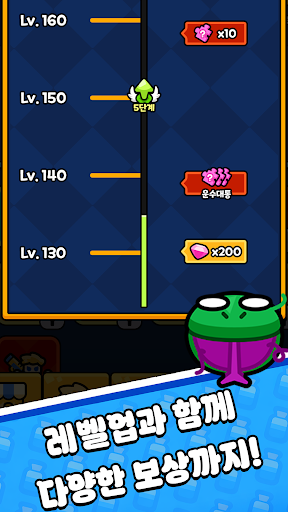
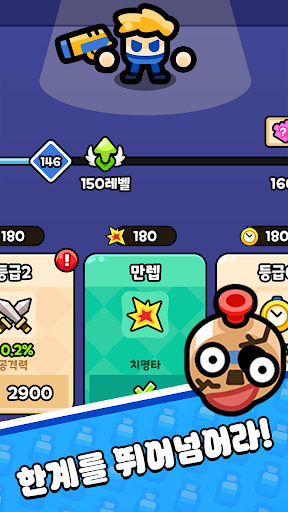
เข้าสู่สนามรบที่ของเล่นต่อสู้เพื่อเอาชีวิตรอด
Toy Survivor - The War คือเกม RPG แนวแอ็คชั่นเอาชีวิตรอดที่คุณควบคุมตัวละครของเล่น ต่อสู้กับศัตรูจำนวนมหาศาล และสร้างชุดอาวุธทรงพลังระหว่างการต่อสู้
ตัวละครแต่ละตัวเริ่มต้นด้วยอาวุธเริ่มต้นที่ไม่ซ้ำกัน ซึ่งไม่สามารถเปลี่ยนแปลงได้ อัปเกรดค่าสถานะหลัก เช่น พลังโจมตี โอกาสคริติคอล และคูลดาวน์ เพื่อปลดล็อกความสามารถเพิ่มเติมและเสริมความแข็งแกร่งให้กับตัวละครของคุณเมื่อเวลาผ่านไป
อาวุธสามารถสะสม อัปเกรด และพัฒนาได้ผ่านระบบความก้าวหน้า เพิ่มความเสียหาย ระยะ และประสิทธิภาพคูลดาวน์ของอาวุธ พร้อมปลดล็อกเอฟเฟกต์ใหม่และทักษะขั้นสูงเมื่อระดับอาวุธสูงขึ้น
เครื่องประดับให้โบนัสค่าสถานะเพิ่มเติมและเอฟเฟกต์การสะสม การสะสมให้ครบและเปิดใช้งานโบนัสเซ็ตจะช่วยให้พัฒนาไปสู่ประสิทธิภาพการต่อสู้ที่แข็งแกร่งยิ่งขึ้น
ระหว่างการต่อสู้ กำจัดศัตรูพิเศษที่ถือหีบสมบัติเพื่อรับการ์ดทักษะ เลือกหนึ่งในสามการอัปเกรดแบบสุ่ม เสริมความแข็งแกร่งให้กับทักษะที่มีอยู่ หรือปลดล็อกความสามารถใหม่ผ่านความก้าวหน้าแบบโร้กไลค์
การ์ดคอมโบพิเศษจะปรากฏขึ้นเมื่อสวมใส่ชุดอาวุธเฉพาะ ทำให้สามารถรวมอาวุธเข้าด้วยกันเป็นรูปแบบที่แข็งแกร่งขึ้นพร้อมเอฟเฟกต์การโจมตีใหม่
เสริมความแข็งแกร่งให้กับทีมของเล่นของคุณและเอาชีวิตรอดจากการต่อสู้ที่ยากขึ้นเรื่อยๆ
แสดงเพิ่มเติม

1. ดาวน์โหลดตัวติดตั้ง MEmu และสิ้นสุดการติดตั้ง

2. เริ่ม MEmu จากนั้นเปิด Google Play บนหน้าแรก

3. ค้นหา Toy Survivor : The War ใน Google Play
Install
4. ดาวน์โหลดและติดตั้ง Toy Survivor : The War
5. เมื่อติดตั้งเสร็จให้คลิกที่ไอคอนเพื่อเริ่มใช้งาน

6. สนุกกับการเล่น Toy Survivor : The War บนพีซีด้วย MEmu
MEmu App Player เป็นอีมูเลเตอร์ Android ที่ดีที่สุดและผู้คนกว่า 50 ล้านคนเพลิดเพลินไปกับประสบการณ์การเล่นเกม Android ที่ยอดเยี่ยม เทคโนโลยีการจำลองเสมือนของ MEmu ช่วยให้คุณเล่นเกม Android หลายพันเกมได้อย่างราบรื่นบนพีซีของคุณแม้แต่เกมที่ต้องใช้กราฟิกมากที่สุด
จอใหญ่และกราฟฟิกสวยกว่า; เล่นได้นาน, ไม่ต้องใช้แบตเตอรี่โทรศัพท์หรือเน็ตโทรศัพท์.
ระบบปรับแต่งปุ่มคีย์บอร์ดและเม้าส์ตามที่คุณเลือก
เล่นมากกว่าหนึ่งเกมบน PC ในเวลาเดียวกันด้วยระบบหลายจอหรือ Multi-Instance manager.
Play Toy Survivor : The War on PC by following steps: