Clone Drone in the Danger Zone
อัปเดตเมื่อ
เวอร์ชันปัจจุบัน
ให้บริการโดย

เวลาคุณเล่น Clone Drone in the Danger Zone, คุณอาจรู้สึกว่ามือคุณอาจบังจอแล้วทำให้ไม่ได้เล่นแบบเต็มที่. เล่นแบบไร้ขีดจำกัดด้วยเม้าส์และคีย์บอร์ด. MEmu มีตัวเลือกหลายอย่างให้คุณใช้งานเกมที่คุณเล่นแบบที่คุณต้องการ. ดาวน์โหลดและเล่น Clone Drone in the Danger Zone บน PC. เล่นนานแค่ไหนก็ได้, ไม่ต้องชาร์จแบตเตอรี่, หรือเจอคนโทรเข้ามาระหว่างเล่น. MEmu 9 เป็นตัวเลือกสำหรับการเล่น Clone Drone in the Danger Zone บน PC. ทางทีมงานเราได้ปรับแต่งเกม, ปรับให้เล่นเกมบางเกมได้เหมือนเล่น Clone Drone in the Danger Zone เป็นเกม PC เช่นเล็งด้วยเม้าส์หรือใช้คีย์บอร์ด. ระบบของเรายังทำให้คุณสามารถเปิดเล่นได้มากกว่า 2 เกมพร้อมๆกันในคอมของคุณ. และที่สำคัญที่สุด, ระบบโปรแกรมของเราสามารถทำให้คุณใช้ระบบของ PC ทำให้เกมลื่นเหมือนกับใช้โทรศัพท์รุ่นล่าสุด. เราไม่ได้ดูแลเรื่องการเล่นเกม, แต่เราดูแลถึงความสนุกสนานที่คุณได้จากการเล่นด้วย.
แสดงเพิ่มเติม
ดาวน์โหลด Clone Drone in the Danger Zone บน PC ด้วย MEmu Android Emulator สนุกกับการเล่นบนหน้าจอขนาดใหญ่ Clone Drone in the Danger Zone is a robot voxel slice-em-up where any part of your body can be sliced off.
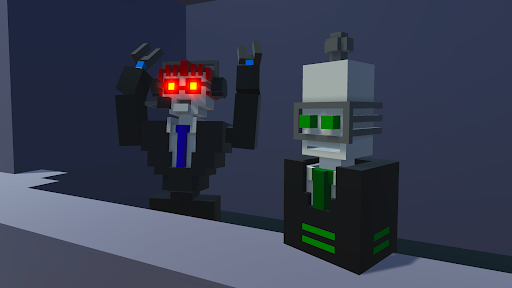
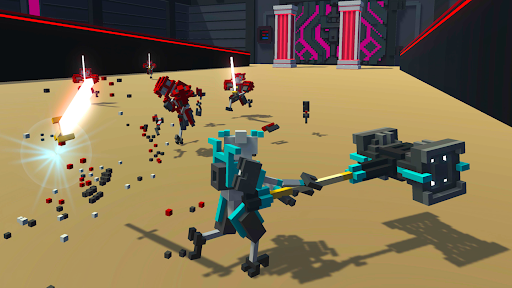
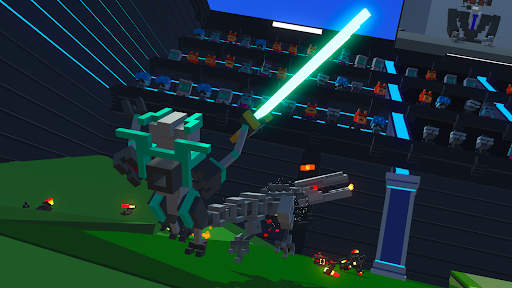
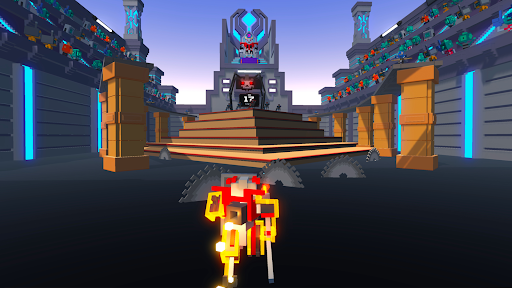
Clone Drone in the Danger Zone is a robot voxel slice-em-up where any part of your body can be sliced off. With your mind downloaded into a robot gladiator, you must survive the sinister trials of the arena. You can finally play the indie action hit on the go. It's Clone Drone on your mobile phone!
Single Player Game Modes
• Story Mode - One part epic tale of human defiance, another part laser swords.
• Endless Mode - Challenge yourself to fight through 86 level variants spread across 7 difficulty tiers. Can you make it to TITANIUM?
• Challenge Mode - Bow-only, hammer-only, can you still survive the arena?
Multiplayer Game Modes
• Last Bot Standing - A Battle-Royale-like game mode with short, 5-10 minute play sessions and up to 15 players. Survive, and shower in the remains of your fellow robot competitors.
• Private Duels - Challenge your friend to a 1v1 duel!
• Online Co-op! - Use the power of human friendship (and laser swords!) to survive in the arena!
Features:
• Epic Voxel Dismemberment: In addition to looking cool, the ability to cut off body parts is central to the gameplay. Jumping on one leg is a common occurrence. Large enemies need to be cut down to size before a fatal blow can be delivered.
• Sharp Sword Combat: Combat is fast and intense, putting great emphasis on movement, timing and positioning. You are never safe, as any blow can instantly kill or dismember.
• Intuitive Controls: On-screen buttons allow you to smoothly jump, dash, and destroy any robot adversary.
• Spin Attack: Perform a deadly 360 spin in this mobile exclusive attack!
• Entertaining Commentary: Commentatron and Analysis-Bot provide a play-by-play of your performance and react to your activities.
• Upgrade Your Robot: Jetpack, bow, kicking, deflection, clones, armor, FIRE BREATH.
• Terrifying Robotic Enemies: They actually get pretty hard! Sword robots, bow robots, Spidertron 5000, Spidertron 6000, gigantic hammer bots. So many things to dismember.
• Achievements! Unlock upgrades, emotes and multiplayer skins by achieving a rich variety of things!
• Emotes! Do the Funky Pillar Dance, mock your foes, or flap your arms delightfully!
แสดงเพิ่มเติม

1. ดาวน์โหลดตัวติดตั้ง MEmu และสิ้นสุดการติดตั้ง

2. เริ่ม MEmu จากนั้นเปิด Google Play บนหน้าแรก

3. ค้นหา Clone Drone in the Danger Zone ใน Google Play
Install
4. ดาวน์โหลดและติดตั้ง Clone Drone in the Danger Zone
5. เมื่อติดตั้งเสร็จให้คลิกที่ไอคอนเพื่อเริ่มใช้งาน

6. สนุกกับการเล่น Clone Drone in the Danger Zone บนพีซีด้วย MEmu
MEmu App Player เป็นอีมูเลเตอร์ Android ที่ดีที่สุดและผู้คนกว่า 50 ล้านคนเพลิดเพลินไปกับประสบการณ์การเล่นเกม Android ที่ยอดเยี่ยม เทคโนโลยีการจำลองเสมือนของ MEmu ช่วยให้คุณเล่นเกม Android หลายพันเกมได้อย่างราบรื่นบนพีซีของคุณแม้แต่เกมที่ต้องใช้กราฟิกมากที่สุด
จอใหญ่และกราฟฟิกสวยกว่า; เล่นได้นาน, ไม่ต้องใช้แบตเตอรี่โทรศัพท์หรือเน็ตโทรศัพท์.
ระบบปรับแต่งปุ่มคีย์บอร์ดและเม้าส์ตามที่คุณเลือก
เล่นมากกว่าหนึ่งเกมบน PC ในเวลาเดียวกันด้วยระบบหลายจอหรือ Multi-Instance manager.
Play Clone Drone in the Danger Zone on PC by following steps:





















![[ไกด์เกม] CookieRun Classic แนะนำ 5 คุกกี้น่าปั้น น่าลงทุน ที่มือใหม่ห้ามพลาด! (เล่นบน PC ผ่าน MEmu ให้ลื่นสุด ๆ) PC](https://www.memuplay.com/blog/wp-content/uploads/2026/08/579c01ab-a953-45b3-8115-9b6279b7d6f9.png)