Zombie Fire : Cabin Survival
อัปเดตเมื่อ
เวอร์ชันปัจจุบัน
0.0.1
ให้บริการโดย

เวลาคุณเล่น Zombie Fire : Cabin Survival, คุณอาจรู้สึกว่ามือคุณอาจบังจอแล้วทำให้ไม่ได้เล่นแบบเต็มที่. เล่นแบบไร้ขีดจำกัดด้วยเม้าส์และคีย์บอร์ด. MEmu มีตัวเลือกหลายอย่างให้คุณใช้งานเกมที่คุณเล่นแบบที่คุณต้องการ. ดาวน์โหลดและเล่น Zombie Fire : Cabin Survival บน PC. เล่นนานแค่ไหนก็ได้, ไม่ต้องชาร์จแบตเตอรี่, หรือเจอคนโทรเข้ามาระหว่างเล่น. MEmu 9 เป็นตัวเลือกสำหรับการเล่น Zombie Fire : Cabin Survival บน PC. ทางทีมงานเราได้ปรับแต่งเกม, ปรับให้เล่นเกมบางเกมได้เหมือนเล่น Zombie Fire : Cabin Survival เป็นเกม PC เช่นเล็งด้วยเม้าส์หรือใช้คีย์บอร์ด. ระบบของเรายังทำให้คุณสามารถเปิดเล่นได้มากกว่า 2 เกมพร้อมๆกันในคอมของคุณ. และที่สำคัญที่สุด, ระบบโปรแกรมของเราสามารถทำให้คุณใช้ระบบของ PC ทำให้เกมลื่นเหมือนกับใช้โทรศัพท์รุ่นล่าสุด. เราไม่ได้ดูแลเรื่องการเล่นเกม, แต่เราดูแลถึงความสนุกสนานที่คุณได้จากการเล่นด้วย.
แสดงเพิ่มเติม
ดาวน์โหลด Zombie Fire : Cabin Survival บน PC ด้วย MEmu Android Emulator สนุกกับการเล่นบนหน้าจอขนาดใหญ่ ดำดิ่งสู่ประสบการณ์สยองขวัญเอาชีวิตรอดขั้นสุดยอด!
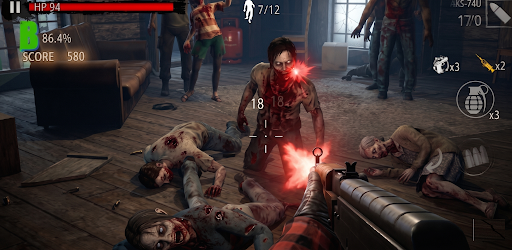
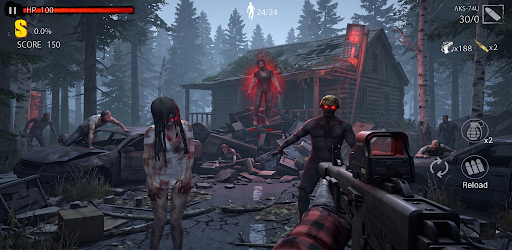
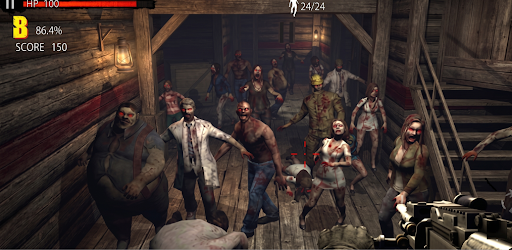
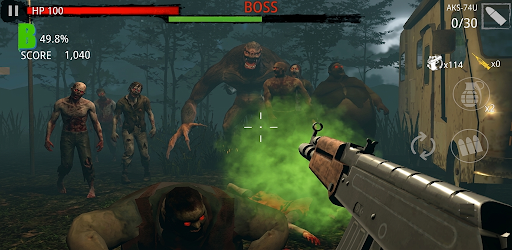
ดำดิ่งสู่ประสบการณ์สยองขวัญเอาชีวิตรอดขั้นสุดยอด!
Zombie Fire: รอดตายในกระท่อม เป็นเกม FPS ออฟไลน์ที่รวดเร็วที่คุณสามารถสนุกได้ทุกที่ทุกเวลา โดยไม่ต้องเชื่อมต่อเซิร์ฟเวอร์
ติดอยู่ในกระท่อมเปลี่ยวร้าง เป้าหมายเดียวของคุณคือเอาชีวิตรอด 80 วันจากฝูงซอมบี้ที่ไม่หยุดยั้ง สัมผัสบรรยากาศสยองขวัญที่น่าขนลุกและน่าสะพรึงกลัวไม่เหมือนเกมยิงอื่นใด
คุณสมบัติหลัก
ป้องกันกระท่อมซอมบี้: ปกป้องกระท่อมของคุณและเอาชีวิตรอดวันแล้ววันเล่าจากคลื่นซอมบี้และผีดิบที่น่ากลัวขึ้นเรื่อยๆ
บรรยากาศหลอนที่ไม่มีใครเทียบ: ภาพที่ชวนดื่มด่ำและน่าขนลุก รวมถึงการออกแบบเสียงที่หลอนประสาท มอบความสยองขวัญที่น่าขนลุก
ไม่ต้องกังวลเรื่อง Wi-Fi!: เกม FPS ออฟไลน์น้ำหนักเบาสำหรับช่วงเวลาสั้นๆ ที่เข้มข้น โดยไม่ต้องกังวลเรื่องข้อมูล
โหมดเกมที่หลากหลาย
- โหมด Stage: จัดการกับด่านที่ท้าทายตามลำดับเพื่อเปิดเผยเรื่องราวการเอาชีวิตรอดของคุณ
- โหมด Defense: Enhance กระท่อมของคุณและป้องกันกองทัพซอมบี้ที่ไม่มีที่สิ้นสุด
- โหมด PvP: พิสูจน์ Skill การยิงของคุณกับผู้รอดชีวิตคนอื่นๆ
- คลังอาวุธขนาดใหญ่: ปลดล็อกและ Enhance ปืนทรงพลังหลากหลายชนิดเพื่อกำจัดซอมบี้พิเศษต่างๆ ได้ในคราวเดียว!
แสดงเพิ่มเติม

1. ดาวน์โหลดตัวติดตั้ง MEmu และสิ้นสุดการติดตั้ง

2. เริ่ม MEmu จากนั้นเปิด Google Play บนหน้าแรก

3. ค้นหา Zombie Fire : Cabin Survival ใน Google Play
Install
4. ดาวน์โหลดและติดตั้ง Zombie Fire : Cabin Survival
5. เมื่อติดตั้งเสร็จให้คลิกที่ไอคอนเพื่อเริ่มใช้งาน

6. สนุกกับการเล่น Zombie Fire : Cabin Survival บนพีซีด้วย MEmu
MEmu App Player เป็นอีมูเลเตอร์ Android ที่ดีที่สุดและผู้คนกว่า 50 ล้านคนเพลิดเพลินไปกับประสบการณ์การเล่นเกม Android ที่ยอดเยี่ยม เทคโนโลยีการจำลองเสมือนของ MEmu ช่วยให้คุณเล่นเกม Android หลายพันเกมได้อย่างราบรื่นบนพีซีของคุณแม้แต่เกมที่ต้องใช้กราฟิกมากที่สุด
จอใหญ่และกราฟฟิกสวยกว่า; เล่นได้นาน, ไม่ต้องใช้แบตเตอรี่โทรศัพท์หรือเน็ตโทรศัพท์.
ระบบปรับแต่งปุ่มคีย์บอร์ดและเม้าส์ตามที่คุณเลือก
เล่นมากกว่าหนึ่งเกมบน PC ในเวลาเดียวกันด้วยระบบหลายจอหรือ Multi-Instance manager.
Play Zombie Fire : Cabin Survival on PC by following steps:























![[ไกด์เกม] CookieRun Classic แนะนำ 5 คุกกี้น่าปั้น น่าลงทุน ที่มือใหม่ห้ามพลาด! (เล่นบน PC ผ่าน MEmu ให้ลื่นสุด ๆ) PC](https://www.memuplay.com/blog/wp-content/uploads/2026/08/579c01ab-a953-45b3-8115-9b6279b7d6f9.png)

















