
All-In-One Offline Maps
อัปเดตเมื่อ
เวอร์ชันปัจจุบัน
3.15d
ให้บริการโดย

เมื่อใช้ All-In-One Offline Maps บนโทรศัพท์ของคุณไม่ต้องกังวลกับการชาร์จไฟมากเกินไปปลดปล่อยตัวคุณเองจากหน้าจอขนาดเล็กและสนุกกับการใช้แอพนี้บนหน้าจอขนาดใหญ่ จากนี้ไปรับประสบการณ์เต็มหน้าจอของแอปพลิเคชันของคุณด้วยคีย์บอร์ดและเมาส์ MEmu มีคุณสมบัติที่น่าแปลกใจที่คุณคาดหวัง: การติดตั้งที่รวดเร็วและการตั้งค่าที่ง่ายควบคุมได้ง่ายไม่ จำกัด แบตเตอรี่ข้อมูลมือถือและการโทรที่รบกวน MEmu 9 ใหม่ล่าสุดเป็นตัวเลือกที่ดีที่สุดสำหรับการใช้ Meitu – โปรแกรมแก้ไขภาพแนวธรรมชาติ บนคอมพิวเตอร์ของคุณ ด้วยรหัสการดูดซึมของเราผู้จัดการหลายอินสแตนซ์ทำให้สามารถเปิดบัญชี 2 บัญชีขึ้นไปในเวลาเดียวกันได้ และที่สำคัญที่สุดเอ็นจิ้นจำลองพิเศษของเราสามารถปลดปล่อยศักยภาพของPCของคุณและทำให้ทุกอย่างราบรื่นและสนุกสนาน
แสดงเพิ่มเติม
ดาวน์โหลด All-In-One Offline Maps บน PC ด้วย MEmu Android Emulator สนุกกับการเล่นบนหน้าจอขนาดใหญ่ No advertisements ~ No data sharing & monetization ~ No analytics ~ No third party libraries.
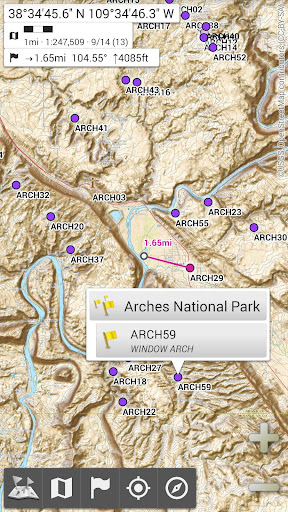
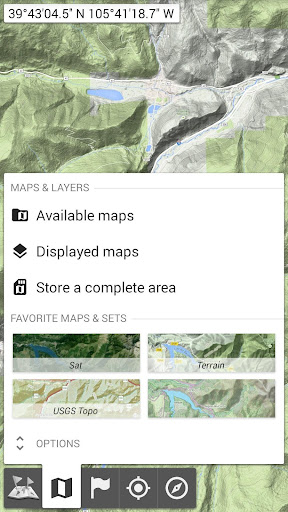
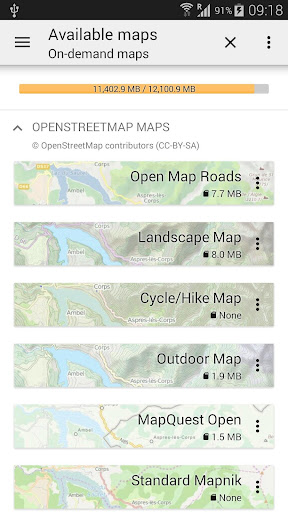
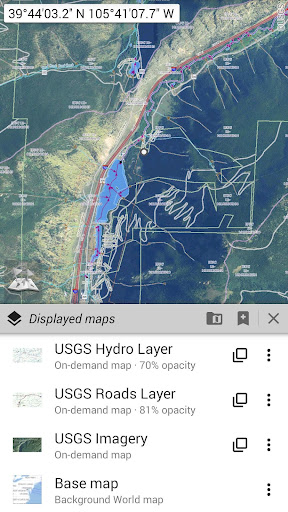
No advertisements ~ No data sharing & monetization ~ No analytics ~ No third party libraries
Bored to wait for maps to display? Use All-In-One OfflineMaps! Once displayed, maps are stored and remain available, quickly, even with no network access.
• Want more than just roads on your maps? You will find what you need here;
• Used to go to places with poor network coverage? Everything will stay available;
• Used to go abroad? You won’t be lost anymore;
• Have a data allowance limit? It will reduce your usage.
★★ Maps ★★
A lot of maps are available, including classical road maps, topographic maps, aerial (satellite) maps and various layers that can be added over any maps: OpenStreetMap (Roads, Topo), USGS National Map (Hi-res topo, Aerial imagery), Worldwide Military Soviet topo maps, etc.
• All maps can be stacked in layers, with precise opacity control;
• Select and store large areas in few clicks;
• Stored space is clear and can be easily deleted.
★★ Display, store and retrieve unlimited placemarks ★★
You can add various items on the map such as waypoints, icons, routes, areas and tracks.
You can easily manage them using the powerful SD-Card Placemarks Explorer.
★★ On-map GPS Location & Orientation ★★
Your real location and direction are clearly displayed on the map, which can be rotated to match your real orientation (depends on device capabilities).
Easy turn on/off to save battery.
And also:
• Metric, imperial and hybrid distance units;
• GPS Latitude/Longitude and grid coordinate formats (UTM, MGRS, USNG, OSGB Grid, Irish Grid, Swiss Grid, Lambert Grids, DFCI Grid, QTH Maidenhead Locator System, …);
• Ability to import hundreds of coordinate formats from https://www.spatialreference.org;
• On-map grids display;
• Full screen map view;
• Multi-touch zoom;
• …
★★ Need more? ★★
If you are a real adventurer, try AlpineQuest Off-Road Explorer, the complete outdoor solution based on All-In-One OfflineMaps, loaded with a powerful GPS Track Recorder and more: https://www.alpinequest.net/google-play
แสดงเพิ่มเติม

1. ดาวน์โหลดตัวติดตั้ง MEmu และสิ้นสุดการติดตั้ง

2. เริ่ม MEmu จากนั้นเปิด Google Play บนหน้าแรก

3. ค้นหา All-In-One Offline Maps ใน Google Play
Install
4. ดาวน์โหลดและติดตั้ง All-In-One Offline Maps
5. เมื่อติดตั้งเสร็จให้คลิกที่ไอคอนเพื่อเริ่มใช้งาน

6. ใช้ MEmu เพื่อสัมผัสประสบการณ์ All-In-One Offline Maps บนคอมพิวเตอร์ของคุณ
MEmu Play คือโปรแกรมจำลอง Android ที่ดีที่สุด มีผู้ใช้มากกว่า 50 ล้านคน มอบประสบการณ์การใช้งานแอป Android ขั้นสุดยอดให้กับคุณ เทคโนโลยีจำลองเสมือนของ MEmu ช่วยให้คุณรันแอป Android หลายพันแอปบนคอมพิวเตอร์ได้อย่างราบรื่น แม้แอปที่กินทรัพยากรเครื่องสูงที่สุด
จอใหญ่และกราฟฟิกสวยกว่า; เล่นได้นาน, ไม่ต้องใช้แบตเตอรี่โทรศัพท์หรือเน็ตโทรศัพท์.
ระบบปรับแต่งปุ่มคีย์บอร์ดและเม้าส์ตามที่คุณเลือก
เล่นมากกว่าหนึ่งเกมบน PC ในเวลาเดียวกันด้วยระบบหลายจอหรือ Multi-Instance manager.
Use All-In-One Offline Maps on PC by following steps: