ampm
อัปเดตเมื่อ
เวอร์ชันปัจจุบัน
3.10.0-1216
ให้บริการโดย

เมื่อใช้ ampm บนโทรศัพท์ของคุณไม่ต้องกังวลกับการชาร์จไฟมากเกินไปปลดปล่อยตัวคุณเองจากหน้าจอขนาดเล็กและสนุกกับการใช้แอพนี้บนหน้าจอขนาดใหญ่ จากนี้ไปรับประสบการณ์เต็มหน้าจอของแอปพลิเคชันของคุณด้วยคีย์บอร์ดและเมาส์ MEmu มีคุณสมบัติที่น่าแปลกใจที่คุณคาดหวัง: การติดตั้งที่รวดเร็วและการตั้งค่าที่ง่ายควบคุมได้ง่ายไม่ จำกัด แบตเตอรี่ข้อมูลมือถือและการโทรที่รบกวน MEmu 9 ใหม่ล่าสุดเป็นตัวเลือกที่ดีที่สุดสำหรับการใช้ Meitu – โปรแกรมแก้ไขภาพแนวธรรมชาติ บนคอมพิวเตอร์ของคุณ ด้วยรหัสการดูดซึมของเราผู้จัดการหลายอินสแตนซ์ทำให้สามารถเปิดบัญชี 2 บัญชีขึ้นไปในเวลาเดียวกันได้ และที่สำคัญที่สุดเอ็นจิ้นจำลองพิเศษของเราสามารถปลดปล่อยศักยภาพของPCของคุณและทำให้ทุกอย่างราบรื่นและสนุกสนาน
แสดงเพิ่มเติม
ดาวน์โหลด ampm บน PC ด้วย MEmu Android Emulator สนุกกับการเล่นบนหน้าจอขนาดใหญ่ Like saving money?
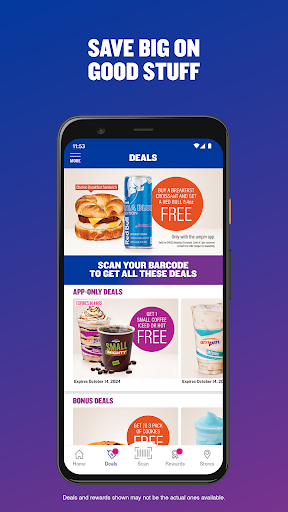
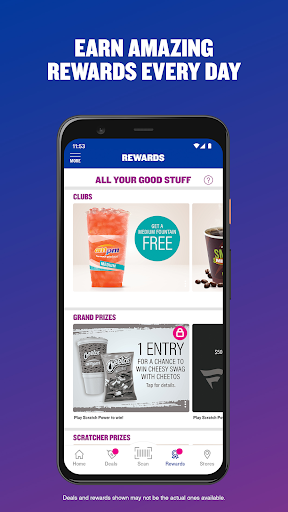
Like saving money? Good. With the ampm app, you’ll save on app only deals and get rewarded with incredible Bonus Deals on your favorite stuff. It’s our way of saying “thanks” for making ampm the place you trust for great quality and incredible value.
GET DEALS YOU’LL LOVE
Enjoy app only deals that can save you extra money every time you visit an ampm. There are even special Bonus Deals that give you the chance to unlock big prizes. Oh. And you’ll probably want to be on the lookout for Flash Deals… but be quick, they are only available for a limited time!
CLUBS SAVE YOU EVEN MORE MONEY
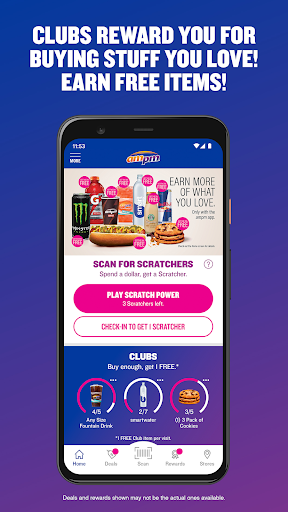
It’s like a digital punch card. You buy the stuff you love. We’ll track how many in the app. When you’ve bought enough, you get a free one. That’s easy enough, right?
SCRATCH AND WIN GAME
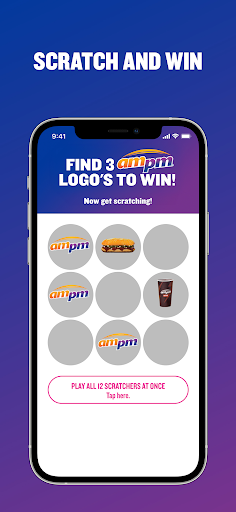
Play Scratch Power for a chance to win FREE stuff. Over 50,000 prizes are available every month! Want more chances to win? Get rewarded with 1 Scratcher for every *$1 you spend (so be sure to scan your barcode every time you visit) and get 1 additional Scratcher every day you check-in to an ampm.
*excludes fuel, propane, lottery and car washes.
WIN THE WEEKLY GRAND PRIZE – LIKE A $500 PUMP PASS!
With ampm, you can win big! Scan your barcode every time you make a purchase for an entry to win a weekly grand prize like a $500 Pump Pass. The more you scan, the more chances you have to win!
INVITE YOUR FRIENDS
Invite your friends to join the app and you both get rewarded. Each time someone signs up with your personal invite code and makes their first purchase, you’ll both get a special reward.
FIND A STORE
When you’re craving a snack, use the handy Store Locator to find an ampm near you. Looking for something specific? Easily get each store’s location and all the ampm amenities that are available such as beer, hot foods, fresh bakery, cold deli, fountain drinks and car wash.
HOW IT WORKS
Get great deals, rewards and prizes in a few easy steps!
1. Download the ampm app.
2. Register your account using your email, mobile number or existing social login.
3. Check-in daily or make a purchase to get rewarded with Scratchers to play Scratch Power.
4. Scan your barcode every time you shop to maximize your savings.
JOIN NOW
What are you waiting for? We’ve got something you need or crave with your name on it. Download the ampm app now and start saving!
แสดงเพิ่มเติม

1. ดาวน์โหลดตัวติดตั้ง MEmu และสิ้นสุดการติดตั้ง

2. เริ่ม MEmu จากนั้นเปิด Google Play บนหน้าแรก

3. ค้นหา ampm ใน Google Play
Install
4. ดาวน์โหลดและติดตั้ง ampm
5. เมื่อติดตั้งเสร็จให้คลิกที่ไอคอนเพื่อเริ่มใช้งาน

6. ใช้ MEmu เพื่อสัมผัสประสบการณ์ ampm บนคอมพิวเตอร์ของคุณ
MEmu Play คือโปรแกรมจำลอง Android ที่ดีที่สุด มีผู้ใช้มากกว่า 50 ล้านคน มอบประสบการณ์การใช้งานแอป Android ขั้นสุดยอดให้กับคุณ เทคโนโลยีจำลองเสมือนของ MEmu ช่วยให้คุณรันแอป Android หลายพันแอปบนคอมพิวเตอร์ได้อย่างราบรื่น แม้แอปที่กินทรัพยากรเครื่องสูงที่สุด
จอใหญ่และกราฟฟิกสวยกว่า; เล่นได้นาน, ไม่ต้องใช้แบตเตอรี่โทรศัพท์หรือเน็ตโทรศัพท์.
ระบบปรับแต่งปุ่มคีย์บอร์ดและเม้าส์ตามที่คุณเลือก
เล่นมากกว่าหนึ่งเกมบน PC ในเวลาเดียวกันด้วยระบบหลายจอหรือ Multi-Instance manager.
Use ampm on PC by following steps: