Audio Evolution Mobile TRIAL
อัปเดตเมื่อ
เวอร์ชันปัจจุบัน
5.3.4.0
ให้บริการโดย

เมื่อใช้ Audio Evolution Mobile TRIAL บนโทรศัพท์ของคุณไม่ต้องกังวลกับการชาร์จไฟมากเกินไปปลดปล่อยตัวคุณเองจากหน้าจอขนาดเล็กและสนุกกับการใช้แอพนี้บนหน้าจอขนาดใหญ่ จากนี้ไปรับประสบการณ์เต็มหน้าจอของแอปพลิเคชันของคุณด้วยคีย์บอร์ดและเมาส์ MEmu มีคุณสมบัติที่น่าแปลกใจที่คุณคาดหวัง: การติดตั้งที่รวดเร็วและการตั้งค่าที่ง่ายควบคุมได้ง่ายไม่ จำกัด แบตเตอรี่ข้อมูลมือถือและการโทรที่รบกวน MEmu 9 ใหม่ล่าสุดเป็นตัวเลือกที่ดีที่สุดสำหรับการใช้ Meitu – โปรแกรมแก้ไขภาพแนวธรรมชาติ บนคอมพิวเตอร์ของคุณ ด้วยรหัสการดูดซึมของเราผู้จัดการหลายอินสแตนซ์ทำให้สามารถเปิดบัญชี 2 บัญชีขึ้นไปในเวลาเดียวกันได้ และที่สำคัญที่สุดเอ็นจิ้นจำลองพิเศษของเราสามารถปลดปล่อยศักยภาพของPCของคุณและทำให้ทุกอย่างราบรื่นและสนุกสนาน
แสดงเพิ่มเติม
ดาวน์โหลด Audio Evolution Mobile TRIAL บน PC ด้วย MEmu Android Emulator สนุกกับการเล่นบนหน้าจอขนาดใหญ่ From recording song ideas to full-fledged mobile productions, Audio Evolution Mobile sets the standard for music creation, mixing and editing on Android.
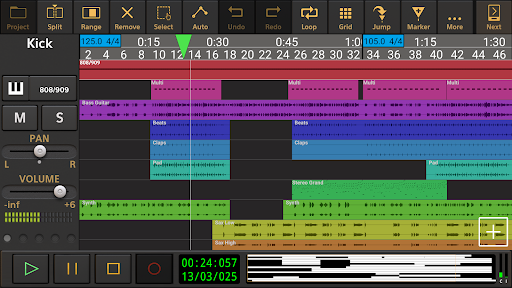
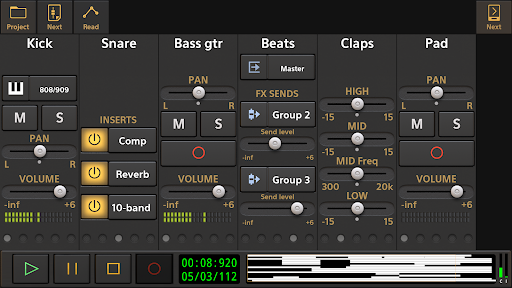
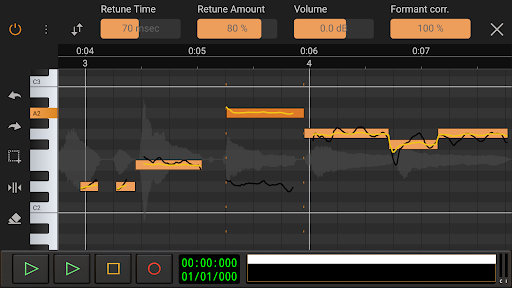
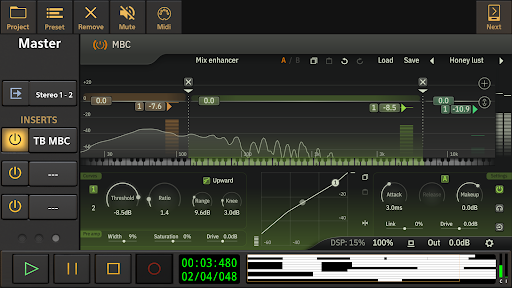
From recording song ideas to full-fledged mobile productions, Audio Evolution Mobile sets the standard for music creation, mixing and editing on Android. Whether you are recording using the internal mic or recording from a multi-channel USB audio (*) or MIDI interface, Audio Evolution Mobile rivals desktop DAWs. Featuring virtual instruments, a vocal pitch and time editor, a virtual analog synthesizer, real-time effects, mixer automation, audio loops, drum pattern editing and more, the app powers your creativity.
Audio Evolution Mobile Studio was chosen the #1 Android mobile music app in Computer Music - December 2020 issue!
Note that this is a TRIAL version of the full paid version and has several limitations:
• Loading of projects is limited to 3 tracks
• Mixdown is limited to 45 seconds
• Recording and playback stops after 2 minutes (45 seconds for USB audio)
• The app will quit after 20 minutes
• The app will stop working after a while
Check out our new tutorial video series: https://www.youtube.com/watch?v=2BePLCxWnDI&list=PLD3ojanF28mZ60SQyMI7LlgD3DO_iRqYW
Features:
• Multitrack audio and MIDI recording / playback
• Auto or manually tune your vocals with Vocal Tune Studio (*) : an editor to correct pitch and time of vocal recordings and the timing of any audio material. It features retune time, retune amount, volume, vibrato controls and formant correction per note.
• Virtual analog synthesizer 'Evolution One' based on the popular Synth One from AudioKit.
• Sample-based Soundfont instruments
• Drum pattern editor (including triplets and using your own audio files)
• Low latency and multichannel recording/playback using a USB audio interface (*)
• Edit audio and MIDI clips with unlimited undo/redo
• Tempo and time signature changes including gradual tempo change
• Real-time effects including chorus, compressor, delays, EQs, reverb, noise gate, pitch shifter, vocal tune etc.
• Flexible effect routing: an unlimited number of effects can be placed on a grid, featuring parallel effect paths.
• Assign LFO's to effect parameters or lock parameters to tempo
• Sidechain on the compressor effects
• Automation of all mixer and effect parameters
• Import of many formats like WAV, MP3, AIFF, FLAC, OGG and MIDI
• Mixdown to WAV, MP3, AIFF, FLAC or OGG with share option
• Unlimited number of tracks and groups
• MIDI remote control
• Projects are interchangeable with our iOS version
• Cloud sync to Google Drive (backup or share/exchange projects with one of your other devices on Android or iOS and collaborate with friends)
In short: a complete portable multitrack digital audio workstation (DAW) that will replace your 4 track recorder or tape machine at an incredibly low price!
(*) The following optional in-app purchases are available in the full version:
• A custom developed USB audio driver that bypasses the limits of Android audio when connecting a USB audio interface/mic: low latency, high quality multi-channel recording and playback at any sample rate and resolution that the device supports (for example 24-bit/96kHz). Please see here for more information and device compatibility: https://www.extreamsd.com/index.php/technology/usb-audio-driver
Note that you are always free to try the Android USB audio driver without this in-app purchase (with the limits that come with it like high latency and 16-bit audio).
• Vocal Tune with two-voice harmonizer and Vocal Tune PRO
• Vocal Tune Studio
We also sell effects and content from other vendors at reduced prices in the full version:
• ToneBoosters Flowtones
• ToneBoosters pack 1 (Barricade, DeEsser, Gate, Reverb)
• ToneBoosters V3 EQ, Compressor, Ferox
• ToneBoosters V4 Barricade, BitJuggler, Enhancer, EQ, MBC, ReelBus, Reverb, etc.
• Loops and Soundfonts at various prices
Facebook: https://www.facebook.com/AudioEvolutionMobile
Forum: https://www.extreamsd.com/forum
User manual: https://www.audio-evolution.com/manual/android/index.html
แสดงเพิ่มเติม

1. ดาวน์โหลดตัวติดตั้ง MEmu และสิ้นสุดการติดตั้ง

2. เริ่ม MEmu จากนั้นเปิด Google Play บนหน้าแรก

3. ค้นหา Audio Evolution Mobile TRIAL ใน Google Play
Install
4. ดาวน์โหลดและติดตั้ง Audio Evolution Mobile TRIAL
5. เมื่อติดตั้งเสร็จให้คลิกที่ไอคอนเพื่อเริ่มใช้งาน

6. ใช้ MEmu เพื่อสัมผัสประสบการณ์ Audio Evolution Mobile TRIAL บนคอมพิวเตอร์ของคุณ
MEmu Play คือโปรแกรมจำลอง Android ที่ดีที่สุด มีผู้ใช้มากกว่า 50 ล้านคน มอบประสบการณ์การใช้งานแอป Android ขั้นสุดยอดให้กับคุณ เทคโนโลยีจำลองเสมือนของ MEmu ช่วยให้คุณรันแอป Android หลายพันแอปบนคอมพิวเตอร์ได้อย่างราบรื่น แม้แอปที่กินทรัพยากรเครื่องสูงที่สุด
จอใหญ่และกราฟฟิกสวยกว่า; เล่นได้นาน, ไม่ต้องใช้แบตเตอรี่โทรศัพท์หรือเน็ตโทรศัพท์.
ระบบปรับแต่งปุ่มคีย์บอร์ดและเม้าส์ตามที่คุณเลือก
เล่นมากกว่าหนึ่งเกมบน PC ในเวลาเดียวกันด้วยระบบหลายจอหรือ Multi-Instance manager.
Use Audio Evolution Mobile TRIAL on PC by following steps: