
Autolist: Used Car Marketplace
อัปเดตเมื่อ
เวอร์ชันปัจจุบัน
13.39.0
ให้บริการโดย

เมื่อใช้ Autolist: Used Car Marketplace บนโทรศัพท์ของคุณไม่ต้องกังวลกับการชาร์จไฟมากเกินไปปลดปล่อยตัวคุณเองจากหน้าจอขนาดเล็กและสนุกกับการใช้แอพนี้บนหน้าจอขนาดใหญ่ จากนี้ไปรับประสบการณ์เต็มหน้าจอของแอปพลิเคชันของคุณด้วยคีย์บอร์ดและเมาส์ MEmu มีคุณสมบัติที่น่าแปลกใจที่คุณคาดหวัง: การติดตั้งที่รวดเร็วและการตั้งค่าที่ง่ายควบคุมได้ง่ายไม่ จำกัด แบตเตอรี่ข้อมูลมือถือและการโทรที่รบกวน MEmu 9 ใหม่ล่าสุดเป็นตัวเลือกที่ดีที่สุดสำหรับการใช้ Meitu – โปรแกรมแก้ไขภาพแนวธรรมชาติ บนคอมพิวเตอร์ของคุณ ด้วยรหัสการดูดซึมของเราผู้จัดการหลายอินสแตนซ์ทำให้สามารถเปิดบัญชี 2 บัญชีขึ้นไปในเวลาเดียวกันได้ และที่สำคัญที่สุดเอ็นจิ้นจำลองพิเศษของเราสามารถปลดปล่อยศักยภาพของPCของคุณและทำให้ทุกอย่างราบรื่นและสนุกสนาน
แสดงเพิ่มเติม
ดาวน์โหลด Autolist: Used Car Marketplace บน PC ด้วย MEmu Android Emulator สนุกกับการเล่นบนหน้าจอขนาดใหญ่ Autolist searches thousands of used car sites so you don't have to.

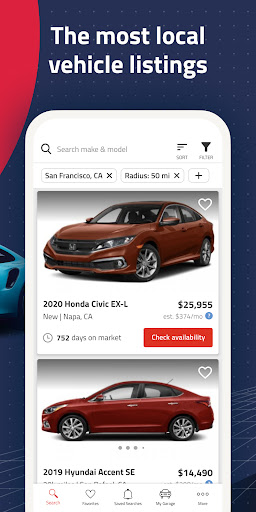
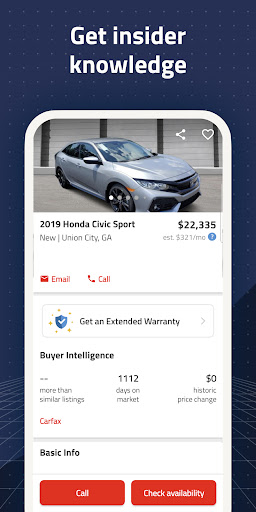
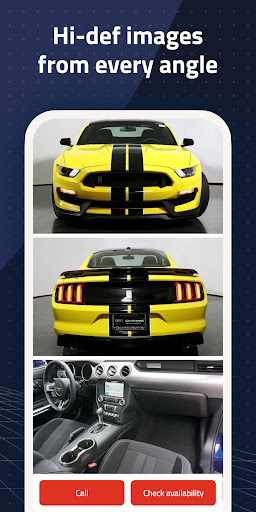
Autolist searches thousands of used car sites so you don't have to. With the largest selection of local cars, trucks and SUVs of any other app, download the Autolist app now to find the perfect ride at the best price.
Named one of The 10 Best Car-Buying Apps by ROAD/SHOW (CNET) and featured in Road & Track, USA Today, Bloomberg Businessweek, ABC News, the New York Times – and more!
SEARCH THE LARGEST SELECTION OF USED CAR LISTINGS
Browse our inventory of millions of used cars for sale nearby or nationwide of every make, model and year. We receive listings from thousands of sources and collect them all into one place - Autolist is the only app you need to find your next car.
OUR TOOLS MAKE FINDING THE PERFECT CAR EASY
Quickly hone in on the perfect car with our extensive list of filters Narrow your search by price, year, interior and exterior color, installed features and many more.
CHECK AVAILABILITY AND GET PRICE QUOTES
Call, text or email Dealers or Private Sellers right from the app to check availability, request a quote, or schedule a test drive.
VIEW PRICE HISTORY, CARFAX REPORT, AND LISTIMATE VALUES OF EVERY CAR
Complete price history for each car and our Listimate value help you know when to buy and negotiate a fair price. Check the CARFAX report on any vehicle to see accident and service history.
GET IMPORTANT UPDATES IMMEDIATELY
Never miss important updates or new inventory. Save your search to get notified of new cars that meet your criteria. Save your favorites to track price drops and availability.
-------------
Have suggestions, questions, or feedback? We would love to hear from you! Contact us directly at feedback@autolist.com
แสดงเพิ่มเติม

1. ดาวน์โหลดตัวติดตั้ง MEmu และสิ้นสุดการติดตั้ง

2. เริ่ม MEmu จากนั้นเปิด Google Play บนหน้าแรก

3. ค้นหา Autolist: Used Car Marketplace ใน Google Play
Install
4. ดาวน์โหลดและติดตั้ง Autolist: Used Car Marketplace
5. เมื่อติดตั้งเสร็จให้คลิกที่ไอคอนเพื่อเริ่มใช้งาน

6. ใช้ MEmu เพื่อสัมผัสประสบการณ์ Autolist: Used Car Marketplace บนคอมพิวเตอร์ของคุณ
MEmu Play คือโปรแกรมจำลอง Android ที่ดีที่สุด มีผู้ใช้มากกว่า 50 ล้านคน มอบประสบการณ์การใช้งานแอป Android ขั้นสุดยอดให้กับคุณ เทคโนโลยีจำลองเสมือนของ MEmu ช่วยให้คุณรันแอป Android หลายพันแอปบนคอมพิวเตอร์ได้อย่างราบรื่น แม้แอปที่กินทรัพยากรเครื่องสูงที่สุด
จอใหญ่และกราฟฟิกสวยกว่า; เล่นได้นาน, ไม่ต้องใช้แบตเตอรี่โทรศัพท์หรือเน็ตโทรศัพท์.
ระบบปรับแต่งปุ่มคีย์บอร์ดและเม้าส์ตามที่คุณเลือก
เล่นมากกว่าหนึ่งเกมบน PC ในเวลาเดียวกันด้วยระบบหลายจอหรือ Multi-Instance manager.
Use Autolist: Used Car Marketplace on PC by following steps: