
Avis Car Rental
อัปเดตเมื่อ
เวอร์ชันปัจจุบัน
15.1
ให้บริการโดย

เมื่อใช้ Avis Car Rental บนโทรศัพท์ของคุณไม่ต้องกังวลกับการชาร์จไฟมากเกินไปปลดปล่อยตัวคุณเองจากหน้าจอขนาดเล็กและสนุกกับการใช้แอพนี้บนหน้าจอขนาดใหญ่ จากนี้ไปรับประสบการณ์เต็มหน้าจอของแอปพลิเคชันของคุณด้วยคีย์บอร์ดและเมาส์ MEmu มีคุณสมบัติที่น่าแปลกใจที่คุณคาดหวัง: การติดตั้งที่รวดเร็วและการตั้งค่าที่ง่ายควบคุมได้ง่ายไม่ จำกัด แบตเตอรี่ข้อมูลมือถือและการโทรที่รบกวน MEmu 9 ใหม่ล่าสุดเป็นตัวเลือกที่ดีที่สุดสำหรับการใช้ Meitu – โปรแกรมแก้ไขภาพแนวธรรมชาติ บนคอมพิวเตอร์ของคุณ ด้วยรหัสการดูดซึมของเราผู้จัดการหลายอินสแตนซ์ทำให้สามารถเปิดบัญชี 2 บัญชีขึ้นไปในเวลาเดียวกันได้ และที่สำคัญที่สุดเอ็นจิ้นจำลองพิเศษของเราสามารถปลดปล่อยศักยภาพของPCของคุณและทำให้ทุกอย่างราบรื่นและสนุกสนาน
แสดงเพิ่มเติม
ดาวน์โหลด Avis Car Rental บน PC ด้วย MEmu Android Emulator สนุกกับการเล่นบนหน้าจอขนาดใหญ่ Discover a better rental car experience with the new Avis app.
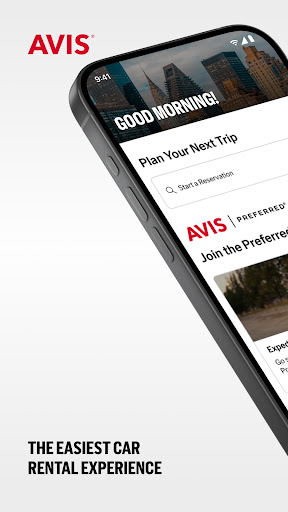
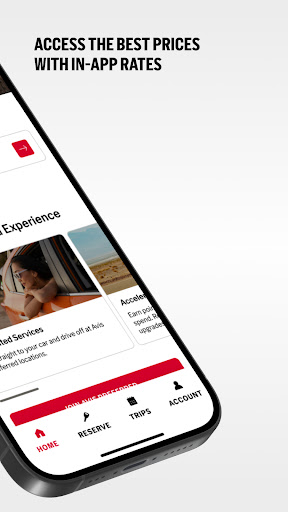
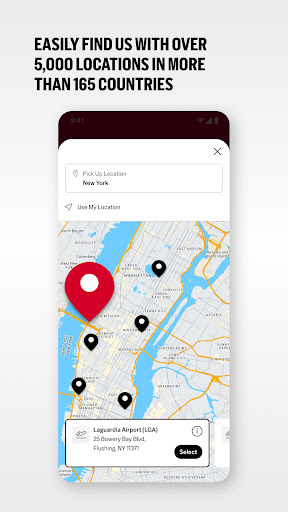
Discover a better rental car experience with the new Avis app. With 5,000+ locations in 165 countries, we are one of the world's best-known car rental companies. Whether traveling for business, family vacation, or weekend getaway, we know you want to get on the road as quickly as possible. The Avis app makes renting a car simple, speedy, and hassle-free with control of your journey from start to finish in the palm of your hands.
Key Features:
Lowest Prices*: Log in for our best available prices.
Seamless Reservations: Find and reserve a car in a few simple steps. Choose from a wide range of vehicles, including SUVs, vans, EVs, trucks, compact cars, and more options to suit your needs and budget.
Manage Your Booking: Easily view, modify, or cancel your reservations directly from the app.
Keep track of your rental details and upcoming trips all in one place.
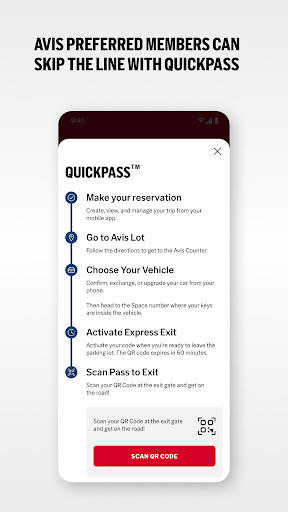
Contactless Rentals: Skip the line and go straight to your car with Avis Preferred**. Enjoy a
seamless experience with our contactless rental options.
Preferred Member Benefits**: choose your car, bypass the counter, earn Avis points on eligible rentals, redeem points for free days or rental extras 24/7 Dedicated Support: Get assistance whenever you need it with our dedicated customer service team. We’re here to help you every step of the way.
Roadside Assistance: If you experience trouble on the road, contact roadside assistance directly from the app.
Location Finder: Find the nearest Avis location with ease. Use the app to get directions, phone numbers, hours of operation, and available vehicle options.
Thousands of Locations: select your car rental from one, or more, of our airport and city locations across the globe.
For the lowest price, the shortest wait, and dedicated customer service, download the new Avis car rental app today. Plan on the Avis app.
Contact us:
Phone: 1.800.398.284
Email: avisapp@avisbudget.com
*Terms & Conditions apply. Visit avis.com/bestprice for details.
**Available at select locations and identity verification required on first Preferred rental. See
avis.com/preferred for details.
แสดงเพิ่มเติม

1. ดาวน์โหลดตัวติดตั้ง MEmu และสิ้นสุดการติดตั้ง

2. เริ่ม MEmu จากนั้นเปิด Google Play บนหน้าแรก

3. ค้นหา Avis Car Rental ใน Google Play
Install
4. ดาวน์โหลดและติดตั้ง Avis Car Rental
5. เมื่อติดตั้งเสร็จให้คลิกที่ไอคอนเพื่อเริ่มใช้งาน

6. ใช้ MEmu เพื่อสัมผัสประสบการณ์ Avis Car Rental บนคอมพิวเตอร์ของคุณ
MEmu Play คือโปรแกรมจำลอง Android ที่ดีที่สุด มีผู้ใช้มากกว่า 50 ล้านคน มอบประสบการณ์การใช้งานแอป Android ขั้นสุดยอดให้กับคุณ เทคโนโลยีจำลองเสมือนของ MEmu ช่วยให้คุณรันแอป Android หลายพันแอปบนคอมพิวเตอร์ได้อย่างราบรื่น แม้แอปที่กินทรัพยากรเครื่องสูงที่สุด
จอใหญ่และกราฟฟิกสวยกว่า; เล่นได้นาน, ไม่ต้องใช้แบตเตอรี่โทรศัพท์หรือเน็ตโทรศัพท์.
ระบบปรับแต่งปุ่มคีย์บอร์ดและเม้าส์ตามที่คุณเลือก
เล่นมากกว่าหนึ่งเกมบน PC ในเวลาเดียวกันด้วยระบบหลายจอหรือ Multi-Instance manager.
Use Avis Car Rental on PC by following steps: