
Blue Line Taxi Hamilton
อัปเดตเมื่อ
เวอร์ชันปัจจุบัน
15.13.0
ให้บริการโดย

เมื่อใช้ Blue Line Taxi Hamilton บนโทรศัพท์ของคุณไม่ต้องกังวลกับการชาร์จไฟมากเกินไปปลดปล่อยตัวคุณเองจากหน้าจอขนาดเล็กและสนุกกับการใช้แอพนี้บนหน้าจอขนาดใหญ่ จากนี้ไปรับประสบการณ์เต็มหน้าจอของแอปพลิเคชันของคุณด้วยคีย์บอร์ดและเมาส์ MEmu มีคุณสมบัติที่น่าแปลกใจที่คุณคาดหวัง: การติดตั้งที่รวดเร็วและการตั้งค่าที่ง่ายควบคุมได้ง่ายไม่ จำกัด แบตเตอรี่ข้อมูลมือถือและการโทรที่รบกวน MEmu 9 ใหม่ล่าสุดเป็นตัวเลือกที่ดีที่สุดสำหรับการใช้ Meitu – โปรแกรมแก้ไขภาพแนวธรรมชาติ บนคอมพิวเตอร์ของคุณ ด้วยรหัสการดูดซึมของเราผู้จัดการหลายอินสแตนซ์ทำให้สามารถเปิดบัญชี 2 บัญชีขึ้นไปในเวลาเดียวกันได้ และที่สำคัญที่สุดเอ็นจิ้นจำลองพิเศษของเราสามารถปลดปล่อยศักยภาพของPCของคุณและทำให้ทุกอย่างราบรื่นและสนุกสนาน
แสดงเพิ่มเติม
ดาวน์โหลด Blue Line Taxi Hamilton บน PC ด้วย MEmu Android Emulator สนุกกับการเล่นบนหน้าจอขนาดใหญ่ Blue Line Taxi is a leading provider of taxi services in Hamilton, Ontario Canada.
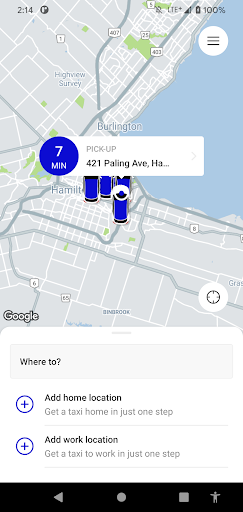
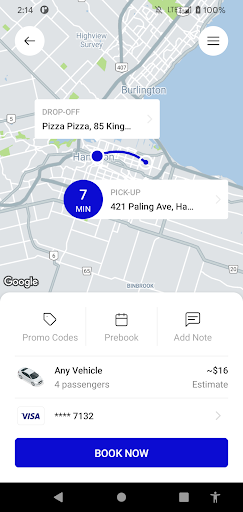
Blue Line Taxi is a leading provider of taxi services in Hamilton, Ontario Canada. We are pleased to offer our valued clients the very latest in smartphone booking technology with our free Blue Line Taxi application.
Key Features of the Blue Line Taxi application include:
• Book a reservation in as few as 3 clicks
• Get a fare estimate by entering both pick-up and destination addresses
• Receive a confirmation number for your reservation immediately on booking
• Receive push notifications including vehicle number once your reservation has been dispatched
• Track and Monitor the progress of your vehicle on a map
• Specify the number of passengers, vehicle type and preferred payment method
• Pay by Cash or Attach a Credit/Debit Card for faster, easier payment
• Review all previous reservations
• Provide feedback related to the application and/or service you received
• Call Blue Line with the push of a button
To begin using the Blue Line Taxi application today:
• Download the free app
• Create an account (Email, Name, Phone # and Password)
• Specify pick-up address
• Book your trip (reservations can be immediate or for a future time/date)
On booking a reservation, you will immediately receive a confirmation number, along with an update when your vehicle has been assigned. From here you can monitor the progress of your vehicle as it moves towards your pick-up location.
The Blue Line Taxi application retains a history of your previous reservations for expense management and to quickly rebook the same trip with the push of a button.
You can also customize your orders by selecting the number of passengers, preferred vehicle type, and preferred method of payment.
At Blue Line Taxi, your comfort and safety are our top priorities! Let us know how we can serve you better by providing feedback via the Blue Line Taxi application or by calling 905 525-0000 or 1 877 525 4411, toll free.
We look forward to adding many exciting new features to the Blue Line Taxi application in the months ahead, and are always interested in what you have to say!
แสดงเพิ่มเติม

1. ดาวน์โหลดตัวติดตั้ง MEmu และสิ้นสุดการติดตั้ง

2. เริ่ม MEmu จากนั้นเปิด Google Play บนหน้าแรก

3. ค้นหา Blue Line Taxi Hamilton ใน Google Play
Install
4. ดาวน์โหลดและติดตั้ง Blue Line Taxi Hamilton
5. เมื่อติดตั้งเสร็จให้คลิกที่ไอคอนเพื่อเริ่มใช้งาน

6. ใช้ MEmu เพื่อสัมผัสประสบการณ์ Blue Line Taxi Hamilton บนคอมพิวเตอร์ของคุณ
MEmu Play คือโปรแกรมจำลอง Android ที่ดีที่สุด มีผู้ใช้มากกว่า 50 ล้านคน มอบประสบการณ์การใช้งานแอป Android ขั้นสุดยอดให้กับคุณ เทคโนโลยีจำลองเสมือนของ MEmu ช่วยให้คุณรันแอป Android หลายพันแอปบนคอมพิวเตอร์ได้อย่างราบรื่น แม้แอปที่กินทรัพยากรเครื่องสูงที่สุด
จอใหญ่และกราฟฟิกสวยกว่า; เล่นได้นาน, ไม่ต้องใช้แบตเตอรี่โทรศัพท์หรือเน็ตโทรศัพท์.
ระบบปรับแต่งปุ่มคีย์บอร์ดและเม้าส์ตามที่คุณเลือก
เล่นมากกว่าหนึ่งเกมบน PC ในเวลาเดียวกันด้วยระบบหลายจอหรือ Multi-Instance manager.
Use Blue Line Taxi Hamilton on PC by following steps: