Clear Outside
อัปเดตเมื่อ
เวอร์ชันปัจจุบัน
1.1
ให้บริการโดย

เมื่อใช้ Clear Outside บนโทรศัพท์ของคุณไม่ต้องกังวลกับการชาร์จไฟมากเกินไปปลดปล่อยตัวคุณเองจากหน้าจอขนาดเล็กและสนุกกับการใช้แอพนี้บนหน้าจอขนาดใหญ่ จากนี้ไปรับประสบการณ์เต็มหน้าจอของแอปพลิเคชันของคุณด้วยคีย์บอร์ดและเมาส์ MEmu มีคุณสมบัติที่น่าแปลกใจที่คุณคาดหวัง: การติดตั้งที่รวดเร็วและการตั้งค่าที่ง่ายควบคุมได้ง่ายไม่ จำกัด แบตเตอรี่ข้อมูลมือถือและการโทรที่รบกวน MEmu 9 ใหม่ล่าสุดเป็นตัวเลือกที่ดีที่สุดสำหรับการใช้ Meitu – โปรแกรมแก้ไขภาพแนวธรรมชาติ บนคอมพิวเตอร์ของคุณ ด้วยรหัสการดูดซึมของเราผู้จัดการหลายอินสแตนซ์ทำให้สามารถเปิดบัญชี 2 บัญชีขึ้นไปในเวลาเดียวกันได้ และที่สำคัญที่สุดเอ็นจิ้นจำลองพิเศษของเราสามารถปลดปล่อยศักยภาพของPCของคุณและทำให้ทุกอย่างราบรื่นและสนุกสนาน
แสดงเพิ่มเติม
ดาวน์โหลด Clear Outside บน PC ด้วย MEmu Android Emulator สนุกกับการเล่นบนหน้าจอขนาดใหญ่ Reliable weather forecasts for astronomers with an emphasis on cloud cover.
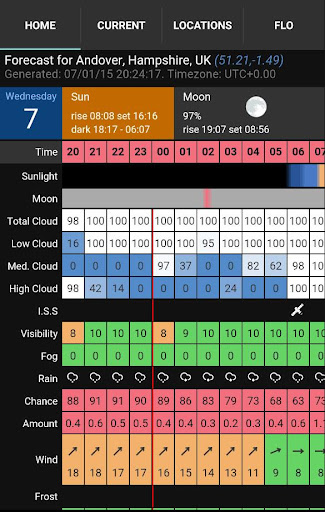
Reliable weather forecasts for astronomers with an emphasis on cloud cover.
Features include:
• Seven day hourly forecasts, updated hourly.
• Low, medium, high and total cloud cover.
• Moon rise/set times and phase.
• Sun rise/set and transit.
• Civil/nautical/astronomical darkness.
• International Space Station (ISS) pass-over information.
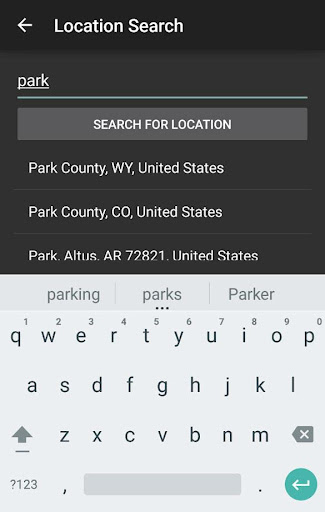
• Location search automatically provides a forecast for your location.
• Save favourite locations for easy access.
• Covers daytime too so also useful for solar observers/imagers.
Updated hourly. Frequent hourly updates are important because often the clear spell between showers provides excellent seeing and 30-minutes under a clear sky with a grab-&-go telescopes is pure gold!
Did you notice the ISS pass-over information? The times are precisely calculated for your location and displayed alongside the cloud forecasts so it has never been easier to observe. It is our favourite feature :-)
Also includes regular weather data (wind, rain, frost, temperature, dew point, etc) so perfect for those wanting a detailed weather forecast, without cutesy graphics.
We have had a lot of fun building and testing Clear Outside and are keen to to develop it further so if you find it useful or have suggestions, please let us know.
แสดงเพิ่มเติม

1. ดาวน์โหลดตัวติดตั้ง MEmu และสิ้นสุดการติดตั้ง

2. เริ่ม MEmu จากนั้นเปิด Google Play บนหน้าแรก

3. ค้นหา Clear Outside ใน Google Play
Install
4. ดาวน์โหลดและติดตั้ง Clear Outside
5. เมื่อติดตั้งเสร็จให้คลิกที่ไอคอนเพื่อเริ่มใช้งาน

6. ใช้ MEmu เพื่อสัมผัสประสบการณ์ Clear Outside บนคอมพิวเตอร์ของคุณ
MEmu Play คือโปรแกรมจำลอง Android ที่ดีที่สุด มีผู้ใช้มากกว่า 50 ล้านคน มอบประสบการณ์การใช้งานแอป Android ขั้นสุดยอดให้กับคุณ เทคโนโลยีจำลองเสมือนของ MEmu ช่วยให้คุณรันแอป Android หลายพันแอปบนคอมพิวเตอร์ได้อย่างราบรื่น แม้แอปที่กินทรัพยากรเครื่องสูงที่สุด
จอใหญ่และกราฟฟิกสวยกว่า; เล่นได้นาน, ไม่ต้องใช้แบตเตอรี่โทรศัพท์หรือเน็ตโทรศัพท์.
ระบบปรับแต่งปุ่มคีย์บอร์ดและเม้าส์ตามที่คุณเลือก
เล่นมากกว่าหนึ่งเกมบน PC ในเวลาเดียวกันด้วยระบบหลายจอหรือ Multi-Instance manager.
Use Clear Outside on PC by following steps: