Sculpt+
อัปเดตเมื่อ
เวอร์ชันปัจจุบัน
7.0
ให้บริการโดย

เมื่อใช้ Sculpt+ บนโทรศัพท์ของคุณไม่ต้องกังวลกับการชาร์จไฟมากเกินไปปลดปล่อยตัวคุณเองจากหน้าจอขนาดเล็กและสนุกกับการใช้แอพนี้บนหน้าจอขนาดใหญ่ จากนี้ไปรับประสบการณ์เต็มหน้าจอของแอปพลิเคชันของคุณด้วยคีย์บอร์ดและเมาส์ MEmu มีคุณสมบัติที่น่าแปลกใจที่คุณคาดหวัง: การติดตั้งที่รวดเร็วและการตั้งค่าที่ง่ายควบคุมได้ง่ายไม่ จำกัด แบตเตอรี่ข้อมูลมือถือและการโทรที่รบกวน MEmu 9 ใหม่ล่าสุดเป็นตัวเลือกที่ดีที่สุดสำหรับการใช้ Meitu – โปรแกรมแก้ไขภาพแนวธรรมชาติ บนคอมพิวเตอร์ของคุณ ด้วยรหัสการดูดซึมของเราผู้จัดการหลายอินสแตนซ์ทำให้สามารถเปิดบัญชี 2 บัญชีขึ้นไปในเวลาเดียวกันได้ และที่สำคัญที่สุดเอ็นจิ้นจำลองพิเศษของเราสามารถปลดปล่อยศักยภาพของPCของคุณและทำให้ทุกอย่างราบรื่นและสนุกสนาน
แสดงเพิ่มเติม
ดาวน์โหลด Sculpt+ บน PC ด้วย MEmu Android Emulator สนุกกับการเล่นบนหน้าจอขนาดใหญ่ Sculpt+ is a digital sculpting and painting app, designed to bring the sculpting experience to your smartphone or tablet.
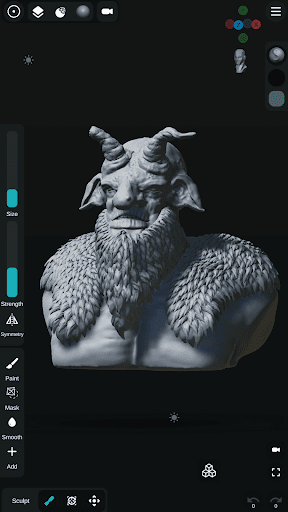
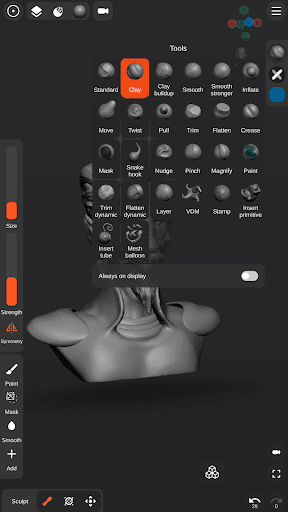
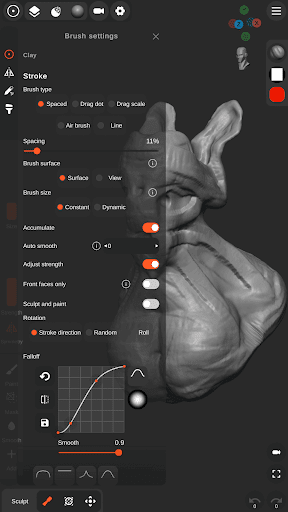
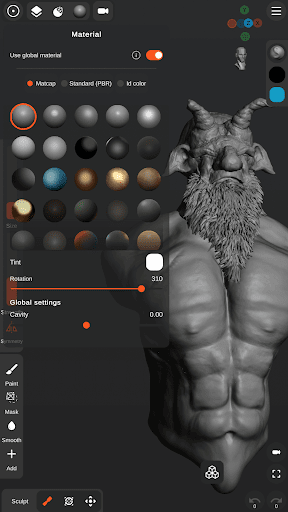
Sculpt+ is a digital sculpting and painting app, designed to bring the sculpting experience to your smartphone or tablet.
FEATURES
- Sculpting brushes: Standard, Clay, Clay buildup, Smooth, Mask, Inflate, Move, Trim, Flatten, Pull, Pinch, Crease, Trim dynamic, Flatten dynamic, Stamp and more.
- VDM brushes - Create custom VDM brushes.
- Stroke customization - Falloff, Alpha and more.
- Vertex Painting - Color, Glossiness, Metalness.
- Multiple primitives - Sphere, Cube, Plane, Cone, Cylinder, Torus, ...
- Ready to sculpt meshes - Base head.
- Base mesh builder inspired by ZSpheres- Quickly and easily sketch out 3D models then transform it into meshes for sculpting.
- Mesh Subdivision and Remeshing.
- Voxel Boolean - Union, Subtraction, Intersection.
- Voxel remeshing.
- PBR rendering.
- Lights - Directional, Spot and Point lights.
- Import OBJ files.
- Import custom Matcap and Alpha textures.
- Import custom HDRI textures for PBR rendering.
- User friendly interface designed for smartphones and tablets - Customizable theme colors and layout.
- UI reference images - Import multiple image references.
- Stylus support - pressure sensitivity and more settings.
- Continuous AutoSave - never lose work again.
Share your creations:
- Export as OBJ, STL or as GLB.
- Export rendered images as .PNG with transparency.
- Export turntable gifs - 360 render.
แสดงเพิ่มเติม

1. ดาวน์โหลดตัวติดตั้ง MEmu และสิ้นสุดการติดตั้ง

2. เริ่ม MEmu จากนั้นเปิด Google Play บนหน้าแรก

3. ค้นหา Sculpt+ ใน Google Play
Install
4. ดาวน์โหลดและติดตั้ง Sculpt+
5. เมื่อติดตั้งเสร็จให้คลิกที่ไอคอนเพื่อเริ่มใช้งาน

6. ใช้ MEmu เพื่อสัมผัสประสบการณ์ Sculpt+ บนคอมพิวเตอร์ของคุณ
MEmu Play คือโปรแกรมจำลอง Android ที่ดีที่สุด มีผู้ใช้มากกว่า 50 ล้านคน มอบประสบการณ์การใช้งานแอป Android ขั้นสุดยอดให้กับคุณ เทคโนโลยีจำลองเสมือนของ MEmu ช่วยให้คุณรันแอป Android หลายพันแอปบนคอมพิวเตอร์ได้อย่างราบรื่น แม้แอปที่กินทรัพยากรเครื่องสูงที่สุด
จอใหญ่และกราฟฟิกสวยกว่า; เล่นได้นาน, ไม่ต้องใช้แบตเตอรี่โทรศัพท์หรือเน็ตโทรศัพท์.
ระบบปรับแต่งปุ่มคีย์บอร์ดและเม้าส์ตามที่คุณเลือก
เล่นมากกว่าหนึ่งเกมบน PC ในเวลาเดียวกันด้วยระบบหลายจอหรือ Multi-Instance manager.
Use Sculpt+ on PC by following steps: