ภาพตัดปะภาพ | กรอบรูป : SCRL
อัปเดตเมื่อ
เวอร์ชันปัจจุบัน
1.19.1
ให้บริการโดย

เมื่อใช้ ภาพตัดปะภาพ | กรอบรูป : SCRL บนโทรศัพท์ของคุณไม่ต้องกังวลกับการชาร์จไฟมากเกินไปปลดปล่อยตัวคุณเองจากหน้าจอขนาดเล็กและสนุกกับการใช้แอพนี้บนหน้าจอขนาดใหญ่ จากนี้ไปรับประสบการณ์เต็มหน้าจอของแอปพลิเคชันของคุณด้วยคีย์บอร์ดและเมาส์ MEmu มีคุณสมบัติที่น่าแปลกใจที่คุณคาดหวัง: การติดตั้งที่รวดเร็วและการตั้งค่าที่ง่ายควบคุมได้ง่ายไม่ จำกัด แบตเตอรี่ข้อมูลมือถือและการโทรที่รบกวน MEmu 9 ใหม่ล่าสุดเป็นตัวเลือกที่ดีที่สุดสำหรับการใช้ Meitu – โปรแกรมแก้ไขภาพแนวธรรมชาติ บนคอมพิวเตอร์ของคุณ ด้วยรหัสการดูดซึมของเราผู้จัดการหลายอินสแตนซ์ทำให้สามารถเปิดบัญชี 2 บัญชีขึ้นไปในเวลาเดียวกันได้ และที่สำคัญที่สุดเอ็นจิ้นจำลองพิเศษของเราสามารถปลดปล่อยศักยภาพของPCของคุณและทำให้ทุกอย่างราบรื่นและสนุกสนาน
แสดงเพิ่มเติม
สัมผัสประสบการณ์สุดยอดการใช้งาน ภาพตัดปะภาพ | กรอบรูป : SCRL บนพีซีด้วย MEmu Play นี่คือโปรแกรมจำลอง Android ฟรีที่ทรงพลัง ให้คุณใช้งานแอป Android นับพันบนเดสก์ท็อป สนุกกับการเชื่อมต่อกับเพื่อนๆ และขัดเกลาผลงานของคุณอย่างมีประสิทธิภาพยิ่งขึ้น! Unleash your creativity with SCRL, the #1 app in the US for creating original photo collages and seamless Instagram carousels.
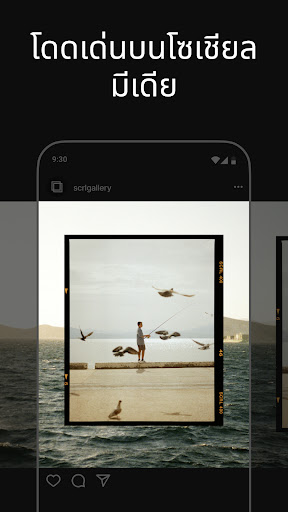
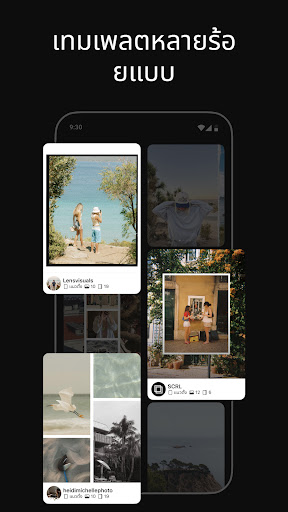
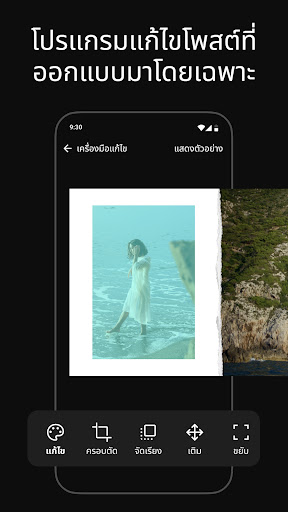
Unleash your creativity with SCRL, the #1 app in the US for creating original photo collages and seamless Instagram carousels. Whether you're an influencer, artist, or just love sharing your moments, SCRL offers everything you need to make your posts stand out.
• Exceptional Collage Maker with Hundreds of Hand-Picked Templates
Start your design journey with our vast selection of collage templates. From minimalist to extravagant, our templates cater to every occasion and style.
Our design experts hand-pick each template to ensure high quality and versatility. Whether you're working on a travel memory, a wedding, or a creative project, the collage maker gives you the right tools to express your creativity. Plus, new collage templates are added regularly, so you’ll always have fresh options to choose from.
• Seamless Swipe-Through Carousel Posts
Easily create stunning swipe-through Instagram carousel posts that captivate your audience. Our intuitive design tools make it effortless to merge photos into panoramic carousel posts or create scroll-through collage layouts that flow seamlessly. The transition between images feels natural, ensuring that your followers stay engaged with your posts. Whether you’re telling a story through images or showcasing a series of moments, Carousels made with SCRL help you present your photos in a captivating way.
• Add More Than 10 Photos to a Single Post
Break the limitations of traditional posts & Instagram layouts. With SCRL, you can add more than 10 photos in a single post, providing more room for your creativity and storytelling.
• Freeform Canvas for Ultimate Creativity
Design your way with our freeform canvas. Zoom in and out to perfect every detail or get an overview of your entire project. Create a layout that’s uniquely yours. The freeform canvas allows you to combine images, stickers, overlays, and text in your own way, ensuring that every collage and carousel is a reflection of your personal style.
• Hundreds of Stickers & Overlays
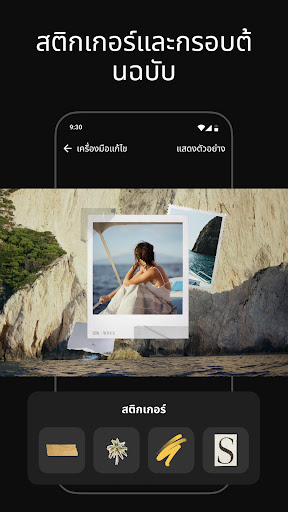
Enhance your photo collages with our extensive library of stickers and overlays. Add fun and detail to your designs with just a few taps. Whatever your style, you’ll find stickers and overlays that complement your collages & carousels perfectly. The right stickers and overlays can transform your collage or carousel into a polished, professional-looking post.
• Instant Posting to Instagram
When your masterpiece is ready, post directly to Instagram. SCRL streamlines the process, so you can share your work instantly and effortlessly. No more saving, exporting, and re-uploading your photo collages. With SCRL, you can create and post in one seamless workflow.
• SCRL Premium Photo Collage Maker
Take your designs to the next level with SCRL Premium. Unlock access to all collage templates, instagram layouts, and additional design tools. Add videos into grids, apply gradient backgrounds, and more. Our premium subscription offers weekly and yearly plans to suit your needs. SCRL Premium gives you the resources to craft standout collages and carousels every time.
TRUSTED BY THE BEST
SCRL is trusted by Grammy Award-winning artists, NBA players, and major international music festivals. We’ve been featured numerous times in the App Store and recognized by top industry publications:
"14 Best Apps For Instagram Collages in 2023" - Hootsuite, August 2022
"20 Mobile Apps to Create Stunning Social Media Visuals" - HubSpot, August 2020
"8 Trendy Apps To Create Collages For Instagram" - Later, April 2019
Terms of Use: https://scrl.com/terms-of-service
Privacy Policy: https://scrl.com/privacy-policy
Follow @scrlgallery on Instagram for inspiration from our community of users. Add the #scrlgallery Instagram tag on your SCRLs to join the community and get a shout out on our page.
We love hearing your ideas and feedback. Please DM us on Instagram at @scrlgallery for questions or suggestions.
Download now and start making stunning collages that will wow your followers!
แสดงเพิ่มเติม

1. ดาวน์โหลดตัวติดตั้ง MEmu และสิ้นสุดการติดตั้ง

2. เริ่ม MEmu จากนั้นเปิด Google Play บนหน้าแรก

3. ค้นหา ภาพตัดปะภาพ | กรอบรูป : SCRL ใน Google Play
Install
4. ดาวน์โหลดและติดตั้ง ภาพตัดปะภาพ | กรอบรูป : SCRL
5. เมื่อติดตั้งเสร็จให้คลิกที่ไอคอนเพื่อเริ่มใช้งาน

6. ใช้ MEmu เพื่อสัมผัสประสบการณ์ ภาพตัดปะภาพ | กรอบรูป : SCRL บนคอมพิวเตอร์ของคุณ
MEmu Play คือโปรแกรมจำลอง Android ที่ดีที่สุด มีผู้ใช้มากกว่า 50 ล้านคน มอบประสบการณ์การใช้งานแอป Android ขั้นสุดยอดให้กับคุณ เทคโนโลยีจำลองเสมือนของ MEmu ช่วยให้คุณรันแอป Android หลายพันแอปบนคอมพิวเตอร์ได้อย่างราบรื่น แม้แอปที่กินทรัพยากรเครื่องสูงที่สุด
จอใหญ่และกราฟฟิกสวยกว่า; เล่นได้นาน, ไม่ต้องใช้แบตเตอรี่โทรศัพท์หรือเน็ตโทรศัพท์.
ระบบปรับแต่งปุ่มคีย์บอร์ดและเม้าส์ตามที่คุณเลือก
เล่นมากกว่าหนึ่งเกมบน PC ในเวลาเดียวกันด้วยระบบหลายจอหรือ Multi-Instance manager.
Use ภาพตัดปะภาพ | กรอบรูป : SCRL on PC by following steps: