Docs To Go™ Office Suite
อัปเดตเมื่อ
เวอร์ชันปัจจุบัน
4.004
ให้บริการโดย

เมื่อใช้ Docs To Go™ Office Suite บนโทรศัพท์ของคุณไม่ต้องกังวลกับการชาร์จไฟมากเกินไปปลดปล่อยตัวคุณเองจากหน้าจอขนาดเล็กและสนุกกับการใช้แอพนี้บนหน้าจอขนาดใหญ่ จากนี้ไปรับประสบการณ์เต็มหน้าจอของแอปพลิเคชันของคุณด้วยคีย์บอร์ดและเมาส์ MEmu มีคุณสมบัติที่น่าแปลกใจที่คุณคาดหวัง: การติดตั้งที่รวดเร็วและการตั้งค่าที่ง่ายควบคุมได้ง่ายไม่ จำกัด แบตเตอรี่ข้อมูลมือถือและการโทรที่รบกวน MEmu 9 ใหม่ล่าสุดเป็นตัวเลือกที่ดีที่สุดสำหรับการใช้ Meitu – โปรแกรมแก้ไขภาพแนวธรรมชาติ บนคอมพิวเตอร์ของคุณ ด้วยรหัสการดูดซึมของเราผู้จัดการหลายอินสแตนซ์ทำให้สามารถเปิดบัญชี 2 บัญชีขึ้นไปในเวลาเดียวกันได้ และที่สำคัญที่สุดเอ็นจิ้นจำลองพิเศษของเราสามารถปลดปล่อยศักยภาพของPCของคุณและทำให้ทุกอย่างราบรื่นและสนุกสนาน
แสดงเพิ่มเติม
ดาวน์โหลด Docs To Go™ Office Suite บน PC ด้วย MEmu Android Emulator สนุกกับการเล่นบนหน้าจอขนาดใหญ่ Work from anywhere: View, edit, and create Microsoft® Office files & view Adobe PDF® files on your Android smartphone and/or tablet with the original & #1 selling mobile Office suite of all time.
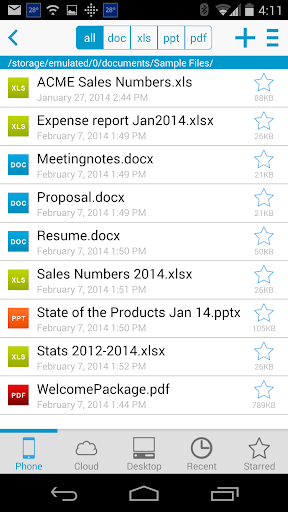
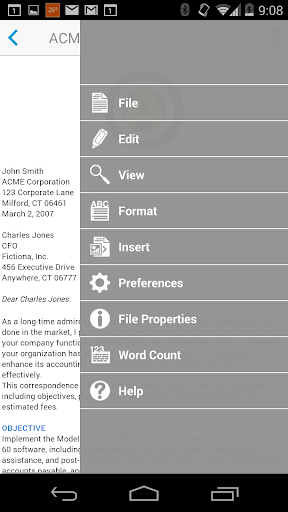
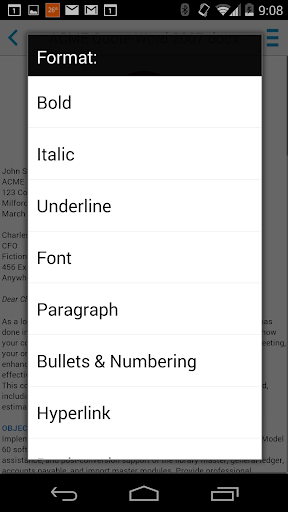
Work from anywhere: View, edit, and create Microsoft® Office files & view Adobe PDF® files on your Android smartphone and/or tablet with the original & #1 selling mobile Office suite of all time.
Docs To Go 4.0 contains best-in-class document viewing & editing
THE DATAVIZ® ADVANTAGE
• Founded in 1984, DataViz is an industry leader in developing mobile Office & productivity solutions for Android, iOS, and more.
• Documents To Go is currently preloaded on millions of devices around the world and has been downloaded over 40 million times on Android.
• InTact Technology™ retains original document formatting of edited files.
• No account sign-up necessary to get started in creating files and the freedom to save files where you choose!
OVERALL SUITE FEATURES:
• Includes both Android smartphone & tablet versions in one download.
• View, edit, and create MS Office files
• View PDF files
• Send & receive supported email attachments using Gmail or your favorite email app.
• Localized in English, French, German, Spanish, Italian, Portuguese, Brazilian Portuguese, Russian, Turkish, Japanese, Chinese, Korean, Arabic, Polish, Czech.
WORD TO GO FEATURES:
• Format font type, size, color, bold, italics, underline, and highlight text
• High fidelity viewing for embedded graphics, tables, bookmarks, comments, footnotes/endnotes, text boxes, table of contents, and hyperlinks
• Change paragraph alignment
• Edit bullets & numbering
• Find & replace
• View Tracked Changes
• Word count
SHEET TO GO FEATURES:
• Freeze panes
• Sort
• Auto-fit
• Extensive cell, number, and sheet formatting options
• 111 functions supported
• Insert, delete, resize, hide/unhide rows & columns
• Rename, insert, and delete worksheets
• Find/find next
• View charts
SLIDESHOW TO GO FEATURES:
• Effortlessly “flick” through slides
• Rehearse timing
• View speaker notes
• Sort and edit slides, including promote/demote bullets
PDF TO GO FEATURES:
• High-fidelity viewing of PDF files with page view, word wrap, auto-rotate, bookmarks, search, and select/copy text options
• Pinch-to-zoom to desired PDF page size/width
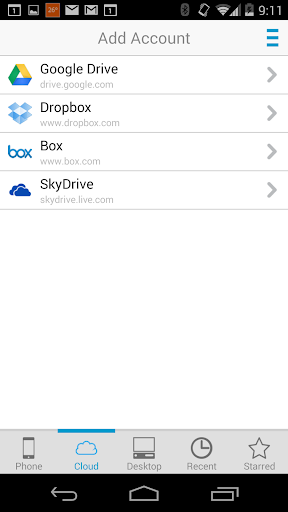
Cloud and Desktop Sync features are only available to customers who previously purchased the Premium app which is no longer for sale.
แสดงเพิ่มเติม

1. ดาวน์โหลดตัวติดตั้ง MEmu และสิ้นสุดการติดตั้ง

2. เริ่ม MEmu จากนั้นเปิด Google Play บนหน้าแรก

3. ค้นหา Docs To Go™ Office Suite ใน Google Play
Install
4. ดาวน์โหลดและติดตั้ง Docs To Go™ Office Suite
5. เมื่อติดตั้งเสร็จให้คลิกที่ไอคอนเพื่อเริ่มใช้งาน

6. ใช้ MEmu เพื่อสัมผัสประสบการณ์ Docs To Go™ Office Suite บนคอมพิวเตอร์ของคุณ
MEmu Play คือโปรแกรมจำลอง Android ที่ดีที่สุด มีผู้ใช้มากกว่า 50 ล้านคน มอบประสบการณ์การใช้งานแอป Android ขั้นสุดยอดให้กับคุณ เทคโนโลยีจำลองเสมือนของ MEmu ช่วยให้คุณรันแอป Android หลายพันแอปบนคอมพิวเตอร์ได้อย่างราบรื่น แม้แอปที่กินทรัพยากรเครื่องสูงที่สุด
จอใหญ่และกราฟฟิกสวยกว่า; เล่นได้นาน, ไม่ต้องใช้แบตเตอรี่โทรศัพท์หรือเน็ตโทรศัพท์.
ระบบปรับแต่งปุ่มคีย์บอร์ดและเม้าส์ตามที่คุณเลือก
เล่นมากกว่าหนึ่งเกมบน PC ในเวลาเดียวกันด้วยระบบหลายจอหรือ Multi-Instance manager.
Use Docs To Go™ Office Suite on PC by following steps: