Send Anywhere (ตัวช่วยส่งไฟล์)
อัปเดตเมื่อ
เวอร์ชันปัจจุบัน
23.3.1
ให้บริการโดย

เมื่อใช้ Send Anywhere (ตัวช่วยส่งไฟล์) บนโทรศัพท์ของคุณไม่ต้องกังวลกับการชาร์จไฟมากเกินไปปลดปล่อยตัวคุณเองจากหน้าจอขนาดเล็กและสนุกกับการใช้แอพนี้บนหน้าจอขนาดใหญ่ จากนี้ไปรับประสบการณ์เต็มหน้าจอของแอปพลิเคชันของคุณด้วยคีย์บอร์ดและเมาส์ MEmu มีคุณสมบัติที่น่าแปลกใจที่คุณคาดหวัง: การติดตั้งที่รวดเร็วและการตั้งค่าที่ง่ายควบคุมได้ง่ายไม่ จำกัด แบตเตอรี่ข้อมูลมือถือและการโทรที่รบกวน MEmu 9 ใหม่ล่าสุดเป็นตัวเลือกที่ดีที่สุดสำหรับการใช้ Meitu – โปรแกรมแก้ไขภาพแนวธรรมชาติ บนคอมพิวเตอร์ของคุณ ด้วยรหัสการดูดซึมของเราผู้จัดการหลายอินสแตนซ์ทำให้สามารถเปิดบัญชี 2 บัญชีขึ้นไปในเวลาเดียวกันได้ และที่สำคัญที่สุดเอ็นจิ้นจำลองพิเศษของเราสามารถปลดปล่อยศักยภาพของPCของคุณและทำให้ทุกอย่างราบรื่นและสนุกสนาน
แสดงเพิ่มเติม
สัมผัสประสบการณ์สุดยอดการใช้งาน Send Anywhere (ตัวช่วยส่งไฟล์) บนพีซีด้วย MEmu Play นี่คือโปรแกรมจำลอง Android ฟรีที่ทรงพลัง ให้คุณใช้งานแอป Android นับพันบนเดสก์ท็อป สนุกกับการเชื่อมต่อกับเพื่อนๆ และขัดเกลาผลงานของคุณอย่างมีประสิทธิภาพยิ่งขึ้น! Send Anywhere: แบ่งปันไฟล์ได้อย่างง่ายๆ รวดเร็ว และไม่จำกัด.
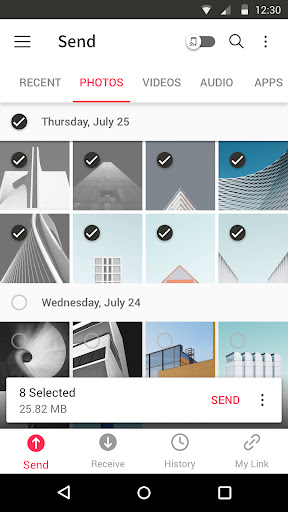
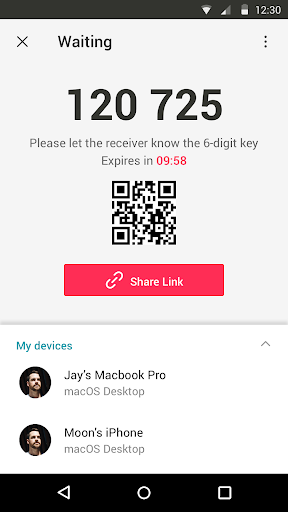
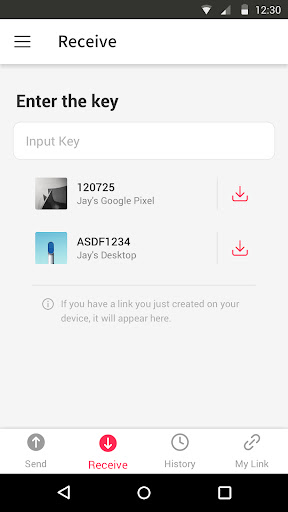
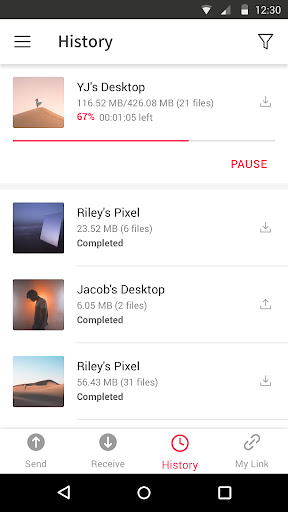
Send Anywhere: แบ่งปันไฟล์ได้อย่างง่ายๆ รวดเร็ว และไม่จำกัด
▶ คุณสมบัติ
•ส่งไฟล์ได้ทุกประเภทโดยไม่เปลี่ยนแปลงไฟล์ดั้งเดิม
•เพียงมีแค่รหัสผ่าน 6 หลักแบบใช้ครั้งเดียว ก็ส่งไฟล์ได้อย่างง่ายดาย
• Wi-Fi Direct: ส่งได้โดยไม่ต้องใช้ข้อมูลหรืออินเทอร์เน็ต
•แชร์ลิงก์ได้แบบง่ายๆผ่านสื่อโซเชียลมีเดียและแอป Messenger
•สนับสนุนการเข้ารหัสไฟล์ (256 บิต)
▶ ใช้ Send Anywhere ได้ตอนไหนบ้าง!
•เมื่อย้ายภาพถ่าย วิดีโอ และเพลงไปยังพีซีของคุณ!
•เมื่อคุณไม่มีข้อมูลหรือเมื่อการเชื่อมต่ออินเทอร์เน็ตไม่ดี
•เมื่อใดก็ตามที่คุณต้องการส่งไฟล์แบบทันที!
* ขณะใช้แอปพลิเคชัน หากมีปัญหาหรือข้อผิดพลาดเกิดขึ้น โปรดแจ้งให้เราทราบโดยการคลิก "Send Feedback" จากเมนู Settings
-
APK File
• The copyright of applications sent through Send Anywhere belong to the application’s developer. If sharing an APK file conflicts with current copyright laws then all responsibility falls upon the user.
• Typically, you will not be able to share APK files between OS and Android. First check with application’s developer before cross-platform transfers.
Video Files
• Depending on the video type received, the video may not be pushed into the phone’s gallery. In this case, using a file management application will play the video.
• If you can’t play the videos received, download a different video player that is compatible with the video format.
-
To best use Send Anywhere’s convenient file sharing service, we ask user’s permissions listed below
• Write External Storage : To store files that are received through Send Anywhere in external storage (SD Card).
• Read External Storage : To send files stored in external storage through Send Anywhere.
• Record Audio : To recognize a sound wave and receive files.
• Get Accounts : To set default profile name when using Send Anywhere for the first time.
• Read Contacts : To send contacts stored in your phone.
• Camera : For being able to receive files via a QR Code.
For more information about our terms and policies, please visit our site.
https://send-anywhere.com/terms
https://send-anywhere.com/mobile-privacy/privacy.html
แสดงเพิ่มเติม

1. ดาวน์โหลดตัวติดตั้ง MEmu และสิ้นสุดการติดตั้ง

2. เริ่ม MEmu จากนั้นเปิด Google Play บนหน้าแรก

3. ค้นหา Send Anywhere (ตัวช่วยส่งไฟล์) ใน Google Play
Install
4. ดาวน์โหลดและติดตั้ง Send Anywhere (ตัวช่วยส่งไฟล์)
5. เมื่อติดตั้งเสร็จให้คลิกที่ไอคอนเพื่อเริ่มใช้งาน

6. ใช้ MEmu เพื่อสัมผัสประสบการณ์ Send Anywhere (ตัวช่วยส่งไฟล์) บนคอมพิวเตอร์ของคุณ
MEmu Play คือโปรแกรมจำลอง Android ที่ดีที่สุด มีผู้ใช้มากกว่า 50 ล้านคน มอบประสบการณ์การใช้งานแอป Android ขั้นสุดยอดให้กับคุณ เทคโนโลยีจำลองเสมือนของ MEmu ช่วยให้คุณรันแอป Android หลายพันแอปบนคอมพิวเตอร์ได้อย่างราบรื่น แม้แอปที่กินทรัพยากรเครื่องสูงที่สุด
จอใหญ่และกราฟฟิกสวยกว่า; เล่นได้นาน, ไม่ต้องใช้แบตเตอรี่โทรศัพท์หรือเน็ตโทรศัพท์.
ระบบปรับแต่งปุ่มคีย์บอร์ดและเม้าส์ตามที่คุณเลือก
เล่นมากกว่าหนึ่งเกมบน PC ในเวลาเดียวกันด้วยระบบหลายจอหรือ Multi-Instance manager.
Use Send Anywhere (ตัวช่วยส่งไฟล์) on PC by following steps: