Currency Converter
อัปเดตเมื่อ
เวอร์ชันปัจจุบัน
2.7.28
ให้บริการโดย

เมื่อใช้ Currency Converter บนโทรศัพท์ของคุณไม่ต้องกังวลกับการชาร์จไฟมากเกินไปปลดปล่อยตัวคุณเองจากหน้าจอขนาดเล็กและสนุกกับการใช้แอพนี้บนหน้าจอขนาดใหญ่ จากนี้ไปรับประสบการณ์เต็มหน้าจอของแอปพลิเคชันของคุณด้วยคีย์บอร์ดและเมาส์ MEmu มีคุณสมบัติที่น่าแปลกใจที่คุณคาดหวัง: การติดตั้งที่รวดเร็วและการตั้งค่าที่ง่ายควบคุมได้ง่ายไม่ จำกัด แบตเตอรี่ข้อมูลมือถือและการโทรที่รบกวน MEmu 9 ใหม่ล่าสุดเป็นตัวเลือกที่ดีที่สุดสำหรับการใช้ Meitu – โปรแกรมแก้ไขภาพแนวธรรมชาติ บนคอมพิวเตอร์ของคุณ ด้วยรหัสการดูดซึมของเราผู้จัดการหลายอินสแตนซ์ทำให้สามารถเปิดบัญชี 2 บัญชีขึ้นไปในเวลาเดียวกันได้ และที่สำคัญที่สุดเอ็นจิ้นจำลองพิเศษของเราสามารถปลดปล่อยศักยภาพของPCของคุณและทำให้ทุกอย่างราบรื่นและสนุกสนาน
แสดงเพิ่มเติม
ดาวน์โหลด Currency Converter บน PC ด้วย MEmu Android Emulator สนุกกับการเล่นบนหน้าจอขนาดใหญ่ Whether you want to check all your favorite currencies at a glance, quickly calculate prices in a foreign country, visualise changes in historical exchange rates or just browse the banknotes for far-flung countries, you've found the ideal currency converter and exchange rate tool to use both at home and when travelling abroad.
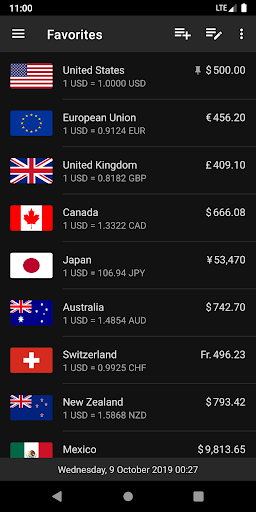
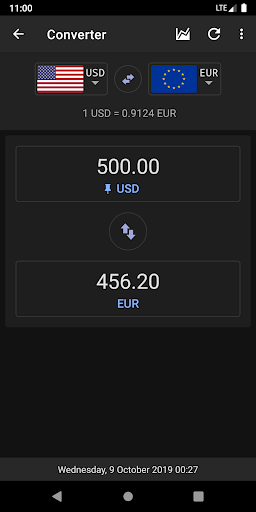
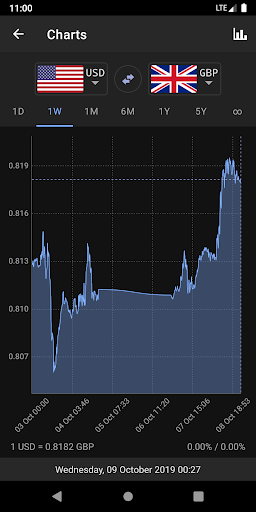
Whether you want to check all your favorite currencies at a glance, quickly calculate prices in a foreign country, visualise changes in historical exchange rates or just browse the banknotes for far-flung countries, you've found the ideal currency converter and exchange rate tool to use both at home and when travelling abroad.
Used by millions of people around the world, it combines an easy to use, modern design with an accurate, commercial data feed that is updated every sixty seconds. But if you are away from the internet, that's okay, it works offline too!
Find whatever you need to convert in the extensive, searchable database containing almost every currency that exists, along with many popular commodities and cryptocurrencies, then save to your favorites with a single tap.
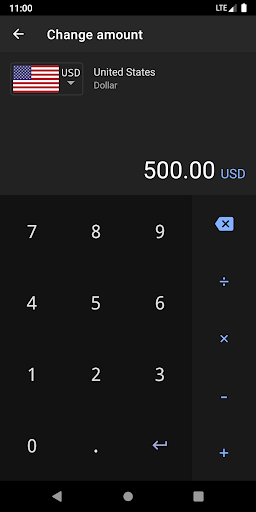
The currency converter comes with a handy in-built calculator and you can choose to convert using the current live exchange rates or with your own custom values.
Interactive historical currency charts are available from the last day to the last decade, along with a full catalogue of banknote images and integration with Wikipedia and several popular financial websites.
The appearance can be customized with light and dark material themes.
แสดงเพิ่มเติม

1. ดาวน์โหลดตัวติดตั้ง MEmu และสิ้นสุดการติดตั้ง

2. เริ่ม MEmu จากนั้นเปิด Google Play บนหน้าแรก

3. ค้นหา Currency Converter ใน Google Play
Install
4. ดาวน์โหลดและติดตั้ง Currency Converter
5. เมื่อติดตั้งเสร็จให้คลิกที่ไอคอนเพื่อเริ่มใช้งาน

6. ใช้ MEmu เพื่อสัมผัสประสบการณ์ Currency Converter บนคอมพิวเตอร์ของคุณ
MEmu Play คือโปรแกรมจำลอง Android ที่ดีที่สุด มีผู้ใช้มากกว่า 50 ล้านคน มอบประสบการณ์การใช้งานแอป Android ขั้นสุดยอดให้กับคุณ เทคโนโลยีจำลองเสมือนของ MEmu ช่วยให้คุณรันแอป Android หลายพันแอปบนคอมพิวเตอร์ได้อย่างราบรื่น แม้แอปที่กินทรัพยากรเครื่องสูงที่สุด
จอใหญ่และกราฟฟิกสวยกว่า; เล่นได้นาน, ไม่ต้องใช้แบตเตอรี่โทรศัพท์หรือเน็ตโทรศัพท์.
ระบบปรับแต่งปุ่มคีย์บอร์ดและเม้าส์ตามที่คุณเลือก
เล่นมากกว่าหนึ่งเกมบน PC ในเวลาเดียวกันด้วยระบบหลายจอหรือ Multi-Instance manager.
Use Currency Converter on PC by following steps: