Dream Skins for Minecraft PE
อัปเดตเมื่อ
เวอร์ชันปัจจุบัน
4.0
ให้บริการโดย

เมื่อใช้ Dream Skins for Minecraft PE บนโทรศัพท์ของคุณไม่ต้องกังวลกับการชาร์จไฟมากเกินไปปลดปล่อยตัวคุณเองจากหน้าจอขนาดเล็กและสนุกกับการใช้แอพนี้บนหน้าจอขนาดใหญ่ จากนี้ไปรับประสบการณ์เต็มหน้าจอของแอปพลิเคชันของคุณด้วยคีย์บอร์ดและเมาส์ MEmu มีคุณสมบัติที่น่าแปลกใจที่คุณคาดหวัง: การติดตั้งที่รวดเร็วและการตั้งค่าที่ง่ายควบคุมได้ง่ายไม่ จำกัด แบตเตอรี่ข้อมูลมือถือและการโทรที่รบกวน MEmu 9 ใหม่ล่าสุดเป็นตัวเลือกที่ดีที่สุดสำหรับการใช้ Meitu – โปรแกรมแก้ไขภาพแนวธรรมชาติ บนคอมพิวเตอร์ของคุณ ด้วยรหัสการดูดซึมของเราผู้จัดการหลายอินสแตนซ์ทำให้สามารถเปิดบัญชี 2 บัญชีขึ้นไปในเวลาเดียวกันได้ และที่สำคัญที่สุดเอ็นจิ้นจำลองพิเศษของเราสามารถปลดปล่อยศักยภาพของPCของคุณและทำให้ทุกอย่างราบรื่นและสนุกสนาน
แสดงเพิ่มเติม
ดาวน์โหลด Dream Skins for Minecraft PE บน PC ด้วย MEmu Android Emulator สนุกกับการเล่นบนหน้าจอขนาดใหญ่ If you are a fan of dream characters, then we have a collection of Dream Skins for Minecraft in high quality.
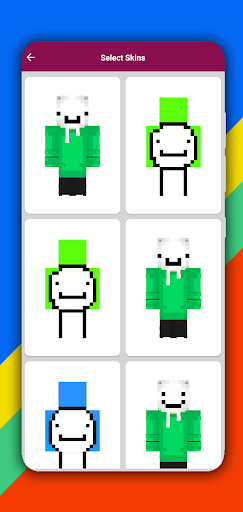
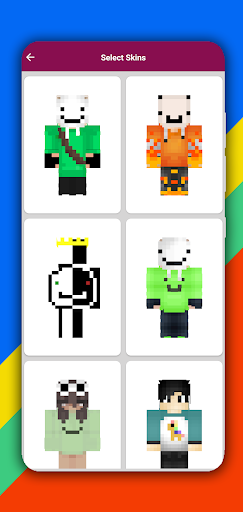
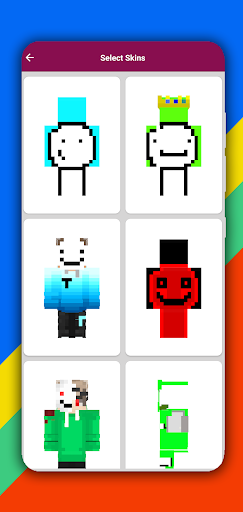
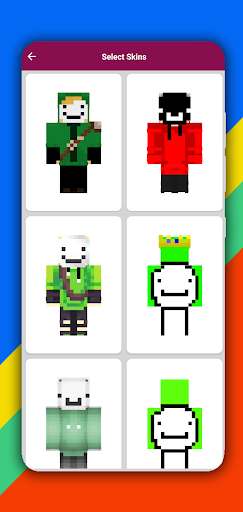
If you are a fan of dream characters, then we have a collection of Dream Skins for Minecraft in high quality. You can have all this collection of skins by downloading this skin pack. Download all dream skins, just one click to install or download skins. Dream Skins for Minecraft can be used on PC Edition. High quality dream skins for MCPE will be your collection.
Dream skins for Minecraft which provides the most unique skins of all time for MCPE players. Either you play Minecraft offline with mod launcher or online with your friends on mcpe server. Great for boys and girls!
Installing the Dream skin does not take much time. Just choose
favorite dream skin, view in 3D, click the Install or Download button and in an instant the dream skin will be right in your game!
Download Dream Skins for Minecraft now and brag in front of your friends on mcpe server.
How to Install Dream Skin for Minecraft PE:
1. Select a skin from the application catalog.
2. Click the "Download" button.
3. Go to the game and select the icon with the hanger.
4. Select the black character.
5. Select the downloaded skin from gallery.
Features of Dream Skin for Minecraft PE:
1. Download to Gallery.
2. Support all versions of MC Pocket Edition and PC Edition.
3. 3D view and 360 degree rotation.
4. Simple and Easy navigation.
5. Preview 3D skins before you download.
6. Mod installer for MCPE.
7. High quality HD skins.
DISCLAIMER:
This is an unofficial application for Minecraft. This app is not affiliated with Mojang AB. The Minecraft Name, Minecraft Brand and Minecraft Assets are property of Mojang AB or their respectful owner. All rights reserved. According to http://account.mojang.com/documents/brand_guidelines
แสดงเพิ่มเติม

1. ดาวน์โหลดตัวติดตั้ง MEmu และสิ้นสุดการติดตั้ง

2. เริ่ม MEmu จากนั้นเปิด Google Play บนหน้าแรก

3. ค้นหา Dream Skins for Minecraft PE ใน Google Play
Install
4. ดาวน์โหลดและติดตั้ง Dream Skins for Minecraft PE
5. เมื่อติดตั้งเสร็จให้คลิกที่ไอคอนเพื่อเริ่มใช้งาน

6. ใช้ MEmu เพื่อสัมผัสประสบการณ์ Dream Skins for Minecraft PE บนคอมพิวเตอร์ของคุณ
MEmu Play คือโปรแกรมจำลอง Android ที่ดีที่สุด มีผู้ใช้มากกว่า 50 ล้านคน มอบประสบการณ์การใช้งานแอป Android ขั้นสุดยอดให้กับคุณ เทคโนโลยีจำลองเสมือนของ MEmu ช่วยให้คุณรันแอป Android หลายพันแอปบนคอมพิวเตอร์ได้อย่างราบรื่น แม้แอปที่กินทรัพยากรเครื่องสูงที่สุด
จอใหญ่และกราฟฟิกสวยกว่า; เล่นได้นาน, ไม่ต้องใช้แบตเตอรี่โทรศัพท์หรือเน็ตโทรศัพท์.
ระบบปรับแต่งปุ่มคีย์บอร์ดและเม้าส์ตามที่คุณเลือก
เล่นมากกว่าหนึ่งเกมบน PC ในเวลาเดียวกันด้วยระบบหลายจอหรือ Multi-Instance manager.
Use Dream Skins for Minecraft PE on PC by following steps: