EmotivPRO Mobile
อัปเดตเมื่อ
เวอร์ชันปัจจุบัน
4.12.5
ให้บริการโดย

เมื่อใช้ EmotivPRO Mobile บนโทรศัพท์ของคุณไม่ต้องกังวลกับการชาร์จไฟมากเกินไปปลดปล่อยตัวคุณเองจากหน้าจอขนาดเล็กและสนุกกับการใช้แอพนี้บนหน้าจอขนาดใหญ่ จากนี้ไปรับประสบการณ์เต็มหน้าจอของแอปพลิเคชันของคุณด้วยคีย์บอร์ดและเมาส์ MEmu มีคุณสมบัติที่น่าแปลกใจที่คุณคาดหวัง: การติดตั้งที่รวดเร็วและการตั้งค่าที่ง่ายควบคุมได้ง่ายไม่ จำกัด แบตเตอรี่ข้อมูลมือถือและการโทรที่รบกวน MEmu 9 ใหม่ล่าสุดเป็นตัวเลือกที่ดีที่สุดสำหรับการใช้ Meitu – โปรแกรมแก้ไขภาพแนวธรรมชาติ บนคอมพิวเตอร์ของคุณ ด้วยรหัสการดูดซึมของเราผู้จัดการหลายอินสแตนซ์ทำให้สามารถเปิดบัญชี 2 บัญชีขึ้นไปในเวลาเดียวกันได้ และที่สำคัญที่สุดเอ็นจิ้นจำลองพิเศษของเราสามารถปลดปล่อยศักยภาพของPCของคุณและทำให้ทุกอย่างราบรื่นและสนุกสนาน
แสดงเพิ่มเติม
สัมผัสประสบการณ์สุดยอดการใช้งาน EmotivPRO Mobile บนพีซีด้วย MEmu Play นี่คือโปรแกรมจำลอง Android ฟรีที่ทรงพลัง ให้คุณใช้งานแอป Android นับพันบนเดสก์ท็อป สนุกกับการเชื่อมต่อกับเพื่อนๆ และขัดเกลาผลงานของคุณอย่างมีประสิทธิภาพยิ่งขึ้น! Pro Mobile is the companion app for EMOTIV's comprehensive EEG monitoring toolkit, designed to extend EEG research beyond the lab.
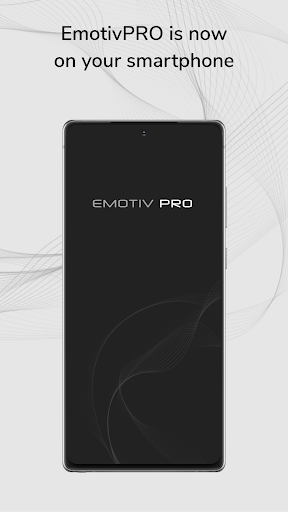
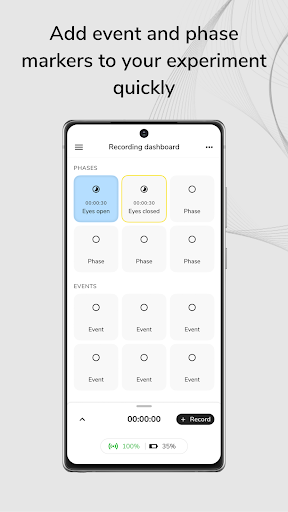
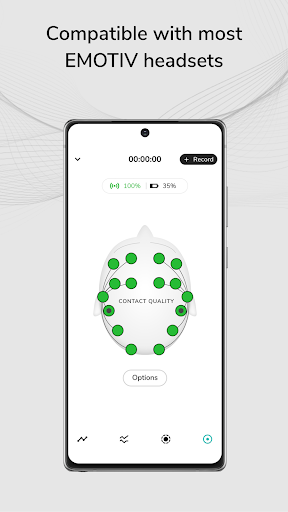
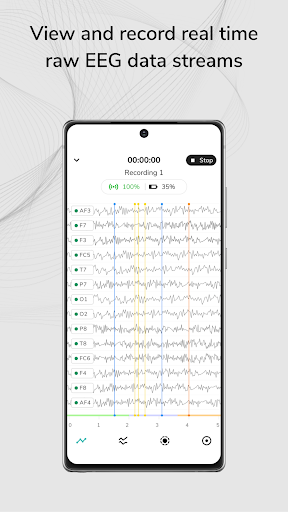
Pro Mobile is the companion app for EMOTIV's comprehensive EEG monitoring toolkit, designed to extend EEG research beyond the lab. Capture EEG data in real-world settings, seamlessly integrating with EMOTIV’s hardware and software to design, execute, and analyze experiments with greater flexibility.
Key Features:
Custom Experiment Design: Build and customize experiments with an intuitive no code interface. Add phases and stimuli seamlessly.
Real-Time Data Acquisition: Record raw EEG, performance metrics, and motion data live.
Contextual EEG Recording: Collect EEG data in natural environments for deeper real-world contexts.
Seamless Data Management: Store recordings securely in the EMOTIV Cloud for easy access and collaboration.
Emotiv Cloud: Process large EEG datasets efficiently through predefined pipelines and visualizations.
Important Disclaimer:
Emotiv products are intended to be used for research applications and personal insight and education only. Our products are not sold as Medical Devices as defined in EU directive 93/42/EEC. Our products are not designed or intended to be used for diagnosis or treatment of disease or medical conditions. Please consult a healthcare professional for any mental health or medical concerns.
Your privacy is our priority - Emotiv employs strong security measures to protect your brain data, ensuring that your information remains safe and confidential.
* Privacy policy - https://id.emotivcloud.com/eoidc/privacy/privacy_policy/
แสดงเพิ่มเติม

1. ดาวน์โหลดตัวติดตั้ง MEmu และสิ้นสุดการติดตั้ง

2. เริ่ม MEmu จากนั้นเปิด Google Play บนหน้าแรก

3. ค้นหา EmotivPRO Mobile ใน Google Play
Install
4. ดาวน์โหลดและติดตั้ง EmotivPRO Mobile
5. เมื่อติดตั้งเสร็จให้คลิกที่ไอคอนเพื่อเริ่มใช้งาน

6. ใช้ MEmu เพื่อสัมผัสประสบการณ์ EmotivPRO Mobile บนคอมพิวเตอร์ของคุณ
MEmu Play คือโปรแกรมจำลอง Android ที่ดีที่สุด มีผู้ใช้มากกว่า 50 ล้านคน มอบประสบการณ์การใช้งานแอป Android ขั้นสุดยอดให้กับคุณ เทคโนโลยีจำลองเสมือนของ MEmu ช่วยให้คุณรันแอป Android หลายพันแอปบนคอมพิวเตอร์ได้อย่างราบรื่น แม้แอปที่กินทรัพยากรเครื่องสูงที่สุด
จอใหญ่และกราฟฟิกสวยกว่า; เล่นได้นาน, ไม่ต้องใช้แบตเตอรี่โทรศัพท์หรือเน็ตโทรศัพท์.
ระบบปรับแต่งปุ่มคีย์บอร์ดและเม้าส์ตามที่คุณเลือก
เล่นมากกว่าหนึ่งเกมบน PC ในเวลาเดียวกันด้วยระบบหลายจอหรือ Multi-Instance manager.
Use EmotivPRO Mobile on PC by following steps: