
English Myanmar Dictionary
อัปเดตเมื่อ
เวอร์ชันปัจจุบัน
11.0.0
ให้บริการโดย

เมื่อใช้ English Myanmar Dictionary บนโทรศัพท์ของคุณไม่ต้องกังวลกับการชาร์จไฟมากเกินไปปลดปล่อยตัวคุณเองจากหน้าจอขนาดเล็กและสนุกกับการใช้แอพนี้บนหน้าจอขนาดใหญ่ จากนี้ไปรับประสบการณ์เต็มหน้าจอของแอปพลิเคชันของคุณด้วยคีย์บอร์ดและเมาส์ MEmu มีคุณสมบัติที่น่าแปลกใจที่คุณคาดหวัง: การติดตั้งที่รวดเร็วและการตั้งค่าที่ง่ายควบคุมได้ง่ายไม่ จำกัด แบตเตอรี่ข้อมูลมือถือและการโทรที่รบกวน MEmu 9 ใหม่ล่าสุดเป็นตัวเลือกที่ดีที่สุดสำหรับการใช้ Meitu – โปรแกรมแก้ไขภาพแนวธรรมชาติ บนคอมพิวเตอร์ของคุณ ด้วยรหัสการดูดซึมของเราผู้จัดการหลายอินสแตนซ์ทำให้สามารถเปิดบัญชี 2 บัญชีขึ้นไปในเวลาเดียวกันได้ และที่สำคัญที่สุดเอ็นจิ้นจำลองพิเศษของเราสามารถปลดปล่อยศักยภาพของPCของคุณและทำให้ทุกอย่างราบรื่นและสนุกสนาน
แสดงเพิ่มเติม
ดาวน์โหลด English Myanmar Dictionary บน PC ด้วย MEmu Android Emulator สนุกกับการเล่นบนหน้าจอขนาดใหญ่ Myanmar <> English Dictionary offline and free.
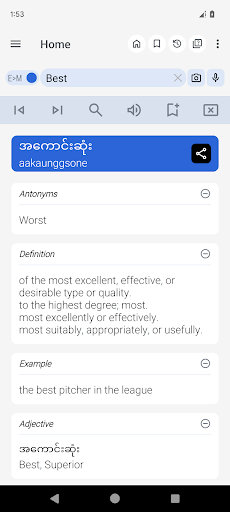
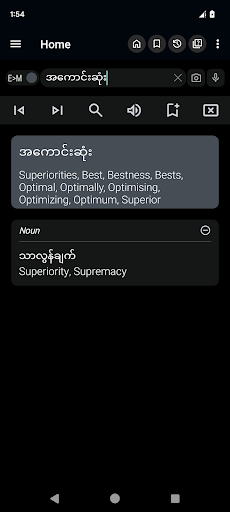
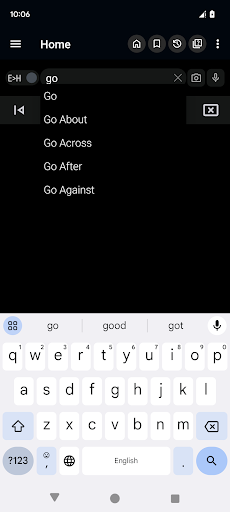
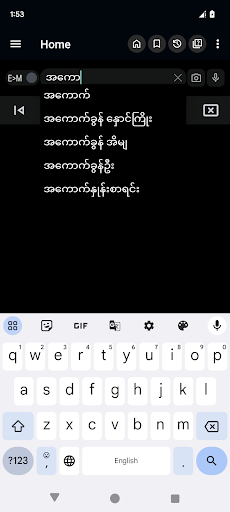
Myanmar <> English Dictionary offline and free. You can search both English and Myanmar words. You can search words directly from "Internet Browser" or other Applications by using Sharing option. In the sharing option you will find "Myanmar Dictionary" and choosing "Myanmar Dictionary" will open the dictionary with the shared word so you need not type. Exiting from the dictionary will return you to "Internet Browser" or other Applications again. This is not only a Dictionary but also a learning tool. You can use this dictionary when you have no Internet connection. MCQ (Multiple Choice Question) option is available. There is autosuggestion so you need not type full words. You also can use Speech to text feature. You can add words to the study plan and remove words from the study plan. When you start typing, you will see some words starting with the letters you typed. The dictionary searches in a database for the matching words. This can slow down typing in small handsets. Therefore in settings there is an option to turn that off. So low profile mobile handsets can turn off Auto search to type quickly. You will see a Dictionary icon on the notification bar to start the app quickly. On sharing text you will find the Myanmar Dictionary. This will be helpful to find out the meaning of any word.
Features of the Dictionary:
• Myanmar To English
• English To Myanmar
• No internet connection required
• Search From Web
• Search by Sharing
• Auto Suggestion
• Pronounce & Voice Search
• Antonyms (Opposite words)
• Synonyms
• Backup and Restore
• History & Study Plan
• Word Game
• Share Words
• Copy Words
แสดงเพิ่มเติม

1. ดาวน์โหลดตัวติดตั้ง MEmu และสิ้นสุดการติดตั้ง

2. เริ่ม MEmu จากนั้นเปิด Google Play บนหน้าแรก

3. ค้นหา English Myanmar Dictionary ใน Google Play
Install
4. ดาวน์โหลดและติดตั้ง English Myanmar Dictionary
5. เมื่อติดตั้งเสร็จให้คลิกที่ไอคอนเพื่อเริ่มใช้งาน

6. ใช้ MEmu เพื่อสัมผัสประสบการณ์ English Myanmar Dictionary บนคอมพิวเตอร์ของคุณ
MEmu Play คือโปรแกรมจำลอง Android ที่ดีที่สุด มีผู้ใช้มากกว่า 50 ล้านคน มอบประสบการณ์การใช้งานแอป Android ขั้นสุดยอดให้กับคุณ เทคโนโลยีจำลองเสมือนของ MEmu ช่วยให้คุณรันแอป Android หลายพันแอปบนคอมพิวเตอร์ได้อย่างราบรื่น แม้แอปที่กินทรัพยากรเครื่องสูงที่สุด
จอใหญ่และกราฟฟิกสวยกว่า; เล่นได้นาน, ไม่ต้องใช้แบตเตอรี่โทรศัพท์หรือเน็ตโทรศัพท์.
ระบบปรับแต่งปุ่มคีย์บอร์ดและเม้าส์ตามที่คุณเลือก
เล่นมากกว่าหนึ่งเกมบน PC ในเวลาเดียวกันด้วยระบบหลายจอหรือ Multi-Instance manager.
Use English Myanmar Dictionary on PC by following steps: