
FFSensi Pro
อัปเดตเมื่อ
เวอร์ชันปัจจุบัน
5.3
ให้บริการโดย

เมื่อใช้ FFSensi Pro บนโทรศัพท์ของคุณไม่ต้องกังวลกับการชาร์จไฟมากเกินไปปลดปล่อยตัวคุณเองจากหน้าจอขนาดเล็กและสนุกกับการใช้แอพนี้บนหน้าจอขนาดใหญ่ จากนี้ไปรับประสบการณ์เต็มหน้าจอของแอปพลิเคชันของคุณด้วยคีย์บอร์ดและเมาส์ MEmu มีคุณสมบัติที่น่าแปลกใจที่คุณคาดหวัง: การติดตั้งที่รวดเร็วและการตั้งค่าที่ง่ายควบคุมได้ง่ายไม่ จำกัด แบตเตอรี่ข้อมูลมือถือและการโทรที่รบกวน MEmu 9 ใหม่ล่าสุดเป็นตัวเลือกที่ดีที่สุดสำหรับการใช้ Meitu – โปรแกรมแก้ไขภาพแนวธรรมชาติ บนคอมพิวเตอร์ของคุณ ด้วยรหัสการดูดซึมของเราผู้จัดการหลายอินสแตนซ์ทำให้สามารถเปิดบัญชี 2 บัญชีขึ้นไปในเวลาเดียวกันได้ และที่สำคัญที่สุดเอ็นจิ้นจำลองพิเศษของเราสามารถปลดปล่อยศักยภาพของPCของคุณและทำให้ทุกอย่างราบรื่นและสนุกสนาน
แสดงเพิ่มเติม
ดาวน์โหลด FFSensi Pro บน PC ด้วย MEmu Android Emulator สนุกกับการเล่นบนหน้าจอขนาดใหญ่ FFX SENSIX BETA is a sophisticated system utility designed to enhance your Android device's fluidity and responsiveness.
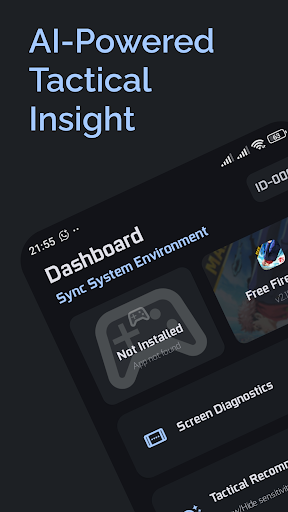
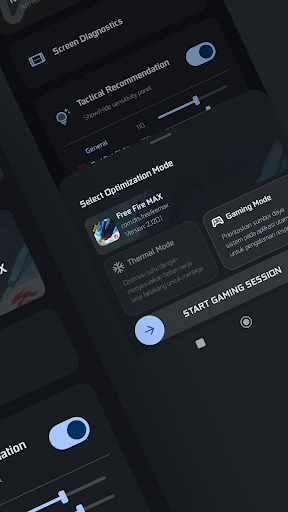
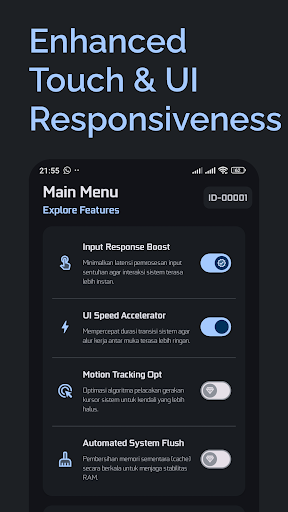
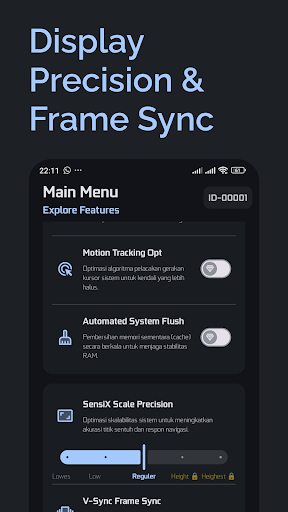
FFX SENSIX BETA is a sophisticated system utility designed to enhance your Android device's fluidity and responsiveness. Built for power users, it utilizes the Shizuku API to provide safe, system-level adjustments that refine your overall user experience.
Key Features of FFX SENSIX BETA:
Display Scale Precision: Customize your system’s Sensix Scale and V-Sync synchronization to reduce visual stutter and improve frame consistency.
Touch Response Optimization: Fine-tune the input response layer to minimize system latency and ensure every tap is registered with high precision.
Real-Time System Monitor: A futuristic overlay to track your device’s thermal status and RAM load, keeping you informed of your hardware health.
Automated System Flush: Maintain peak efficiency by clearing redundant system cache files without interrupting your workflow.
Performance Scaling: Choose between Execute Performance for high-demand tasks or Balanced Mode for a cool and battery-efficient experience.
Why FFX SENSIX BETA?
Professional Integration: Powered by the secure Shizuku framework, allowing deep system tuning without compromising device security.
Modern UI: Features a sleek interface with Material Symbols, ensuring a professional and intuitive navigation.
VIP Access: Unlock the highest optimization levels (Level 5) and exclusive Pro-Presets for the ultimate system control.
Developer Transparency & Policy: FFX SENSIX BETA is a general-purpose system management utility. It optimizes global Android parameters and DOES NOT modify, intercept, or manipulate third-party application data or game files. We are committed to a fair and safe ecosystem; this app does not provide cheats, hacks, or unauthorized modifications. Results depend on individual hardware specifications.
Elevate your system potential with the power of FFX SENSIX BETA.
แสดงเพิ่มเติม

1. ดาวน์โหลดตัวติดตั้ง MEmu และสิ้นสุดการติดตั้ง

2. เริ่ม MEmu จากนั้นเปิด Google Play บนหน้าแรก

3. ค้นหา FFSensi Pro ใน Google Play
Install
4. ดาวน์โหลดและติดตั้ง FFSensi Pro
5. เมื่อติดตั้งเสร็จให้คลิกที่ไอคอนเพื่อเริ่มใช้งาน

6. ใช้ MEmu เพื่อสัมผัสประสบการณ์ FFSensi Pro บนคอมพิวเตอร์ของคุณ
MEmu Play คือโปรแกรมจำลอง Android ที่ดีที่สุด มีผู้ใช้มากกว่า 50 ล้านคน มอบประสบการณ์การใช้งานแอป Android ขั้นสุดยอดให้กับคุณ เทคโนโลยีจำลองเสมือนของ MEmu ช่วยให้คุณรันแอป Android หลายพันแอปบนคอมพิวเตอร์ได้อย่างราบรื่น แม้แอปที่กินทรัพยากรเครื่องสูงที่สุด
จอใหญ่และกราฟฟิกสวยกว่า; เล่นได้นาน, ไม่ต้องใช้แบตเตอรี่โทรศัพท์หรือเน็ตโทรศัพท์.
ระบบปรับแต่งปุ่มคีย์บอร์ดและเม้าส์ตามที่คุณเลือก
เล่นมากกว่าหนึ่งเกมบน PC ในเวลาเดียวกันด้วยระบบหลายจอหรือ Multi-Instance manager.
Use FFSensi Pro on PC by following steps: