Licowa -Photobooth & Wallpaper
อัปเดตเมื่อ
เวอร์ชันปัจจุบัน
1.14.2
ให้บริการโดย

เมื่อใช้ Licowa -Photobooth & Wallpaper บนโทรศัพท์ของคุณไม่ต้องกังวลกับการชาร์จไฟมากเกินไปปลดปล่อยตัวคุณเองจากหน้าจอขนาดเล็กและสนุกกับการใช้แอพนี้บนหน้าจอขนาดใหญ่ จากนี้ไปรับประสบการณ์เต็มหน้าจอของแอปพลิเคชันของคุณด้วยคีย์บอร์ดและเมาส์ MEmu มีคุณสมบัติที่น่าแปลกใจที่คุณคาดหวัง: การติดตั้งที่รวดเร็วและการตั้งค่าที่ง่ายควบคุมได้ง่ายไม่ จำกัด แบตเตอรี่ข้อมูลมือถือและการโทรที่รบกวน MEmu 9 ใหม่ล่าสุดเป็นตัวเลือกที่ดีที่สุดสำหรับการใช้ Meitu – โปรแกรมแก้ไขภาพแนวธรรมชาติ บนคอมพิวเตอร์ของคุณ ด้วยรหัสการดูดซึมของเราผู้จัดการหลายอินสแตนซ์ทำให้สามารถเปิดบัญชี 2 บัญชีขึ้นไปในเวลาเดียวกันได้ และที่สำคัญที่สุดเอ็นจิ้นจำลองพิเศษของเราสามารถปลดปล่อยศักยภาพของPCของคุณและทำให้ทุกอย่างราบรื่นและสนุกสนาน
แสดงเพิ่มเติม
สัมผัสประสบการณ์สุดยอดการใช้งาน Licowa -Photobooth & Wallpaper บนพีซีด้วย MEmu Play นี่คือโปรแกรมจำลอง Android ฟรีที่ทรงพลัง ให้คุณใช้งานแอป Android นับพันบนเดสก์ท็อป สนุกกับการเชื่อมต่อกับเพื่อนๆ และขัดเกลาผลงานของคุณอย่างมีประสิทธิภาพยิ่งขึ้น! Licowa – แอปแต่งรูป AI ฟรี 100% และไม่มีโฆษณา .

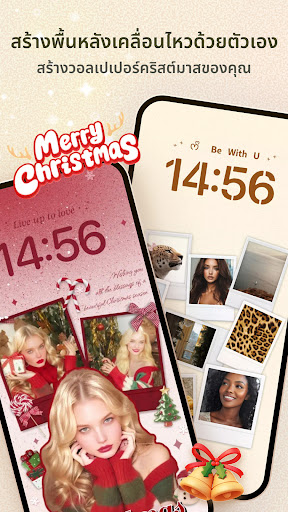
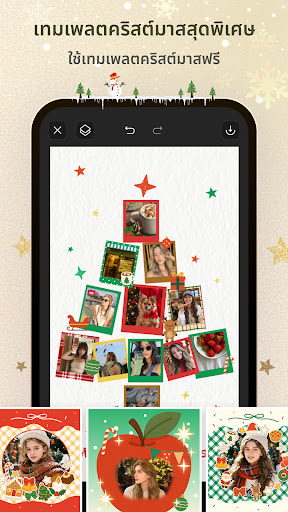
Licowa – แอปแต่งรูป AI ฟรี 100% และไม่มีโฆษณา
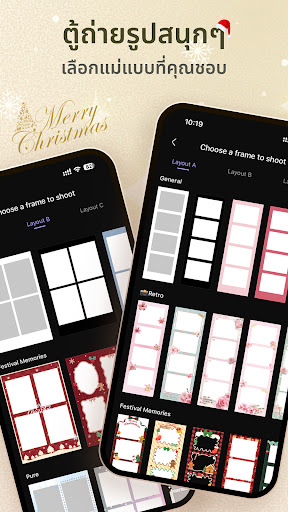
ตู้ถ่ายรูปสนุก • เก็บภาพความสนุก เก็บความทรงจำกับเพื่อนให้สวยงาม.
เทมเพลตสวยๆ นับพันแบบ • แตะเดียวเปลี่ยนเป็นวอลเปเปอร์มีชีวิตแบบของคุณ!
Licowa – The AI Photo Editor That’s 100% FREE and Ad-Free
Fun Photo Booth – Freeze the Fun, Beautify the Memories with Friends
Thousands of eye-catching templates – just one tap to design your unique live wallpaper!
Why Do Users Love Licowa?
Fun Photo Booth
New idol stickers are here! Snap cute photo booth pics with your favorite idols!
- With a single tap, captures four consecutive photos and instantly creates a classic photo collage.
- Get thousands of free templates, stickers, and filters to effortlessly enhance those precious memories captured with friends.
DIY Live Wallpaper Master
- Enjoy thousands of amazing effects, stickers, frames, backgrounds, grids, and layouts — completely free!
- Turn photos/art into 8K dynamic wallpapers in seconds.
- All Free- Takes your phone personalization to the next level!
New AI Editing Suite
- AI Object Removal: Erase unwanted elements with a brush → Pure visuals, zero distractions!
- One-Tap AI Cutout: Precision in milliseconds → Seamless collages & stickers!
- AI Style Transfer: Transform photos into Disney/Pixar art, clay animation & more!
- AI Image Enhancer: Boost clarity, fix colors → Outshine raw shots instantly!
- AI Portrait Perfection: Auto-brighten skin, enhance facial features → Natural beauty, zero effort!
Create Collages, Cards & More in One App!
Whether you want to make a freestyle collage, a photo dump, or a greeting card, Licowa has you covered:
- Freestyle Collages: Arrange photos, stickers, and text however you like.
- Quick Cards: Create birthday, holiday, and thank-you cards with ease.
- Photo Collections: Showcase your favorite memories in stylish layouts.
Edit Photos & Videos
Enhance your photos and videos with powerful editing tools:
- Background Removal: Use AI to remove backgrounds with a single tap.
- Filters & Effects: Apply filters to match any mood—vintage, portrait, food, and more.
- Video Collages: Combine photos and videos to create dynamic slideshows.
Tiktok &Instagram Story & Reel Templates
Stand out on social media with templates designed specifically for Instagram or Tiktok:
- Create stunning stories and reels to share with your followers.
- Add animations, text, and stickers to make your posts unforgettable.
⭐ Ready-to-Use Templates & Layouts
Get inspired by a wide variety of pre-designed templates:
- Grids & Frames: Organize photos neatly with customizable grids and frames.
- Animated Templates: Add motion to your designs for eye-catching results.
- AI Highlight Detection: Automatically keep the focus on the best parts of your photos.
Personalize with Text
Add text to your collages with customizable options:
- Choose from a variety of fonts, from casual to formal.
- Use the Curved Text Editor to create circular or arched text.
Add Stickers & Backgrounds
Make your designs pop with exclusive stickers and backgrounds:
- Collaborations with artists bring you fresh and trendy designs.
- Thousands of stickers and patterns are available for every occasion.
- Use doodles to enhance your collages with fun, creative sketches.
Celebrate every moment, express your creativity, and share your story with Licowa!
More Information:
Privacy Policy:
https://resource.collagemagician.com/PrivacyPolicy.html
User Agreement:
https://resource.collagemagician.com/UserPolicy.html
Follow Us:
Tiktok:@licowa.app
INS:@licowa.app
แสดงเพิ่มเติม

1. ดาวน์โหลดตัวติดตั้ง MEmu และสิ้นสุดการติดตั้ง

2. เริ่ม MEmu จากนั้นเปิด Google Play บนหน้าแรก

3. ค้นหา Licowa -Photobooth & Wallpaper ใน Google Play
Install
4. ดาวน์โหลดและติดตั้ง Licowa -Photobooth & Wallpaper
5. เมื่อติดตั้งเสร็จให้คลิกที่ไอคอนเพื่อเริ่มใช้งาน

6. ใช้ MEmu เพื่อสัมผัสประสบการณ์ Licowa -Photobooth & Wallpaper บนคอมพิวเตอร์ของคุณ
MEmu Play คือโปรแกรมจำลอง Android ที่ดีที่สุด มีผู้ใช้มากกว่า 50 ล้านคน มอบประสบการณ์การใช้งานแอป Android ขั้นสุดยอดให้กับคุณ เทคโนโลยีจำลองเสมือนของ MEmu ช่วยให้คุณรันแอป Android หลายพันแอปบนคอมพิวเตอร์ได้อย่างราบรื่น แม้แอปที่กินทรัพยากรเครื่องสูงที่สุด
จอใหญ่และกราฟฟิกสวยกว่า; เล่นได้นาน, ไม่ต้องใช้แบตเตอรี่โทรศัพท์หรือเน็ตโทรศัพท์.
ระบบปรับแต่งปุ่มคีย์บอร์ดและเม้าส์ตามที่คุณเลือก
เล่นมากกว่าหนึ่งเกมบน PC ในเวลาเดียวกันด้วยระบบหลายจอหรือ Multi-Instance manager.
Use Licowa -Photobooth & Wallpaper on PC by following steps: