Line2 - Second Phone Number
อัปเดตเมื่อ
เวอร์ชันปัจจุบัน
5.59
ให้บริการโดย

เมื่อใช้ Line2 - Second Phone Number บนโทรศัพท์ของคุณไม่ต้องกังวลกับการชาร์จไฟมากเกินไปปลดปล่อยตัวคุณเองจากหน้าจอขนาดเล็กและสนุกกับการใช้แอพนี้บนหน้าจอขนาดใหญ่ จากนี้ไปรับประสบการณ์เต็มหน้าจอของแอปพลิเคชันของคุณด้วยคีย์บอร์ดและเมาส์ MEmu มีคุณสมบัติที่น่าแปลกใจที่คุณคาดหวัง: การติดตั้งที่รวดเร็วและการตั้งค่าที่ง่ายควบคุมได้ง่ายไม่ จำกัด แบตเตอรี่ข้อมูลมือถือและการโทรที่รบกวน MEmu 9 ใหม่ล่าสุดเป็นตัวเลือกที่ดีที่สุดสำหรับการใช้ Meitu – โปรแกรมแก้ไขภาพแนวธรรมชาติ บนคอมพิวเตอร์ของคุณ ด้วยรหัสการดูดซึมของเราผู้จัดการหลายอินสแตนซ์ทำให้สามารถเปิดบัญชี 2 บัญชีขึ้นไปในเวลาเดียวกันได้ และที่สำคัญที่สุดเอ็นจิ้นจำลองพิเศษของเราสามารถปลดปล่อยศักยภาพของPCของคุณและทำให้ทุกอย่างราบรื่นและสนุกสนาน
แสดงเพิ่มเติม
สัมผัสประสบการณ์สุดยอดการใช้งาน Line2 - Second Phone Number บนพีซีด้วย MEmu Play นี่คือโปรแกรมจำลอง Android ฟรีที่ทรงพลัง ให้คุณใช้งานแอป Android นับพันบนเดสก์ท็อป สนุกกับการเชื่อมต่อกับเพื่อนๆ และขัดเกลาผลงานของคุณอย่างมีประสิทธิภาพยิ่งขึ้น! Line2 is the most affordable, reliable & simple way to set up a second phone number and connect anywhere!

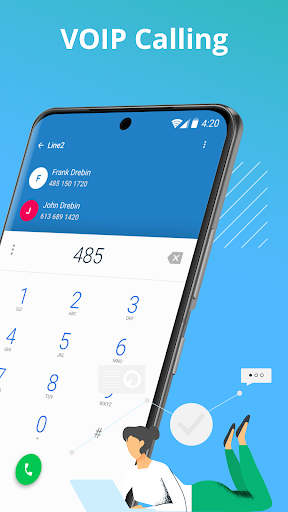
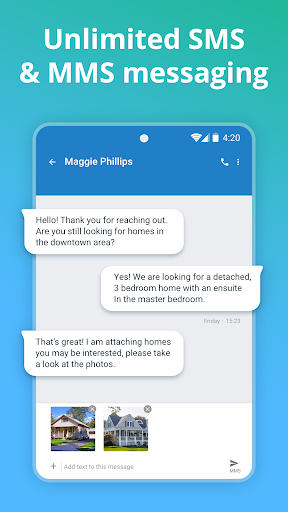
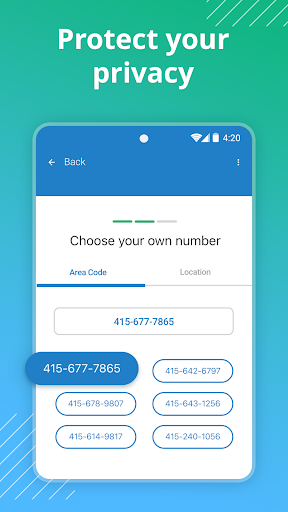
Line2 is the most affordable, reliable & simple way to set up a second phone number and connect anywhere! Get a second line & access unlimited calls, text & voicemail features. It’s time for a better way to communicate - Line2 is your solution.
Your personal phone number should stay personal. Line2 makes it simple to screen and block calls to maintain your privacy with robust features that help you say goodbye to annoying spam calls. Keep your second number safe with Line2’s premier communications system that allows you to receive and make calls worry-free.
Line2 also provides unlimited text and group messaging, making it more than just a calling app. Set up a second texting number and message friends and loved ones wherever you are. Best of all, Line2 offers WiFi texting, so you can receive messages without eating up your mobile data. Line2 is the easiest way to set up local or vanity numbers to stay connected anytime, anywhere.
Line2 is your private and convenient way of making phone calls and sending texts anywhere you may be. Download the simplest texting and calling app today and start connecting.
LINE2 FEATURES
Privacy First
- Call screening to detect if a phone call is spam or not.
- Call blocking means not worrying about unwanted numbers reaching your phone.
- With caller ID you can safely know who is calling you.
Set Up a Second Phone Line
- Manage a second phone number with Line2’s features that make creating one (or many!) easy.
- Create a vanity number, texting number, or second line for all of your communication needs.
- Add multiple phone numbers to your device and receive or make phone calls from anywhere.
Local and Vanity Phone Numbers
- Our phone call app lets you create localized and vanity phone numbers to help you connect.
- Export your existing phone number to Line2 to keep all of your communication in one place.
- Set up a new phone number to connect wherever you are heading next.
Unlimited Text and Call App
- Save on expensive cellular data plans and enjoy unlimited texting and calling on Line2.
- Unlimited VoIP call and text across the United States and Canada.
- Make phone calls and send text messages between other Line2 calling app users completely free.
No Cellular Data Needed
- VoIP technology lets you make and receive calls and texts from anywhere, at any time.
- Say goodbye to cellular data expenses with Line2’s wifi calls.
- Enjoy WiFi texting and never worry about extra SMS and MMS costs again.
Calling App That Does More
- Access your Line2 voicemail, phone number and contacts from your smartphone, tablet or computer.
- Call recording lets you record calls automatically to help keep track of important conversations.
- Use call forwarding so you never miss a call.
- Group messaging and private texting are at your fingertips with Line2.
Get unlimited texting and calling with Line2 when you sign up for one of our plans.
Questions? We’re here to help at http://help.line2.com or tap Settings -> Help from within the app.
Note: Your cellular provider may prohibit or restrict VoIP (Voice over Internet Protocol) on their network. It’s your responsibility to check with your cellular provider about their VoIP functionality, and any additional charges it may incur. Line2 is not responsible for any additional cellular charges that may occur as a result of using the Line2 service.
Business/Work users who send SMS/MMS to U.S. numbers must complete a registration process after purchase, as required by U.S. mobile carriers. Business messages sent from unregistered numbers may be subject to non-delivery by mobile carriers. Line2 does not provide refunds or credits due to issues with messaging from unregistered numbers. Please visit https://try.line2.com/10dlc/mobile/faq/.
Privacy Policy: https://www.line2.com/privacy/
แสดงเพิ่มเติม

1. ดาวน์โหลดตัวติดตั้ง MEmu และสิ้นสุดการติดตั้ง

2. เริ่ม MEmu จากนั้นเปิด Google Play บนหน้าแรก

3. ค้นหา Line2 - Second Phone Number ใน Google Play
Install
4. ดาวน์โหลดและติดตั้ง Line2 - Second Phone Number
5. เมื่อติดตั้งเสร็จให้คลิกที่ไอคอนเพื่อเริ่มใช้งาน

6. ใช้ MEmu เพื่อสัมผัสประสบการณ์ Line2 - Second Phone Number บนคอมพิวเตอร์ของคุณ
MEmu Play คือโปรแกรมจำลอง Android ที่ดีที่สุด มีผู้ใช้มากกว่า 50 ล้านคน มอบประสบการณ์การใช้งานแอป Android ขั้นสุดยอดให้กับคุณ เทคโนโลยีจำลองเสมือนของ MEmu ช่วยให้คุณรันแอป Android หลายพันแอปบนคอมพิวเตอร์ได้อย่างราบรื่น แม้แอปที่กินทรัพยากรเครื่องสูงที่สุด
จอใหญ่และกราฟฟิกสวยกว่า; เล่นได้นาน, ไม่ต้องใช้แบตเตอรี่โทรศัพท์หรือเน็ตโทรศัพท์.
ระบบปรับแต่งปุ่มคีย์บอร์ดและเม้าส์ตามที่คุณเลือก
เล่นมากกว่าหนึ่งเกมบน PC ในเวลาเดียวกันด้วยระบบหลายจอหรือ Multi-Instance manager.
Use Line2 - Second Phone Number on PC by following steps: