Mantis Laser Academy
อัปเดตเมื่อ
เวอร์ชันปัจจุบัน
2.8
ให้บริการโดย

เมื่อใช้ Mantis Laser Academy บนโทรศัพท์ของคุณไม่ต้องกังวลกับการชาร์จไฟมากเกินไปปลดปล่อยตัวคุณเองจากหน้าจอขนาดเล็กและสนุกกับการใช้แอพนี้บนหน้าจอขนาดใหญ่ จากนี้ไปรับประสบการณ์เต็มหน้าจอของแอปพลิเคชันของคุณด้วยคีย์บอร์ดและเมาส์ MEmu มีคุณสมบัติที่น่าแปลกใจที่คุณคาดหวัง: การติดตั้งที่รวดเร็วและการตั้งค่าที่ง่ายควบคุมได้ง่ายไม่ จำกัด แบตเตอรี่ข้อมูลมือถือและการโทรที่รบกวน MEmu 9 ใหม่ล่าสุดเป็นตัวเลือกที่ดีที่สุดสำหรับการใช้ Meitu – โปรแกรมแก้ไขภาพแนวธรรมชาติ บนคอมพิวเตอร์ของคุณ ด้วยรหัสการดูดซึมของเราผู้จัดการหลายอินสแตนซ์ทำให้สามารถเปิดบัญชี 2 บัญชีขึ้นไปในเวลาเดียวกันได้ และที่สำคัญที่สุดเอ็นจิ้นจำลองพิเศษของเราสามารถปลดปล่อยศักยภาพของPCของคุณและทำให้ทุกอย่างราบรื่นและสนุกสนาน
แสดงเพิ่มเติม
ดาวน์โหลด Mantis Laser Academy บน PC ด้วย MEmu Android Emulator สนุกกับการเล่นบนหน้าจอขนาดใหญ่ TRAIN SMARTER:.
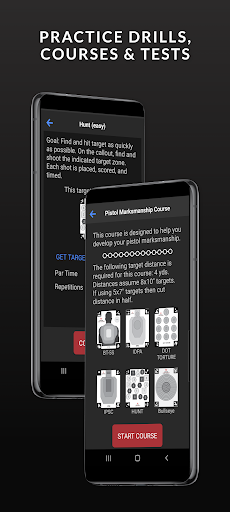
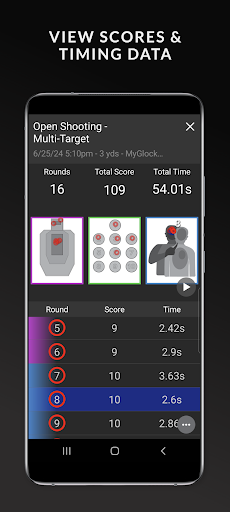
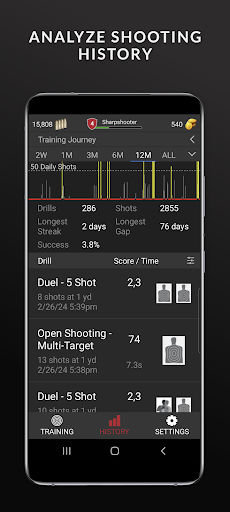
TRAIN SMARTER:
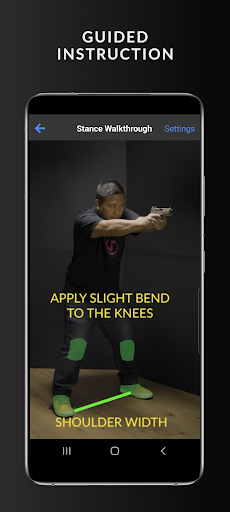
Mantis Laser Academy is a dry-fire laser training system, built around smart targets that support automatic hit detection, scoring, and shot time in the Laser Academy app from data provided by the camera on your smartphone.
TRAIN AT HOME:
Mantis Laser Academy enables you to set up a dry fire laser range that is powerful, safe, convenient, and very inexpensive. Laser Academy drills are built to enhance your shooting performance, in both marksmanship and speed. Test your skills against your friends using dueling drills that allow you to shoot side by side.
KEY FEATURES:
• Automatic target detection
• Automatic shot detection
• Automatic scoring
• Marksmanship, speed, and reaction time drills
• Shooter-to-shooter dueling drills
• Save to history
WHAT YOU NEED:
• The Mantis Laser Academy app, available for free from the app store.
• Smart Targets, which you can purchase or download for free at Mantisx.com.
• A laser cartridge for your firearm or a laser enabled firearm.
• A tripod with a phone mount.
You can purchase any of these items, or a full training kit, at MantisX.com.
GETTING STARTED:
Once you have your gear, you are ready to train. Before getting started check the training area and all firearms for safety. Ensure any firearms are unloaded and remove live ammunition from the training area.
• Place the smart targets in the desired location. Avoid areas where glare from lights and windows may the affect detection of shots on the targets.
• Place your smartphone on the tripod and point the rear camera at the target(s) you have placed.
• If you are using a laser cartridge, load the laser cartridge into the chamber of your firearm.
• Launch the Mantis Laser Academy app on your phone, select a drill, and proceed to train.
DRILLS and SMART TARGETS:
The Mantis Laser Academy app has a variety of drills focused on different aspects of shooting. Some drills require specific smart targets. Other drills work with any smart target. Several drills support multiple targets and allow local competition between shooters.
Smart targets are automatically detected and scored by Mantis Laser Academy. Using smart targets provides the most enjoyable and valuable training experience. The Control Target allows you to Start, Stop, Clear, and Close in the app by shooting specific regions on the Control Target.
Mantis Laser Academy has a selection of free drills and a selection of drills that can be purchased or unlocked. If you purchase a Mantis Laser Academy training kit, a Full Access code is included with your kit to unlock all drills in the Laser Academy app. You can also purchase a single drill or Full Access in the app.
Our mission is to help every shooter improve their accuracy and confidence. Mantis Laser Academy is the latest innovation in our next-level shooting systems designed to help you achieve a higher level of proficiency.
Train smarter, train better, train with Mantis.
แสดงเพิ่มเติม

1. ดาวน์โหลดตัวติดตั้ง MEmu และสิ้นสุดการติดตั้ง

2. เริ่ม MEmu จากนั้นเปิด Google Play บนหน้าแรก

3. ค้นหา Mantis Laser Academy ใน Google Play
Install
4. ดาวน์โหลดและติดตั้ง Mantis Laser Academy
5. เมื่อติดตั้งเสร็จให้คลิกที่ไอคอนเพื่อเริ่มใช้งาน

6. ใช้ MEmu เพื่อสัมผัสประสบการณ์ Mantis Laser Academy บนคอมพิวเตอร์ของคุณ
MEmu Play คือโปรแกรมจำลอง Android ที่ดีที่สุด มีผู้ใช้มากกว่า 50 ล้านคน มอบประสบการณ์การใช้งานแอป Android ขั้นสุดยอดให้กับคุณ เทคโนโลยีจำลองเสมือนของ MEmu ช่วยให้คุณรันแอป Android หลายพันแอปบนคอมพิวเตอร์ได้อย่างราบรื่น แม้แอปที่กินทรัพยากรเครื่องสูงที่สุด
จอใหญ่และกราฟฟิกสวยกว่า; เล่นได้นาน, ไม่ต้องใช้แบตเตอรี่โทรศัพท์หรือเน็ตโทรศัพท์.
ระบบปรับแต่งปุ่มคีย์บอร์ดและเม้าส์ตามที่คุณเลือก
เล่นมากกว่าหนึ่งเกมบน PC ในเวลาเดียวกันด้วยระบบหลายจอหรือ Multi-Instance manager.
Use Mantis Laser Academy on PC by following steps: