My Tide Times - Tables & Chart
อัปเดตเมื่อ
เวอร์ชันปัจจุบัน
6.9.4
ให้บริการโดย

เมื่อใช้ My Tide Times - Tables & Chart บนโทรศัพท์ของคุณไม่ต้องกังวลกับการชาร์จไฟมากเกินไปปลดปล่อยตัวคุณเองจากหน้าจอขนาดเล็กและสนุกกับการใช้แอพนี้บนหน้าจอขนาดใหญ่ จากนี้ไปรับประสบการณ์เต็มหน้าจอของแอปพลิเคชันของคุณด้วยคีย์บอร์ดและเมาส์ MEmu มีคุณสมบัติที่น่าแปลกใจที่คุณคาดหวัง: การติดตั้งที่รวดเร็วและการตั้งค่าที่ง่ายควบคุมได้ง่ายไม่ จำกัด แบตเตอรี่ข้อมูลมือถือและการโทรที่รบกวน MEmu 9 ใหม่ล่าสุดเป็นตัวเลือกที่ดีที่สุดสำหรับการใช้ Meitu – โปรแกรมแก้ไขภาพแนวธรรมชาติ บนคอมพิวเตอร์ของคุณ ด้วยรหัสการดูดซึมของเราผู้จัดการหลายอินสแตนซ์ทำให้สามารถเปิดบัญชี 2 บัญชีขึ้นไปในเวลาเดียวกันได้ และที่สำคัญที่สุดเอ็นจิ้นจำลองพิเศษของเราสามารถปลดปล่อยศักยภาพของPCของคุณและทำให้ทุกอย่างราบรื่นและสนุกสนาน
แสดงเพิ่มเติม
ดาวน์โหลด My Tide Times - Tables & Chart บน PC ด้วย MEmu Android Emulator สนุกกับการเล่นบนหน้าจอขนาดใหญ่ My Tide Times is the only tide tables and forecasts application you'll ever need.
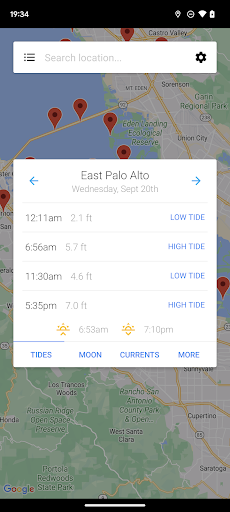
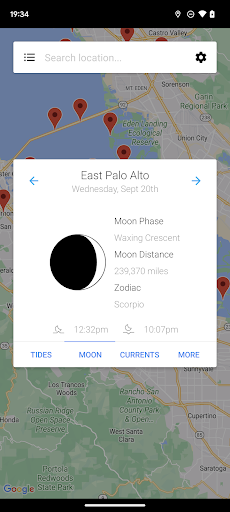
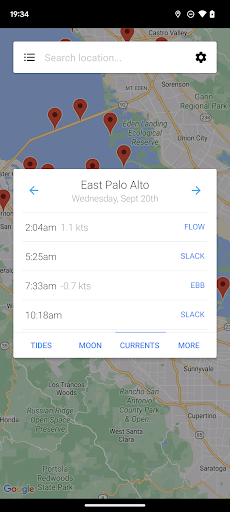
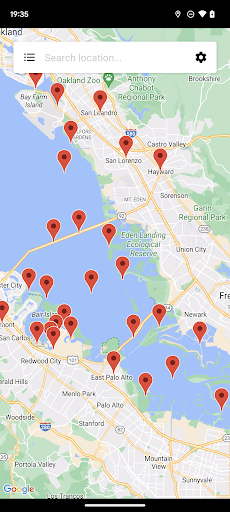
My Tide Times is the only tide tables and forecasts application you'll ever need. Whether you're surfing, fishing or just going to the beach you'll be able to use it to get quick and easy access to the tides. We think it's the most beautiful tide times application on the market to date.
FEATURES
- Supports over 9,000 tidal stations in over 30 countries (including the US, Canada, Brazil, UK, Spain, France, Germany, Italy, Australia and New Zealand)!
- Find the nearest locations to you when the app opens, so you can get tide times no matter where you are!
- Never have to worry about ensuring the data is up-to-date because the app takes care of that for you!
- See 5 to 7 day forecasts for all locations (locations outside of the UK even have up to 30-day charts!)
- View the moon phase, moonrise and moonset times!
- See predictions for the currents (the slacks, ebbs and flows for each day) at selected locations around the US! Just try to view tide times as you normally would, if there's a currents station nearby you'll see an extra tab for "Currents".
- Basic wind speed information for all tidal locations!
- When information has been downloaded it is stored on the phone so you can view it without an internet connection!
- It offers a clean interface that you just won't get from other apps!
If you're in need of tide tables, charts, forecasts or times, don't go elsewhere - you can install My Tide Times today. This version is ad-supported.
แสดงเพิ่มเติม

1. ดาวน์โหลดตัวติดตั้ง MEmu และสิ้นสุดการติดตั้ง

2. เริ่ม MEmu จากนั้นเปิด Google Play บนหน้าแรก

3. ค้นหา My Tide Times - Tables & Chart ใน Google Play
Install
4. ดาวน์โหลดและติดตั้ง My Tide Times - Tables & Chart
5. เมื่อติดตั้งเสร็จให้คลิกที่ไอคอนเพื่อเริ่มใช้งาน

6. ใช้ MEmu เพื่อสัมผัสประสบการณ์ My Tide Times - Tables & Chart บนคอมพิวเตอร์ของคุณ
MEmu Play คือโปรแกรมจำลอง Android ที่ดีที่สุด มีผู้ใช้มากกว่า 50 ล้านคน มอบประสบการณ์การใช้งานแอป Android ขั้นสุดยอดให้กับคุณ เทคโนโลยีจำลองเสมือนของ MEmu ช่วยให้คุณรันแอป Android หลายพันแอปบนคอมพิวเตอร์ได้อย่างราบรื่น แม้แอปที่กินทรัพยากรเครื่องสูงที่สุด
จอใหญ่และกราฟฟิกสวยกว่า; เล่นได้นาน, ไม่ต้องใช้แบตเตอรี่โทรศัพท์หรือเน็ตโทรศัพท์.
ระบบปรับแต่งปุ่มคีย์บอร์ดและเม้าส์ตามที่คุณเลือก
เล่นมากกว่าหนึ่งเกมบน PC ในเวลาเดียวกันด้วยระบบหลายจอหรือ Multi-Instance manager.
Use My Tide Times - Tables & Chart on PC by following steps: