Phone Dialer
อัปเดตเมื่อ
เวอร์ชันปัจจุบัน
0.67
ให้บริการโดย

เมื่อใช้ Phone Dialer บนโทรศัพท์ของคุณไม่ต้องกังวลกับการชาร์จไฟมากเกินไปปลดปล่อยตัวคุณเองจากหน้าจอขนาดเล็กและสนุกกับการใช้แอพนี้บนหน้าจอขนาดใหญ่ จากนี้ไปรับประสบการณ์เต็มหน้าจอของแอปพลิเคชันของคุณด้วยคีย์บอร์ดและเมาส์ MEmu มีคุณสมบัติที่น่าแปลกใจที่คุณคาดหวัง: การติดตั้งที่รวดเร็วและการตั้งค่าที่ง่ายควบคุมได้ง่ายไม่ จำกัด แบตเตอรี่ข้อมูลมือถือและการโทรที่รบกวน MEmu 9 ใหม่ล่าสุดเป็นตัวเลือกที่ดีที่สุดสำหรับการใช้ Meitu – โปรแกรมแก้ไขภาพแนวธรรมชาติ บนคอมพิวเตอร์ของคุณ ด้วยรหัสการดูดซึมของเราผู้จัดการหลายอินสแตนซ์ทำให้สามารถเปิดบัญชี 2 บัญชีขึ้นไปในเวลาเดียวกันได้ และที่สำคัญที่สุดเอ็นจิ้นจำลองพิเศษของเราสามารถปลดปล่อยศักยภาพของPCของคุณและทำให้ทุกอย่างราบรื่นและสนุกสนาน
แสดงเพิ่มเติม
ดาวน์โหลด Phone Dialer บน PC ด้วย MEmu Android Emulator สนุกกับการเล่นบนหน้าจอขนาดใหญ่ Talk is an Android app designed to redefine your calling experience with a refreshing, user-centric approach.
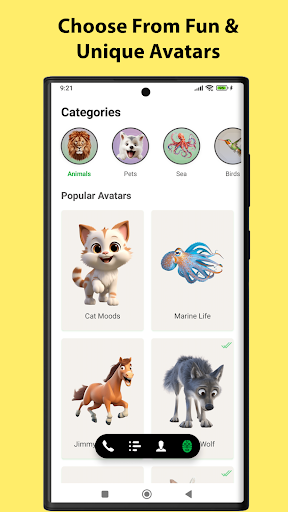
Talk is an Android app designed to redefine your calling experience with a refreshing, user-centric approach. Already trusted by over 2.5 million users, Talk combines simplicity, creativity, and powerful features to make every call enjoyable and efficient.
Effortless Spam Blocking & DND Enrollment
Say goodbye to spam calls! Talk simplifies spam reporting with a single touch, seamlessly integrating with TRAI’s streamlined complaint process. Enroll in Do Not Disturb (DND) service and block spam effortlessly.
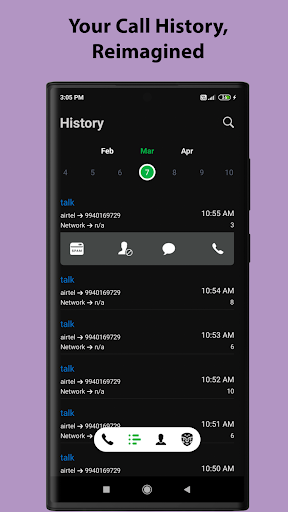
Smart Call History & Insights
Relive past conversations with a sleek calendar-based call history. View call details, including network strength, to make data-backed decisions about your network quality.
Multilingual Contact Indexing
Never struggle to find contacts saved in various languages! Talk supports Kannada, Tamil, Telugu, Hindi, and more, offering precise contact search and organization for everyone.
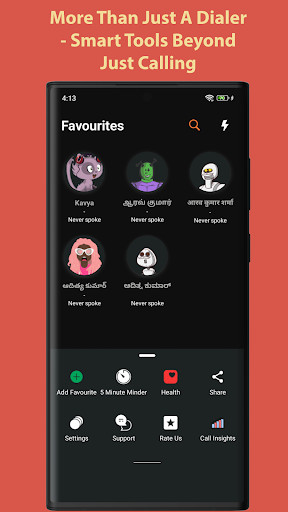
⭐ Intelligent Favorites & Reminders
Let Talk intelligently identify your most-called contacts and display them right on your home screen. Stay connected with reminders when you haven’t spoken to your favorite people in a while.
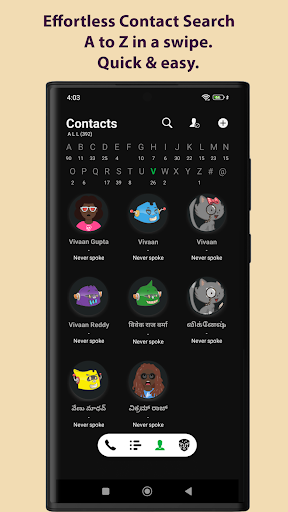
Organized Contacts
Navigate your contact list like never before. With an alphabetical scroll and contact count display, managing your network feels effortless and intuitive.
Avatars for Fun Interactions
Add a playful touch to your calls with charming avatars! Experience a delightful and colorful interface every time you receive or make a call.Make calling personal! Choose from vibrant avatar packs like animals, pets, moods, and more for your call screen.
Talk is designed to make your calling experience better, simpler, and more enjoyable. Whether you’re tired of spam calls, struggling with multilingual contacts, or just looking for a dialer that understands you, Talk is here to help.
Download Talk today and join millions who’ve transformed the way they connect!
แสดงเพิ่มเติม

1. ดาวน์โหลดตัวติดตั้ง MEmu และสิ้นสุดการติดตั้ง

2. เริ่ม MEmu จากนั้นเปิด Google Play บนหน้าแรก

3. ค้นหา Phone Dialer ใน Google Play
Install
4. ดาวน์โหลดและติดตั้ง Phone Dialer
5. เมื่อติดตั้งเสร็จให้คลิกที่ไอคอนเพื่อเริ่มใช้งาน

6. ใช้ MEmu เพื่อสัมผัสประสบการณ์ Phone Dialer บนคอมพิวเตอร์ของคุณ
MEmu Play คือโปรแกรมจำลอง Android ที่ดีที่สุด มีผู้ใช้มากกว่า 50 ล้านคน มอบประสบการณ์การใช้งานแอป Android ขั้นสุดยอดให้กับคุณ เทคโนโลยีจำลองเสมือนของ MEmu ช่วยให้คุณรันแอป Android หลายพันแอปบนคอมพิวเตอร์ได้อย่างราบรื่น แม้แอปที่กินทรัพยากรเครื่องสูงที่สุด
จอใหญ่และกราฟฟิกสวยกว่า; เล่นได้นาน, ไม่ต้องใช้แบตเตอรี่โทรศัพท์หรือเน็ตโทรศัพท์.
ระบบปรับแต่งปุ่มคีย์บอร์ดและเม้าส์ตามที่คุณเลือก
เล่นมากกว่าหนึ่งเกมบน PC ในเวลาเดียวกันด้วยระบบหลายจอหรือ Multi-Instance manager.
Use Phone Dialer on PC by following steps: