Price Comparison- MySmartPrice
อัปเดตเมื่อ
เวอร์ชันปัจจุบัน
v6.0.3
ให้บริการโดย

เมื่อใช้ Price Comparison- MySmartPrice บนโทรศัพท์ของคุณไม่ต้องกังวลกับการชาร์จไฟมากเกินไปปลดปล่อยตัวคุณเองจากหน้าจอขนาดเล็กและสนุกกับการใช้แอพนี้บนหน้าจอขนาดใหญ่ จากนี้ไปรับประสบการณ์เต็มหน้าจอของแอปพลิเคชันของคุณด้วยคีย์บอร์ดและเมาส์ MEmu มีคุณสมบัติที่น่าแปลกใจที่คุณคาดหวัง: การติดตั้งที่รวดเร็วและการตั้งค่าที่ง่ายควบคุมได้ง่ายไม่ จำกัด แบตเตอรี่ข้อมูลมือถือและการโทรที่รบกวน MEmu 9 ใหม่ล่าสุดเป็นตัวเลือกที่ดีที่สุดสำหรับการใช้ Meitu – โปรแกรมแก้ไขภาพแนวธรรมชาติ บนคอมพิวเตอร์ของคุณ ด้วยรหัสการดูดซึมของเราผู้จัดการหลายอินสแตนซ์ทำให้สามารถเปิดบัญชี 2 บัญชีขึ้นไปในเวลาเดียวกันได้ และที่สำคัญที่สุดเอ็นจิ้นจำลองพิเศษของเราสามารถปลดปล่อยศักยภาพของPCของคุณและทำให้ทุกอย่างราบรื่นและสนุกสนาน
แสดงเพิ่มเติม
ดาวน์โหลด Price Comparison- MySmartPrice บน PC ด้วย MEmu Android Emulator สนุกกับการเล่นบนหน้าจอขนาดใหญ่ Discover the perfect mobile phone with our app!
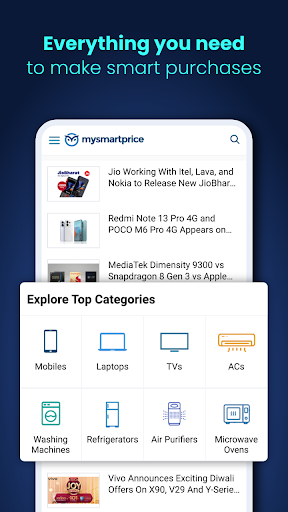
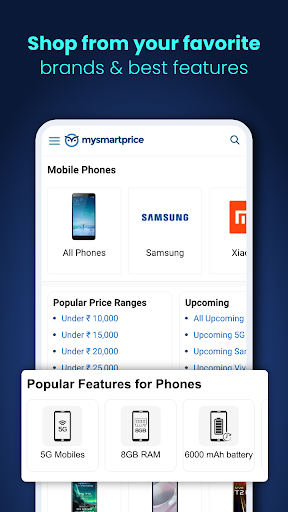
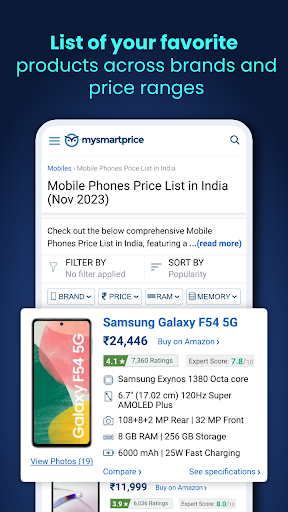
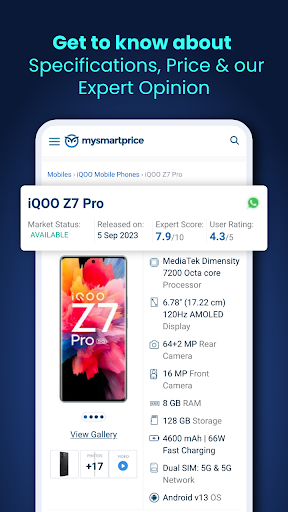
Discover the perfect mobile phone with our app! Compare prices and read reviews on the latest smartphones. Make informed choices and get the best deals on mobile devices today.
MySmartPrice.com is a gadget research destination where we help users find the best products at the best price for product categories like mobiles, laptops, electronics, TVs, home appliances, audio products, etc.
Here's what you will find when you shop online from MySmartPrice:
News:
We cover all the important news, new launches, and live videos so that our readers and users can stay updated with all the happenings in the gadget world. Check out our News section.
Reviews and Expert Score:
Our mobile experts review every mobile and score it on the following parameters – Design and display, Camera, Performance, Battery life, and Value for money. Based on this we derive the Expert Score, which will help you select a phone when you are not sure.
Price Comparison:
We get prices from all the top online retailers like Amazon, Flipkart, Tatacliq, etc., and show them together along with offers and coupons so that you can find the best price for the product you are looking for. Prices are updated every few minutes and are highly accurate.
Best Lists:
Our experts test and review mobiles and other gadgets and create the Best Lists for various requirements. You can find the best and top–rated products for your requirements here.
Videos:
We shoot product videos in Hindi and English for our users. Check out our YouTube channel.
Upcoming Products:
We constantly try to find out about upcoming products. For many of these, we break the info on the Internet. Usually, we are the first ones to cover these. Check out the leaks for upcoming devices covered by us.
Usage of AccessibilityService API:
This helps us to show users the latest prices of the products listed on our platform. AccessibilityService API reads & allows us to fetch the price from the e-commerce & brand apps in the user's device so that they compare prices and can make informed decisions.
แสดงเพิ่มเติม

1. ดาวน์โหลดตัวติดตั้ง MEmu และสิ้นสุดการติดตั้ง

2. เริ่ม MEmu จากนั้นเปิด Google Play บนหน้าแรก

3. ค้นหา Price Comparison- MySmartPrice ใน Google Play
Install
4. ดาวน์โหลดและติดตั้ง Price Comparison- MySmartPrice
5. เมื่อติดตั้งเสร็จให้คลิกที่ไอคอนเพื่อเริ่มใช้งาน

6. ใช้ MEmu เพื่อสัมผัสประสบการณ์ Price Comparison- MySmartPrice บนคอมพิวเตอร์ของคุณ
MEmu Play คือโปรแกรมจำลอง Android ที่ดีที่สุด มีผู้ใช้มากกว่า 50 ล้านคน มอบประสบการณ์การใช้งานแอป Android ขั้นสุดยอดให้กับคุณ เทคโนโลยีจำลองเสมือนของ MEmu ช่วยให้คุณรันแอป Android หลายพันแอปบนคอมพิวเตอร์ได้อย่างราบรื่น แม้แอปที่กินทรัพยากรเครื่องสูงที่สุด
จอใหญ่และกราฟฟิกสวยกว่า; เล่นได้นาน, ไม่ต้องใช้แบตเตอรี่โทรศัพท์หรือเน็ตโทรศัพท์.
ระบบปรับแต่งปุ่มคีย์บอร์ดและเม้าส์ตามที่คุณเลือก
เล่นมากกว่าหนึ่งเกมบน PC ในเวลาเดียวกันด้วยระบบหลายจอหรือ Multi-Instance manager.
Use Price Comparison- MySmartPrice on PC by following steps: