Storm Team 8- WOOD TV8 Weather
อัปเดตเมื่อ
เวอร์ชันปัจจุบัน
6.7.1.600000002
ให้บริการโดย

เมื่อใช้ Storm Team 8- WOOD TV8 Weather บนโทรศัพท์ของคุณไม่ต้องกังวลกับการชาร์จไฟมากเกินไปปลดปล่อยตัวคุณเองจากหน้าจอขนาดเล็กและสนุกกับการใช้แอพนี้บนหน้าจอขนาดใหญ่ จากนี้ไปรับประสบการณ์เต็มหน้าจอของแอปพลิเคชันของคุณด้วยคีย์บอร์ดและเมาส์ MEmu มีคุณสมบัติที่น่าแปลกใจที่คุณคาดหวัง: การติดตั้งที่รวดเร็วและการตั้งค่าที่ง่ายควบคุมได้ง่ายไม่ จำกัด แบตเตอรี่ข้อมูลมือถือและการโทรที่รบกวน MEmu 9 ใหม่ล่าสุดเป็นตัวเลือกที่ดีที่สุดสำหรับการใช้ Meitu – โปรแกรมแก้ไขภาพแนวธรรมชาติ บนคอมพิวเตอร์ของคุณ ด้วยรหัสการดูดซึมของเราผู้จัดการหลายอินสแตนซ์ทำให้สามารถเปิดบัญชี 2 บัญชีขึ้นไปในเวลาเดียวกันได้ และที่สำคัญที่สุดเอ็นจิ้นจำลองพิเศษของเราสามารถปลดปล่อยศักยภาพของPCของคุณและทำให้ทุกอย่างราบรื่นและสนุกสนาน
แสดงเพิ่มเติม
ดาวน์โหลด Storm Team 8- WOOD TV8 Weather บน PC ด้วย MEmu Android Emulator สนุกกับการเล่นบนหน้าจอขนาดใหญ่ Never miss another forecast.
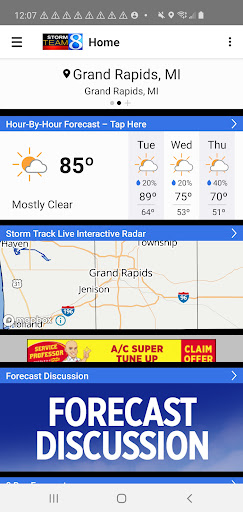
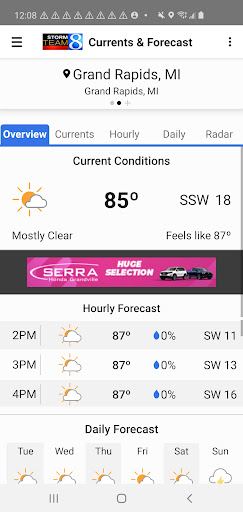
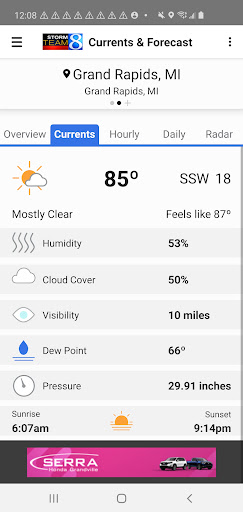
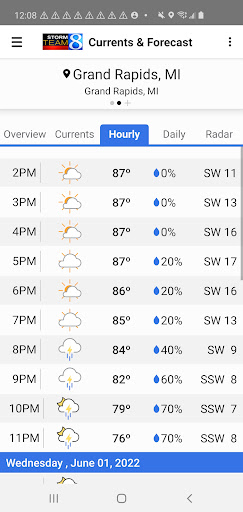
Never miss another forecast. With the Storm Team 8 weather app, our trusted meteorologists bring you the latest, most accurate hour-by-hour, daily and 8-day forecasts for Grand Rapids, West Michigan and beyond — all in the palm of your hand, wherever you go.
This free, local weather app from WOOD TV8 delivers customized, location-based current conditions, radar, severe weather alerts and school closing information. Set up customized weather alerts to keep you and your family safe, even when you travel around the U.S.
Features:
-Current conditions, based on your geographic or preferred location
-Interactive radar that allows you to track inclement weather in West Michigan and beyond
-The daily forecast in text and video form
-Storm Team 8's 8-day forecast
-Customizable severe weather alerts
-School closing and delay information
-Special weather content, including Bill's Blog, Ask Ellen and Watching the Skies
-Power outage updates
-West Michigan webcams
-News 8's livestream for newscasts, weathercasts and breaking news
-Weather headlines from News 8 and more!
แสดงเพิ่มเติม

1. ดาวน์โหลดตัวติดตั้ง MEmu และสิ้นสุดการติดตั้ง

2. เริ่ม MEmu จากนั้นเปิด Google Play บนหน้าแรก

3. ค้นหา Storm Team 8- WOOD TV8 Weather ใน Google Play
Install
4. ดาวน์โหลดและติดตั้ง Storm Team 8- WOOD TV8 Weather
5. เมื่อติดตั้งเสร็จให้คลิกที่ไอคอนเพื่อเริ่มใช้งาน

6. ใช้ MEmu เพื่อสัมผัสประสบการณ์ Storm Team 8- WOOD TV8 Weather บนคอมพิวเตอร์ของคุณ
MEmu Play คือโปรแกรมจำลอง Android ที่ดีที่สุด มีผู้ใช้มากกว่า 50 ล้านคน มอบประสบการณ์การใช้งานแอป Android ขั้นสุดยอดให้กับคุณ เทคโนโลยีจำลองเสมือนของ MEmu ช่วยให้คุณรันแอป Android หลายพันแอปบนคอมพิวเตอร์ได้อย่างราบรื่น แม้แอปที่กินทรัพยากรเครื่องสูงที่สุด
จอใหญ่และกราฟฟิกสวยกว่า; เล่นได้นาน, ไม่ต้องใช้แบตเตอรี่โทรศัพท์หรือเน็ตโทรศัพท์.
ระบบปรับแต่งปุ่มคีย์บอร์ดและเม้าส์ตามที่คุณเลือก
เล่นมากกว่าหนึ่งเกมบน PC ในเวลาเดียวกันด้วยระบบหลายจอหรือ Multi-Instance manager.
Use Storm Team 8- WOOD TV8 Weather on PC by following steps: