TacticalPad Coach's Whiteboard
อัปเดตเมื่อ
เวอร์ชันปัจจุบัน
2024.1.0
ให้บริการโดย

เมื่อใช้ TacticalPad Coach's Whiteboard บนโทรศัพท์ของคุณไม่ต้องกังวลกับการชาร์จไฟมากเกินไปปลดปล่อยตัวคุณเองจากหน้าจอขนาดเล็กและสนุกกับการใช้แอพนี้บนหน้าจอขนาดใหญ่ จากนี้ไปรับประสบการณ์เต็มหน้าจอของแอปพลิเคชันของคุณด้วยคีย์บอร์ดและเมาส์ MEmu มีคุณสมบัติที่น่าแปลกใจที่คุณคาดหวัง: การติดตั้งที่รวดเร็วและการตั้งค่าที่ง่ายควบคุมได้ง่ายไม่ จำกัด แบตเตอรี่ข้อมูลมือถือและการโทรที่รบกวน MEmu 9 ใหม่ล่าสุดเป็นตัวเลือกที่ดีที่สุดสำหรับการใช้ Meitu – โปรแกรมแก้ไขภาพแนวธรรมชาติ บนคอมพิวเตอร์ของคุณ ด้วยรหัสการดูดซึมของเราผู้จัดการหลายอินสแตนซ์ทำให้สามารถเปิดบัญชี 2 บัญชีขึ้นไปในเวลาเดียวกันได้ และที่สำคัญที่สุดเอ็นจิ้นจำลองพิเศษของเราสามารถปลดปล่อยศักยภาพของPCของคุณและทำให้ทุกอย่างราบรื่นและสนุกสนาน
แสดงเพิ่มเติม
ดาวน์โหลด TacticalPad Coach's Whiteboard บน PC ด้วย MEmu Android Emulator สนุกกับการเล่นบนหน้าจอขนาดใหญ่ TacticalPad is the #1 app for drawing and animating drills, lineups, exercises and planning your training sessions.
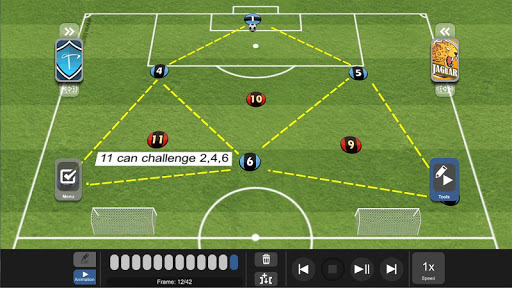
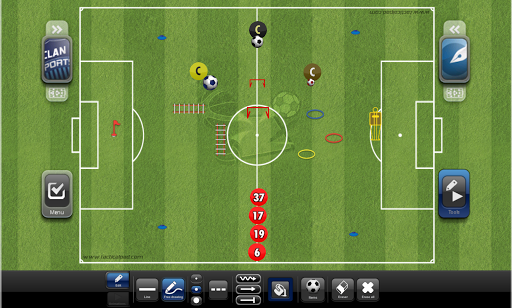
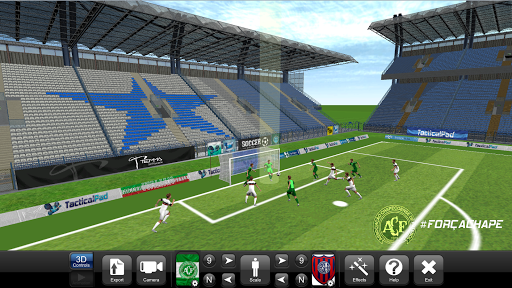
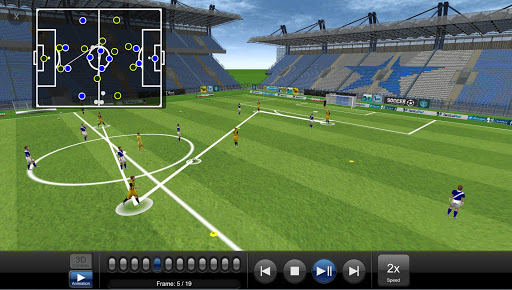
TacticalPad is the #1 app for drawing and animating drills, lineups, exercises and planning your training sessions. It is the most complete tool for coaches, assistant coaches, performance analysts, trainers, journalists and sport enthusiasts.
Easy to use, agile, together with tablets and smartphones mobility, TacticalPad is the best option for football/soccer professionals to improve their communication, resulting in better understanding in tactical discussions and development of football/soccer skills. TacticalPad targets every level, from amateur to professional, from youth development to high level.
TacticalPad is not only used by the technical staff (couch, assistants, observers, etc), but also by journalists, bloggers, teachers and sport enthusiasts. Because of its high quality graphics, it is widely used to generate content for blogs, social networks, lectures, newspapers, etc. It is the most used tool for coaches to share trainning content on social media.
Check below some features and scenarios that make TacticalPad so powerful:
• Projects with multiple tactical boards
• Animated plays
• 3D visualization
• 3D animation with realistic graphics and actions
• Several options for football/soccer pitches (whiteboards templates), including different sports like: GAA, Football (American), Rugby, Lacrosse, Field hockey, Beach Soccer, Volleyball, etc
• High quality and attractive graphics
• Add visual effects to: highlight players; show connection lines; pitch areas; trail movement paths
• Export all created content to:
- Images
- Videos
- Documents with images and notes
- Social networks
- Whatsapp
• Synchronize and share your projects in the cloud (Google Drive, Dropbox, One Drive) with the feature Repositories
• Use the Notepad feature to categorize add description for your drills, tactical analysis, etc. Also supports The FA 4 Corner Model.
• Attach videos from Youtube and Vimeo
• Many document export templates available for you to create your playbook
• Digital ink support:
- Free drawing
- Lines
- Arrows
- Shapes (circle, rectangle, polygons)
- Dashed
- Configurable color and thickness
- Eraser
• Lots of training items
• Add you own custom pitches and items
• Team roster settings with:
- Names
- Number
- Positions
- Lineups
- Pitcures
- Other info
• Teams and players’ appearances:
- Classic button
- Triangle
- Jersey
- Players' pictures
- Custom image
- Colors
- Badge
• Save, load and set your favorite teams
• Use it in the bench, pre-game presentations, training sessions, half time talks, daily chats, home, etc. Use it anytime and anywhere by everyone
• Project to a TV or projector
• There is more, much more. TacticalPad is constantly updated with new features requested by our great community of users and feedback from clubs and federations
แสดงเพิ่มเติม

1. ดาวน์โหลดตัวติดตั้ง MEmu และสิ้นสุดการติดตั้ง

2. เริ่ม MEmu จากนั้นเปิด Google Play บนหน้าแรก

3. ค้นหา TacticalPad Coach's Whiteboard ใน Google Play
Install
4. ดาวน์โหลดและติดตั้ง TacticalPad Coach's Whiteboard
5. เมื่อติดตั้งเสร็จให้คลิกที่ไอคอนเพื่อเริ่มใช้งาน

6. ใช้ MEmu เพื่อสัมผัสประสบการณ์ TacticalPad Coach's Whiteboard บนคอมพิวเตอร์ของคุณ
MEmu Play คือโปรแกรมจำลอง Android ที่ดีที่สุด มีผู้ใช้มากกว่า 50 ล้านคน มอบประสบการณ์การใช้งานแอป Android ขั้นสุดยอดให้กับคุณ เทคโนโลยีจำลองเสมือนของ MEmu ช่วยให้คุณรันแอป Android หลายพันแอปบนคอมพิวเตอร์ได้อย่างราบรื่น แม้แอปที่กินทรัพยากรเครื่องสูงที่สุด
จอใหญ่และกราฟฟิกสวยกว่า; เล่นได้นาน, ไม่ต้องใช้แบตเตอรี่โทรศัพท์หรือเน็ตโทรศัพท์.
ระบบปรับแต่งปุ่มคีย์บอร์ดและเม้าส์ตามที่คุณเลือก
เล่นมากกว่าหนึ่งเกมบน PC ในเวลาเดียวกันด้วยระบบหลายจอหรือ Multi-Instance manager.
Use TacticalPad Coach's Whiteboard on PC by following steps: