
Tallinja - Plan your trip
อัปเดตเมื่อ
เวอร์ชันปัจจุบัน
3.1.7.release
ให้บริการโดย

เมื่อใช้ Tallinja - Plan your trip บนโทรศัพท์ของคุณไม่ต้องกังวลกับการชาร์จไฟมากเกินไปปลดปล่อยตัวคุณเองจากหน้าจอขนาดเล็กและสนุกกับการใช้แอพนี้บนหน้าจอขนาดใหญ่ จากนี้ไปรับประสบการณ์เต็มหน้าจอของแอปพลิเคชันของคุณด้วยคีย์บอร์ดและเมาส์ MEmu มีคุณสมบัติที่น่าแปลกใจที่คุณคาดหวัง: การติดตั้งที่รวดเร็วและการตั้งค่าที่ง่ายควบคุมได้ง่ายไม่ จำกัด แบตเตอรี่ข้อมูลมือถือและการโทรที่รบกวน MEmu 9 ใหม่ล่าสุดเป็นตัวเลือกที่ดีที่สุดสำหรับการใช้ Meitu – โปรแกรมแก้ไขภาพแนวธรรมชาติ บนคอมพิวเตอร์ของคุณ ด้วยรหัสการดูดซึมของเราผู้จัดการหลายอินสแตนซ์ทำให้สามารถเปิดบัญชี 2 บัญชีขึ้นไปในเวลาเดียวกันได้ และที่สำคัญที่สุดเอ็นจิ้นจำลองพิเศษของเราสามารถปลดปล่อยศักยภาพของPCของคุณและทำให้ทุกอย่างราบรื่นและสนุกสนาน
แสดงเพิ่มเติม
ดาวน์โหลด Tallinja - Plan your trip บน PC ด้วย MEmu Android Emulator สนุกกับการเล่นบนหน้าจอขนาดใหญ่ Download the Tallinja App to upgrade your experience of the public transport service in Malta.
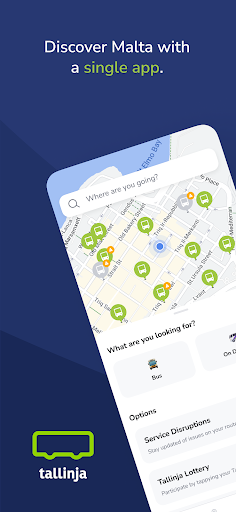
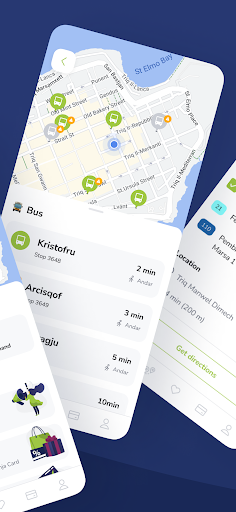
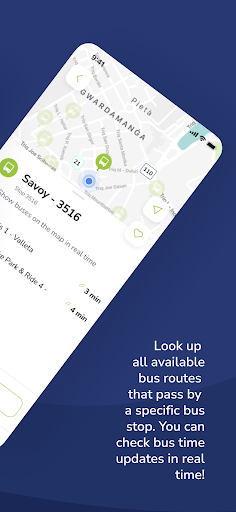
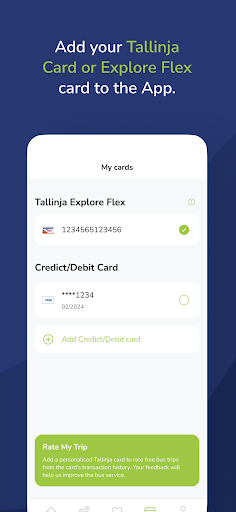
Download the Tallinja App to upgrade your experience of the public transport service in Malta.
Welcome to the Tallinja App. With the Tallinja App, you will enjoy all the benefits of Malta Public Transport by travelling more affordably and sustainably.
The Tallinja App has many functions that will make your day-to-day journeys easier while combining all transport services offered by Malta Public Transport:
Real-time information: Locate your nearest bus stop on the map and check all available bus routes to your chosen destination. Real-time information can be accessed by tapping on your nearest bus stop.
Real-time bus tracking: Follow your bus in real-time while you are waiting at the bus stop. Once you tap on your nearest bus stop, choose “Show buses on the map in real-time” to locate on the map the bus you are waiting for.
My Cards: In this section, you can add, manage, and keep track of several payment methods. Additionally, you can connect your personalised Tallinja Card or Flex Card with the Tallinja App. This will enable you to view your transaction history, pay for any Tallinja On Demand bookings, and check for any new travel offers.
The Journey Planner: Plan your bus trips by choosing your departure location and your destination. The journey planner will suggest various bus routes for you to choose from.
On Demand: Tallinja On Demand is a public transport on-demand service. In this section, you can book a seat on one of our premium buses. Simply choose from which bus stop you would like to be picked up and from which bus stop you would like to be dropped off.
Airport Shuttle: Malta Transfer is an official shuttle service of Malta International Airport. You can book your transport from the airport to various hotels in Malta and back through the Tallinja App. Malta Transfer extends its services to the cruise liner terminal in Valletta.
Favourites: Create your favourites list by clicking on the heart icon on the map view, including your most visited destinations or the bus stops or bus routes you use regularly.
Service Update: Check the map for caution signs that indicate alerts or service disruptions. Simply click on the alert tag to access detailed information about the service update. This feature ensures that you are aware of any changes that may affect your journey. Also, you can receive push notifications on service alerts happening on your saved favourite routes and bus stops. This way, you can plan your trips more effectively and stay up-to-date with any disruptions on your preferred routes.
Do you have any questions? Feel free to contact our customer care through email at enquiries@publictransport.com.mt or by sending a private message on the Tallinja Facebook page.
The Tallinja App is powered by Meep (www.meep.app).
แสดงเพิ่มเติม

1. ดาวน์โหลดตัวติดตั้ง MEmu และสิ้นสุดการติดตั้ง

2. เริ่ม MEmu จากนั้นเปิด Google Play บนหน้าแรก

3. ค้นหา Tallinja - Plan your trip ใน Google Play
Install
4. ดาวน์โหลดและติดตั้ง Tallinja - Plan your trip
5. เมื่อติดตั้งเสร็จให้คลิกที่ไอคอนเพื่อเริ่มใช้งาน

6. ใช้ MEmu เพื่อสัมผัสประสบการณ์ Tallinja - Plan your trip บนคอมพิวเตอร์ของคุณ
MEmu Play คือโปรแกรมจำลอง Android ที่ดีที่สุด มีผู้ใช้มากกว่า 50 ล้านคน มอบประสบการณ์การใช้งานแอป Android ขั้นสุดยอดให้กับคุณ เทคโนโลยีจำลองเสมือนของ MEmu ช่วยให้คุณรันแอป Android หลายพันแอปบนคอมพิวเตอร์ได้อย่างราบรื่น แม้แอปที่กินทรัพยากรเครื่องสูงที่สุด
จอใหญ่และกราฟฟิกสวยกว่า; เล่นได้นาน, ไม่ต้องใช้แบตเตอรี่โทรศัพท์หรือเน็ตโทรศัพท์.
ระบบปรับแต่งปุ่มคีย์บอร์ดและเม้าส์ตามที่คุณเลือก
เล่นมากกว่าหนึ่งเกมบน PC ในเวลาเดียวกันด้วยระบบหลายจอหรือ Multi-Instance manager.
Use Tallinja - Plan your trip on PC by following steps: