Temperature Today: Weather App
อัปเดตเมื่อ
เวอร์ชันปัจจุบัน
1.1.6
ให้บริการโดย

เมื่อใช้ Temperature Today: Weather App บนโทรศัพท์ของคุณไม่ต้องกังวลกับการชาร์จไฟมากเกินไปปลดปล่อยตัวคุณเองจากหน้าจอขนาดเล็กและสนุกกับการใช้แอพนี้บนหน้าจอขนาดใหญ่ จากนี้ไปรับประสบการณ์เต็มหน้าจอของแอปพลิเคชันของคุณด้วยคีย์บอร์ดและเมาส์ MEmu มีคุณสมบัติที่น่าแปลกใจที่คุณคาดหวัง: การติดตั้งที่รวดเร็วและการตั้งค่าที่ง่ายควบคุมได้ง่ายไม่ จำกัด แบตเตอรี่ข้อมูลมือถือและการโทรที่รบกวน MEmu 9 ใหม่ล่าสุดเป็นตัวเลือกที่ดีที่สุดสำหรับการใช้ Meitu – โปรแกรมแก้ไขภาพแนวธรรมชาติ บนคอมพิวเตอร์ของคุณ ด้วยรหัสการดูดซึมของเราผู้จัดการหลายอินสแตนซ์ทำให้สามารถเปิดบัญชี 2 บัญชีขึ้นไปในเวลาเดียวกันได้ และที่สำคัญที่สุดเอ็นจิ้นจำลองพิเศษของเราสามารถปลดปล่อยศักยภาพของPCของคุณและทำให้ทุกอย่างราบรื่นและสนุกสนาน
แสดงเพิ่มเติม
ดาวน์โหลด Temperature Today: Weather App บน PC ด้วย MEmu Android Emulator สนุกกับการเล่นบนหน้าจอขนาดใหญ่ Introducing Temperature Today: Weather App - your ultimate companion for accurate and real-time weather updates.
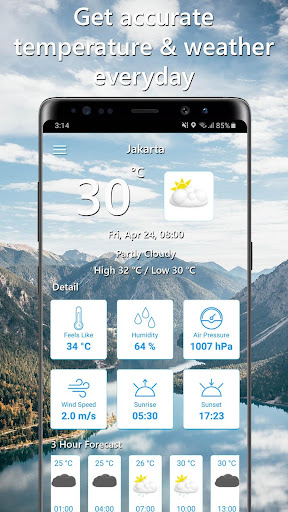
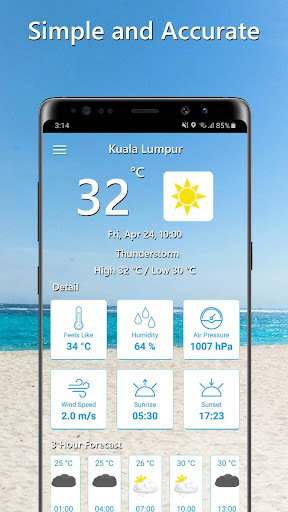
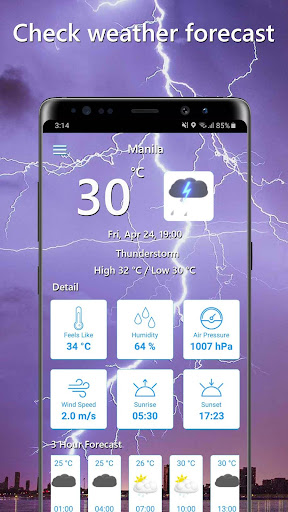
Introducing Temperature Today: Weather App - your ultimate companion for accurate and real-time weather updates. Stay informed about the current temperature, weather conditions, and forecast right at your fingertips. With a user-friendly interface and powerful features, this app ensures you're always prepared for any weather situation.
Key Features:
Instant Weather Snapshot
Upon launching the app, you'll immediately see the current temperature and weather condition of your current location. The display also includes the daily lowest and highest temperatures, providing a comprehensive overview at a glance.
Real-Time Weather Updates
Get instant access to the most up-to-date weather information. Our app uses reliable data sources to provide you with accurate and trustworthy forecasts.
Detailed Weather Insights
Dive into the details with our comprehensive current weather section. Explore the "feels like" temperature, humidity levels, air pressure, wind speed, sunrise time, and sunset time, giving you a complete understanding of the current conditions.
Three-Hour Forecast
Plan your day effectively with our detailed three-hour weather forecasts. Stay ahead of changing conditions and make informed decisions, whether it's about your morning commute, outdoor activities, or upcoming events.
Stay prepared with our detailed three-hour forecast list. Easily track temperature changes, weather conditions, and forecast times throughout the day. By clicking on a specific forecast, you can access a more detailed view, including temperature, weather conditions, humidity, pressure, and wind speed for that period.
Customizable Settings
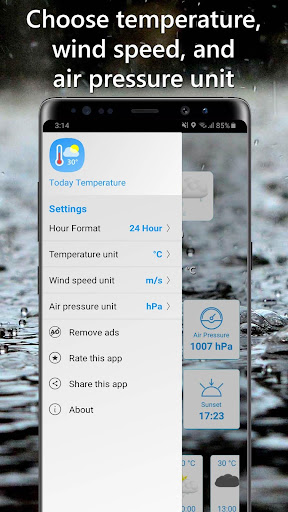
Personalize the app to your preferences with our intuitive settings. Choose between a 24-hour or 12-hour time format, select your preferred temperature unit (Celsius, Fahrenheit, or Kelvin), opt for your desired wind speed unit (m/s, km/h, or mph), and personalize your air pressure unit (hPa, kPa, atm, bar, mBar, Psi, mmHg, or inHg).
Ad-Free Experience
Enjoy an uninterrupted weather experience by removing ads through a convenient subscription or in-app purchase. Focus on the information that matters most to you without any distractions.
Easy-to-Use Interface
We've designed our app with a clean and user-friendly interface, making it effortless to navigate and retrieve the weather information you need. Enjoy a seamless experience from start to finish.
Download Temperature Today: Weather App now and experience the convenience of having accurate and timely weather information right in the palm of your hand. Stay prepared, stay informed, and make the most out of your day, no matter what the weather brings.
แสดงเพิ่มเติม

1. ดาวน์โหลดตัวติดตั้ง MEmu และสิ้นสุดการติดตั้ง

2. เริ่ม MEmu จากนั้นเปิด Google Play บนหน้าแรก

3. ค้นหา Temperature Today: Weather App ใน Google Play
Install
4. ดาวน์โหลดและติดตั้ง Temperature Today: Weather App
5. เมื่อติดตั้งเสร็จให้คลิกที่ไอคอนเพื่อเริ่มใช้งาน

6. ใช้ MEmu เพื่อสัมผัสประสบการณ์ Temperature Today: Weather App บนคอมพิวเตอร์ของคุณ
MEmu Play คือโปรแกรมจำลอง Android ที่ดีที่สุด มีผู้ใช้มากกว่า 50 ล้านคน มอบประสบการณ์การใช้งานแอป Android ขั้นสุดยอดให้กับคุณ เทคโนโลยีจำลองเสมือนของ MEmu ช่วยให้คุณรันแอป Android หลายพันแอปบนคอมพิวเตอร์ได้อย่างราบรื่น แม้แอปที่กินทรัพยากรเครื่องสูงที่สุด
จอใหญ่และกราฟฟิกสวยกว่า; เล่นได้นาน, ไม่ต้องใช้แบตเตอรี่โทรศัพท์หรือเน็ตโทรศัพท์.
ระบบปรับแต่งปุ่มคีย์บอร์ดและเม้าส์ตามที่คุณเลือก
เล่นมากกว่าหนึ่งเกมบน PC ในเวลาเดียวกันด้วยระบบหลายจอหรือ Multi-Instance manager.
Use Temperature Today: Weather App on PC by following steps: