Thai Dictionary Offline
อัปเดตเมื่อ
เวอร์ชันปัจจุบัน
Floody
ให้บริการโดย

เมื่อใช้ Thai Dictionary Offline บนโทรศัพท์ของคุณไม่ต้องกังวลกับการชาร์จไฟมากเกินไปปลดปล่อยตัวคุณเองจากหน้าจอขนาดเล็กและสนุกกับการใช้แอพนี้บนหน้าจอขนาดใหญ่ จากนี้ไปรับประสบการณ์เต็มหน้าจอของแอปพลิเคชันของคุณด้วยคีย์บอร์ดและเมาส์ MEmu มีคุณสมบัติที่น่าแปลกใจที่คุณคาดหวัง: การติดตั้งที่รวดเร็วและการตั้งค่าที่ง่ายควบคุมได้ง่ายไม่ จำกัด แบตเตอรี่ข้อมูลมือถือและการโทรที่รบกวน MEmu 9 ใหม่ล่าสุดเป็นตัวเลือกที่ดีที่สุดสำหรับการใช้ Meitu – โปรแกรมแก้ไขภาพแนวธรรมชาติ บนคอมพิวเตอร์ของคุณ ด้วยรหัสการดูดซึมของเราผู้จัดการหลายอินสแตนซ์ทำให้สามารถเปิดบัญชี 2 บัญชีขึ้นไปในเวลาเดียวกันได้ และที่สำคัญที่สุดเอ็นจิ้นจำลองพิเศษของเราสามารถปลดปล่อยศักยภาพของPCของคุณและทำให้ทุกอย่างราบรื่นและสนุกสนาน
แสดงเพิ่มเติม
ดาวน์โหลด Thai Dictionary Offline บน PC ด้วย MEmu Android Emulator สนุกกับการเล่นบนหน้าจอขนาดใหญ่ This Thai Dictionary has the facility of searching both from English to Thai and Thai to English.
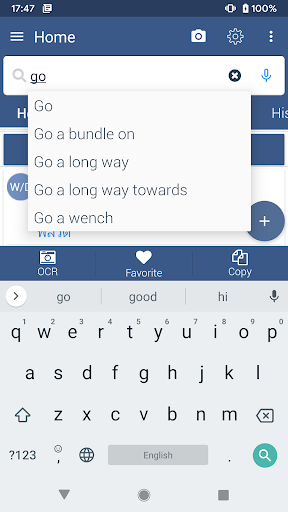
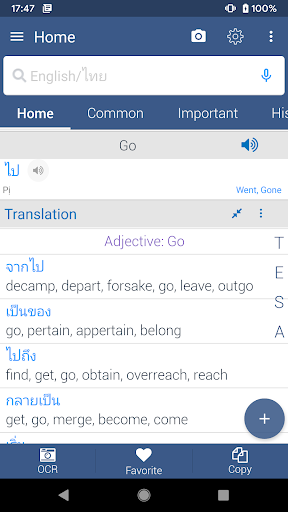
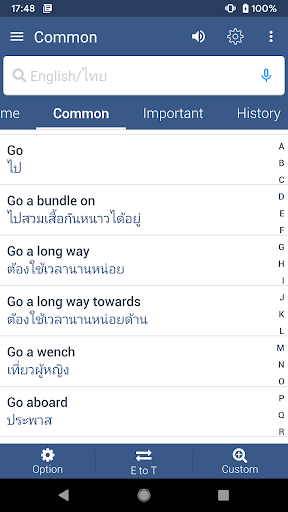
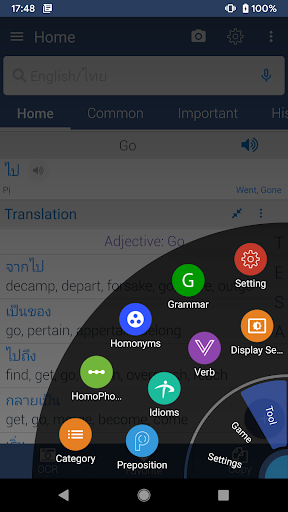
This Thai Dictionary has the facility of searching both from English to Thai and Thai to English.and English to English meaning with example.
Relevant and important words are listed and synced with search that gives advantage of a word book of Thai and English.
Search History, Store Favorite, Display Word Of the Day. List of Synonyms and Antonyms with details English description.
Searching words through voice, Pronunciation of English, Detecting typed language automatically.
How to use some main features
Instant Scanning features: At first you have to enable instant scanning from display settings or home screen , During using browser or any other application please select the word or words and then press copy. You will see instant meaning of this word without opening dictionary.
English Grammar: We provide some important grammar chapter like tense , sentence , voice narration etc.
Word Quiz: Our quiz have 24 level, You have to complete one by one. For wrong answer you will be asked again on the end of the level.
Mixer MCQ: This is like real exam. You can change number of question and question type also.
Word Category: We divide important word into 60 categories.You will find it from drawer. You can change category position by dragging.We include verbs, idioms and phrases section.
Backup & Restore: You can take backup and your favorite and history word in sdcard.and can restore it later.
How to set Live Wallpaper: From left drawer please click live wallpaper option and you will see word with meaning on your home screen. You can customize this wallpaper screen. you can change color, font size and also position of word.
Quotes: We provide a lot of quotes that can change your life.
แสดงเพิ่มเติม

1. ดาวน์โหลดตัวติดตั้ง MEmu และสิ้นสุดการติดตั้ง

2. เริ่ม MEmu จากนั้นเปิด Google Play บนหน้าแรก

3. ค้นหา Thai Dictionary Offline ใน Google Play
Install
4. ดาวน์โหลดและติดตั้ง Thai Dictionary Offline
5. เมื่อติดตั้งเสร็จให้คลิกที่ไอคอนเพื่อเริ่มใช้งาน

6. ใช้ MEmu เพื่อสัมผัสประสบการณ์ Thai Dictionary Offline บนคอมพิวเตอร์ของคุณ
MEmu Play คือโปรแกรมจำลอง Android ที่ดีที่สุด มีผู้ใช้มากกว่า 50 ล้านคน มอบประสบการณ์การใช้งานแอป Android ขั้นสุดยอดให้กับคุณ เทคโนโลยีจำลองเสมือนของ MEmu ช่วยให้คุณรันแอป Android หลายพันแอปบนคอมพิวเตอร์ได้อย่างราบรื่น แม้แอปที่กินทรัพยากรเครื่องสูงที่สุด
จอใหญ่และกราฟฟิกสวยกว่า; เล่นได้นาน, ไม่ต้องใช้แบตเตอรี่โทรศัพท์หรือเน็ตโทรศัพท์.
ระบบปรับแต่งปุ่มคีย์บอร์ดและเม้าส์ตามที่คุณเลือก
เล่นมากกว่าหนึ่งเกมบน PC ในเวลาเดียวกันด้วยระบบหลายจอหรือ Multi-Instance manager.
Use Thai Dictionary Offline on PC by following steps: