TrueVisions NOW
อัปเดตเมื่อ
เวอร์ชันปัจจุบัน
1787552866
ให้บริการโดย

เมื่อใช้ TrueVisions NOW บนโทรศัพท์ของคุณไม่ต้องกังวลกับการชาร์จไฟมากเกินไปปลดปล่อยตัวคุณเองจากหน้าจอขนาดเล็กและสนุกกับการใช้แอพนี้บนหน้าจอขนาดใหญ่ จากนี้ไปรับประสบการณ์เต็มหน้าจอของแอปพลิเคชันของคุณด้วยคีย์บอร์ดและเมาส์ MEmu มีคุณสมบัติที่น่าแปลกใจที่คุณคาดหวัง: การติดตั้งที่รวดเร็วและการตั้งค่าที่ง่ายควบคุมได้ง่ายไม่ จำกัด แบตเตอรี่ข้อมูลมือถือและการโทรที่รบกวน MEmu 9 ใหม่ล่าสุดเป็นตัวเลือกที่ดีที่สุดสำหรับการใช้ Meitu – โปรแกรมแก้ไขภาพแนวธรรมชาติ บนคอมพิวเตอร์ของคุณ ด้วยรหัสการดูดซึมของเราผู้จัดการหลายอินสแตนซ์ทำให้สามารถเปิดบัญชี 2 บัญชีขึ้นไปในเวลาเดียวกันได้ และที่สำคัญที่สุดเอ็นจิ้นจำลองพิเศษของเราสามารถปลดปล่อยศักยภาพของPCของคุณและทำให้ทุกอย่างราบรื่นและสนุกสนาน
แสดงเพิ่มเติม
ดาวน์โหลด TrueVisions NOW บน PC ด้วย MEmu Android Emulator สนุกกับการเล่นบนหน้าจอขนาดใหญ่ TrueVisions NOW - กีฬาสดทั่วโลก & ความบันเทิงพรีเมียม ครบในแอปเดียว.

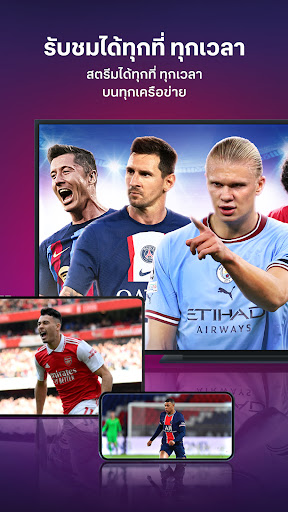
TrueVisions NOW - กีฬาสดทั่วโลก & ความบันเทิงพรีเมียม ครบในแอปเดียว
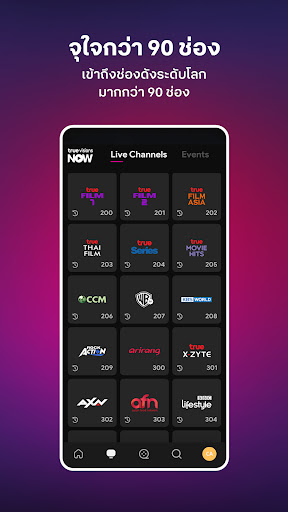
ไม่พลาดทุกแมตช์สำคัญและรายการโปรด กับแอป TrueVisions NOW ที่รวมคอนเทนต์ระดับโลกไว้ให้คุณ ทั้งกีฬาแบบสด–ย้อนหลัง และความบันเทิงคุณภาพแบบจัดเต็ม ดูได้ทุกที่ ทุกเวลา
กีฬาสดจากทั่วโลก ครบทุกอารมณ์
* รวมกีฬาดัง: ฟุตบอลลีกยุโรปชั้นนำ เช่น UEFA Champions League, LaLiga และอื่นๆ อีกมากมาย Formula 1, MotoGP, Tennis Grandslam, แบดมินตัน, กอล์ฟ, สนุกเกอร์, UFC
* รับชมการถ่ายทอดสดแบบมืออาชีพด้วยนักพากย์จากทรูวิชั่นส์
* มีทั้งก่อนเกม–หลังเกม วิเคราะห์เด็ด ไฮไลต์ และดูย้อนหลังได้เต็มอรรถรส
ความบันเทิงระดับพรีเมียม
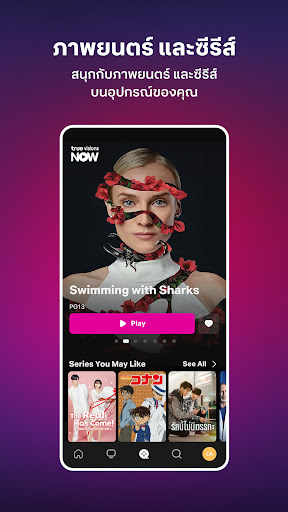
* ซีรีส์ฮิตจากไทย จีน เกาหลี ญี่ปุ่น พร้อมหนังดังจาก Hollywood และเอเชีย
* วาไรตี้ K-Pop สุดปัง อนิเมะ สารคดีระดับโลก และช่องข่าวชื่อดัง
ฟีเจอร์เด่นที่ให้คุณดูได้แบบจุใจ
* ดูสดและย้อนหลังได้สูงสุด 7 วัน (Catch Up)
* Timeshift ย้อนดูรายการสดที่เพิ่งเริ่มไปได้ทันที
* ดูหนังและซีรีส์ครบทุกตอนผ่าน Video on Demand
* มีให้เลือกทั้งเสียงพากย์ไทยและเสียงต้นฉบับ (Original Soundtrack)
* ระบบแนะนำคอนเทนต์ตรงใจ พร้อมแจ้งเตือนรายการสำคัญไม่ให้พลาด
* รองรับทุกอุปกรณ์: สมาร์ตโฟน แท็บเล็ต สมาร์ตทีวี และกล่อง TrueID
เหมาะสำหรับ
แฟนกีฬา สายซีรีส์ คอหนัง สายอนิเมะ และทุกคนที่ต้องการคอนเทนต์คุณภาพครบในที่เดียว
ดาวน์โหลดเลยวันนี้ แล้วสนุกกับความบันเทิงระดับพรีเมียมในมือคุณ!
แสดงเพิ่มเติม

1. ดาวน์โหลดตัวติดตั้ง MEmu และสิ้นสุดการติดตั้ง

2. เริ่ม MEmu จากนั้นเปิด Google Play บนหน้าแรก

3. ค้นหา TrueVisions NOW ใน Google Play
Install
4. ดาวน์โหลดและติดตั้ง TrueVisions NOW
5. เมื่อติดตั้งเสร็จให้คลิกที่ไอคอนเพื่อเริ่มใช้งาน

6. ใช้ MEmu เพื่อสัมผัสประสบการณ์ TrueVisions NOW บนคอมพิวเตอร์ของคุณ
MEmu Play คือโปรแกรมจำลอง Android ที่ดีที่สุด มีผู้ใช้มากกว่า 50 ล้านคน มอบประสบการณ์การใช้งานแอป Android ขั้นสุดยอดให้กับคุณ เทคโนโลยีจำลองเสมือนของ MEmu ช่วยให้คุณรันแอป Android หลายพันแอปบนคอมพิวเตอร์ได้อย่างราบรื่น แม้แอปที่กินทรัพยากรเครื่องสูงที่สุด
จอใหญ่และกราฟฟิกสวยกว่า; เล่นได้นาน, ไม่ต้องใช้แบตเตอรี่โทรศัพท์หรือเน็ตโทรศัพท์.
ระบบปรับแต่งปุ่มคีย์บอร์ดและเม้าส์ตามที่คุณเลือก
เล่นมากกว่าหนึ่งเกมบน PC ในเวลาเดียวกันด้วยระบบหลายจอหรือ Multi-Instance manager.
Use TrueVisions NOW on PC by following steps: