USB Camera
อัปเดตเมื่อ
เวอร์ชันปัจจุบัน
1734750347
ให้บริการโดย

เมื่อใช้ USB Camera บนโทรศัพท์ของคุณไม่ต้องกังวลกับการชาร์จไฟมากเกินไปปลดปล่อยตัวคุณเองจากหน้าจอขนาดเล็กและสนุกกับการใช้แอพนี้บนหน้าจอขนาดใหญ่ จากนี้ไปรับประสบการณ์เต็มหน้าจอของแอปพลิเคชันของคุณด้วยคีย์บอร์ดและเมาส์ MEmu มีคุณสมบัติที่น่าแปลกใจที่คุณคาดหวัง: การติดตั้งที่รวดเร็วและการตั้งค่าที่ง่ายควบคุมได้ง่ายไม่ จำกัด แบตเตอรี่ข้อมูลมือถือและการโทรที่รบกวน MEmu 9 ใหม่ล่าสุดเป็นตัวเลือกที่ดีที่สุดสำหรับการใช้ Meitu – โปรแกรมแก้ไขภาพแนวธรรมชาติ บนคอมพิวเตอร์ของคุณ ด้วยรหัสการดูดซึมของเราผู้จัดการหลายอินสแตนซ์ทำให้สามารถเปิดบัญชี 2 บัญชีขึ้นไปในเวลาเดียวกันได้ และที่สำคัญที่สุดเอ็นจิ้นจำลองพิเศษของเราสามารถปลดปล่อยศักยภาพของPCของคุณและทำให้ทุกอย่างราบรื่นและสนุกสนาน
แสดงเพิ่มเติม
ดาวน์โหลด USB Camera บน PC ด้วย MEmu Android Emulator สนุกกับการเล่นบนหน้าจอขนาดใหญ่ *** The Pro version provides some extra features from General Settings and without ads **.
*** The Pro version provides some extra features from General Settings and without ads **
Using USB 3.0 HDMI capture card : https://youtu.be/WkmuyfwKVrs
Using UVC H.264 device : https://youtu.be/j-71QMNuDr0
RTSP real time stream : https://youtu.be/-Qzc0RSDerg
RTMP live streaming : https://youtu.be/S5Bc1r57CUU
Picture In Picture : https://youtu.be/Mbturdxyi5c
VR/FPV View : https://youtu.be/zEqBXLNFnE0
Display Video On Lock Screen : https://youtu.be/Hdf2H_YusO
Tip:
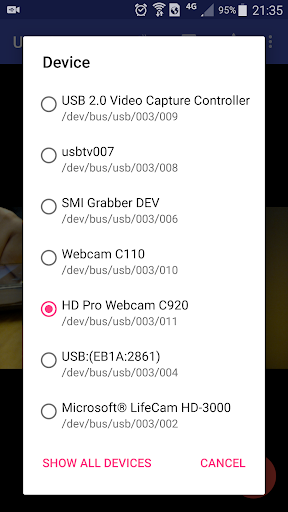
Supports following devices:
1) UVC WebCam with microphone or external USB Audio input (Supports H.264, H.265, HEVC, MJPG, YUY2, P010, NV12 and so on)
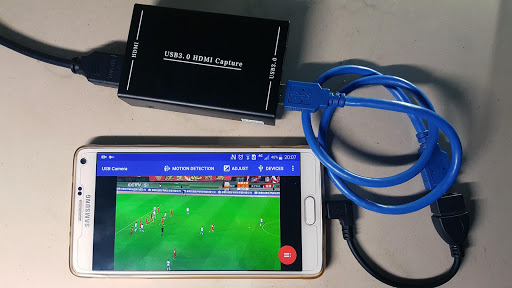
2) UVC video grabber with audio input or external USB Audio input (Up to 4K via HDMI, Supports H.264, H.265, HEVC, MJPG, YUY2, P010, NV12 and so on, Supports progressive and interlaced video)
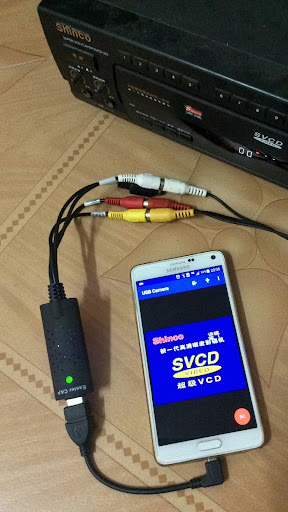
3) EasyCap including audio with UTV007 / HTV600 / HTV800 chipsets (VID_1B71&PID_3002)
4) EasyCap including audio with STK1160 + SAA7113/GM7113 + AC97 chipsets (Audio 48kHz stereo version VID_05E1&PID_0408)
5) EasyCap including audio with STK1160 + SAA7113/GM7113 (Audio 8kHz mono version VID_05E1&PID_0408)
6) EasyCap including audio with EM2860 + SAA7113/GM7113 + AC97 chipsets (VID_EB1A&PID_2861)
7) EasyCap including audio with SMI2021 + SAA7113/GM7113 + ES7240/CS5340 chipsets (VID_1C88&PID_0007, PID_003C, PID_003D, PID_003E, PID_003F, PID_1001)
Please click USB icon from toolbar to open Device dialog to open device if the system unable to detect your device.
Please use a good quality OTG cable and ensure power supply. Some devices may need to bridge HUB to enhanced USB signals to work properly, e.g. Elgato Cam link, ezcap Video Grabber.
Using HEVC for video recording/streaming requires Android 5.0 or above, and the device must supports HEVC codec.
Using AV1 for video streaming requires Android 10 or above, and the device must supports AV1 codec.
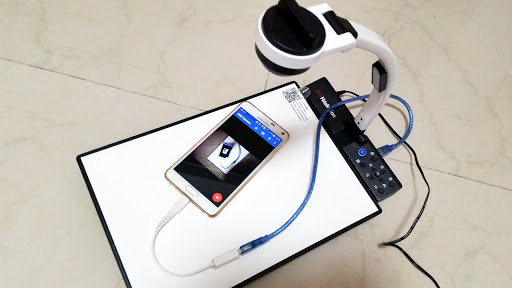
"USB Camera" can let your android device connect to USB WebCam or video capture card via USB-OTG. You can record video or capture snapshot, OR turn your phone into a wireless IP Camera via build-in RTSP and HTTP Server for security monitoring WITH Bi-directional audio support, you can use your browser to view, of course, include "IP Camera" App.
"USB Camera" can mix USB Audio with a built-in microphone and output.
"USB Camera" can push the video and audio to RTMP/SRT live media server and use for network live broadcast. It supports the rtmps security protocol and SRT protocol and it can also push the media to multiple media server at the same time. It also supports HEVC/AV1 over RTMP and can be used for YouTube Live currently.
"USB Camera" supports Side by Side(SBS) view and it can work with FPV goggle
"USB Camera" can add timestamp, GPS, speed and other info on the video frames while recording and can use your headset or Bluetooth headset to capture snapshot and record video. It also supports WebCam's snapshot button.
"USB Camera" supports loop-recording. Can set auto-segment when recording and auto-delete old video archives when no enough storage. "USB Camera" can be used as "Dash Cam"
USB Camera can seamless switching between foreground and background. Just press 'Enter background' from menu. The recording will not interrupted during switching!
It support auto video recording which based on Motion Detection and the video record can be uploaded to FTP server automatically and notify you via Email!
Bi-directional audio requires IP Camera App, you can get it from https://play.google.com/store/apps/details?id=com.shenyaocn.android.WebCam
IMPORTANT! On Android 9 and above, Camera permission is required to get fully USB Video device access. Don't worry, the application does not contain any function/code to visit built-in camera because it is unnecessary.
This is userspace driver so it used for the app only. Android does not allow to install kernel driver so it unable to use for third-party apps.
แสดงเพิ่มเติม

1. ดาวน์โหลดตัวติดตั้ง MEmu และสิ้นสุดการติดตั้ง

2. เริ่ม MEmu จากนั้นเปิด Google Play บนหน้าแรก

3. ค้นหา USB Camera ใน Google Play
Install
4. ดาวน์โหลดและติดตั้ง USB Camera
5. เมื่อติดตั้งเสร็จให้คลิกที่ไอคอนเพื่อเริ่มใช้งาน

6. ใช้ MEmu เพื่อสัมผัสประสบการณ์ USB Camera บนคอมพิวเตอร์ของคุณ
MEmu Play คือโปรแกรมจำลอง Android ที่ดีที่สุด มีผู้ใช้มากกว่า 50 ล้านคน มอบประสบการณ์การใช้งานแอป Android ขั้นสุดยอดให้กับคุณ เทคโนโลยีจำลองเสมือนของ MEmu ช่วยให้คุณรันแอป Android หลายพันแอปบนคอมพิวเตอร์ได้อย่างราบรื่น แม้แอปที่กินทรัพยากรเครื่องสูงที่สุด
จอใหญ่และกราฟฟิกสวยกว่า; เล่นได้นาน, ไม่ต้องใช้แบตเตอรี่โทรศัพท์หรือเน็ตโทรศัพท์.
ระบบปรับแต่งปุ่มคีย์บอร์ดและเม้าส์ตามที่คุณเลือก
เล่นมากกว่าหนึ่งเกมบน PC ในเวลาเดียวกันด้วยระบบหลายจอหรือ Multi-Instance manager.
Use USB Camera on PC by following steps: