WDIV 4Warn Weather
อัปเดตเมื่อ
เวอร์ชันปัจจุบัน
6.20.1.1120
ให้บริการโดย

เมื่อใช้ WDIV 4Warn Weather บนโทรศัพท์ของคุณไม่ต้องกังวลกับการชาร์จไฟมากเกินไปปลดปล่อยตัวคุณเองจากหน้าจอขนาดเล็กและสนุกกับการใช้แอพนี้บนหน้าจอขนาดใหญ่ จากนี้ไปรับประสบการณ์เต็มหน้าจอของแอปพลิเคชันของคุณด้วยคีย์บอร์ดและเมาส์ MEmu มีคุณสมบัติที่น่าแปลกใจที่คุณคาดหวัง: การติดตั้งที่รวดเร็วและการตั้งค่าที่ง่ายควบคุมได้ง่ายไม่ จำกัด แบตเตอรี่ข้อมูลมือถือและการโทรที่รบกวน MEmu 9 ใหม่ล่าสุดเป็นตัวเลือกที่ดีที่สุดสำหรับการใช้ Meitu – โปรแกรมแก้ไขภาพแนวธรรมชาติ บนคอมพิวเตอร์ของคุณ ด้วยรหัสการดูดซึมของเราผู้จัดการหลายอินสแตนซ์ทำให้สามารถเปิดบัญชี 2 บัญชีขึ้นไปในเวลาเดียวกันได้ และที่สำคัญที่สุดเอ็นจิ้นจำลองพิเศษของเราสามารถปลดปล่อยศักยภาพของPCของคุณและทำให้ทุกอย่างราบรื่นและสนุกสนาน
แสดงเพิ่มเติม
ดาวน์โหลด WDIV 4Warn Weather บน PC ด้วย MEmu Android Emulator สนุกกับการเล่นบนหน้าจอขนาดใหญ่ The 4Warn Weather app offers a sleek and fluid map displaying real-time radar, temperature, and surface winds.
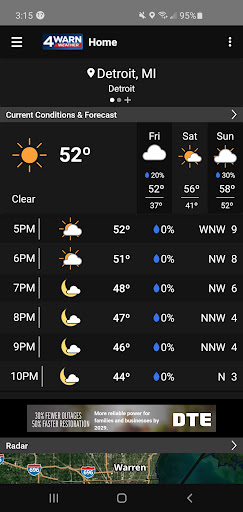
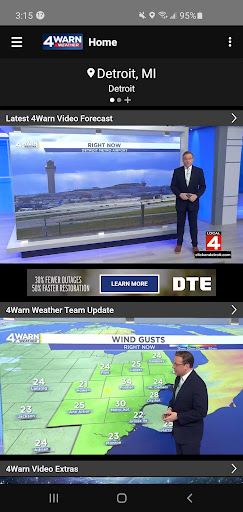
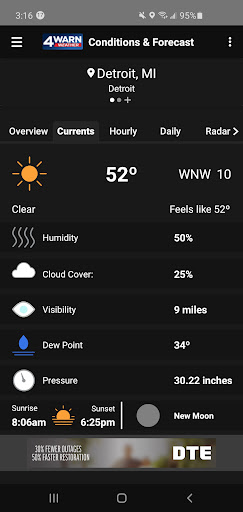
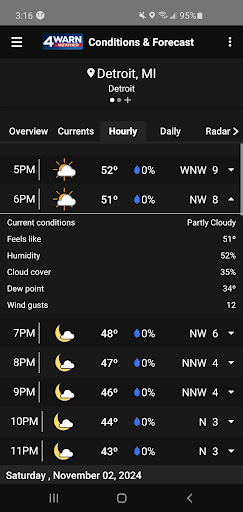
The 4Warn Weather app offers a sleek and fluid map displaying real-time radar, temperature, and surface winds. Whether you're planning your week or just stepping out for the day, our app provides detailed 24-hour and 7-day forecasts tailored to your specific location, accessible by city, zip code or wherever you are.
Key Features of the 4Warn Weather App:
Live From the 4Warn Weather Office: Livestreams of the best meteorologist team, for up-to-the-minute coverage of weather impacting the region and your backyard.
Interactive Weather Maps: Better, more dynamic weather radar that is more interactive and easier to read.
Updates from the WDIV Local 4 Weather Team: Get real-time insight, video forecasts and up-to-date analysis from our dedicated meteorologists
More Detailed Forecasts: Now including windspeed and direction! Get 3- and 7-day forecasts in both quick view and detailed formats, ensuring you're fully prepared no matter the weather.
Live Weather Alerts: Experience integrated weather alerts including tornado likelihood rankings from 1 to 10 for upcoming storm cells.
Customizable Notifications: Choose from WDIV Local 4 weather alerts and National Weather Service warnings for comprehensive alerting including tornadoes, severe thunderstorms and flash floods, directly on your map.
MIPics: Share and view photos and videos from your community and where events are taking place. Nothing is more powerful than the sights and sounds shared by our viewers, far beyond the forecasts and maps.
Dark Mode: A new visual option for easier nighttime viewing. A new visual option for easier nighttime viewing. Dark mode is enabled based on your device's settings.
Beyond just forecasts, the 4Warn Weather app offers fully automated, specific weather alerts with up to 15 minutes lead time before severe conditions hit. You can set up alerts for up to four locations, including your current mobile location, ensuring that you and your loved ones stay safe.
Metro Detroit, don't just watch the weather. Stay a step ahead with the 4Warn Weather app. Download or update today, and take control of your weather experience. Your peace of mind is now at your fingertips.
แสดงเพิ่มเติม

1. ดาวน์โหลดตัวติดตั้ง MEmu และสิ้นสุดการติดตั้ง

2. เริ่ม MEmu จากนั้นเปิด Google Play บนหน้าแรก

3. ค้นหา WDIV 4Warn Weather ใน Google Play
Install
4. ดาวน์โหลดและติดตั้ง WDIV 4Warn Weather
5. เมื่อติดตั้งเสร็จให้คลิกที่ไอคอนเพื่อเริ่มใช้งาน

6. ใช้ MEmu เพื่อสัมผัสประสบการณ์ WDIV 4Warn Weather บนคอมพิวเตอร์ของคุณ
MEmu Play คือโปรแกรมจำลอง Android ที่ดีที่สุด มีผู้ใช้มากกว่า 50 ล้านคน มอบประสบการณ์การใช้งานแอป Android ขั้นสุดยอดให้กับคุณ เทคโนโลยีจำลองเสมือนของ MEmu ช่วยให้คุณรันแอป Android หลายพันแอปบนคอมพิวเตอร์ได้อย่างราบรื่น แม้แอปที่กินทรัพยากรเครื่องสูงที่สุด
จอใหญ่และกราฟฟิกสวยกว่า; เล่นได้นาน, ไม่ต้องใช้แบตเตอรี่โทรศัพท์หรือเน็ตโทรศัพท์.
ระบบปรับแต่งปุ่มคีย์บอร์ดและเม้าส์ตามที่คุณเลือก
เล่นมากกว่าหนึ่งเกมบน PC ในเวลาเดียวกันด้วยระบบหลายจอหรือ Multi-Instance manager.
Use WDIV 4Warn Weather on PC by following steps: