Pofi Create - Art Pose & Paint
Đã cập nhật
Phiên bản hiện tại
v1.3.7
Cung cấp bởi

Bạn không cần phải lo lắng về việc sạc quá mức khi sử dụng Pofi Create - Art Pose & Paint trên điện thoại của bạn, không phải sử dụng trên màn hình nhỏ bé và tận hưởng ứng dụng trên màn hình lớn hơn rất nhiều. Từ bây giờ, bạn hãy trải nghiệm ứng dụng của bạn toàn màn hình bằng bàn phím và chuột. MEmu cung cấp cho bạn tất cả các tính năng đáng ngạc nhiên mà bạn mong đợi: cài đặt nhanh, cài đặt dễ dàng, điều khiển trực quan, không còn giới hạn về pin, dữ liệu di động và các cuộc gọi làm phiền. MEmu 9 hoàn toàn mới là sự lựa chọn tốt nhất để sử dụng Pofi Create - Art Pose & Paint trên máy tính của bạn. Được mã hóa với sự hợp nhất của chúng tôi, trình quản lý multi-instance giúp mở 2 tài khoản trở lên cùng một lúc. Và điều quan trọng nhất là, công cụ mô phỏng độc quyền của chúng tôi có thể tận dụng hết toàn bộ tiềm năng trên PC của bạn, giúp mọi thứ vận hành trơn tru và thú vị.
Nhiều hơn
Tải Pofi Create - Art Pose & Paint trên PC với Trình giả lập Android MEmu. Tận hưởng trải nghiệm chơi game trên màn hình lớn Pofi provides a rich variety of humanoid, animal, object/instrument, and landscape/scene figures for drawing and painting, freeing you from the troubles of finding references and model figures.
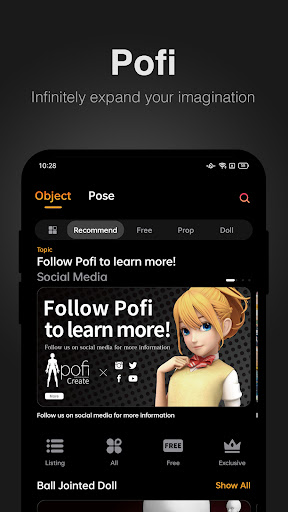
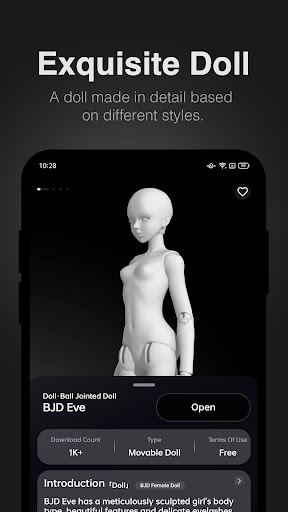
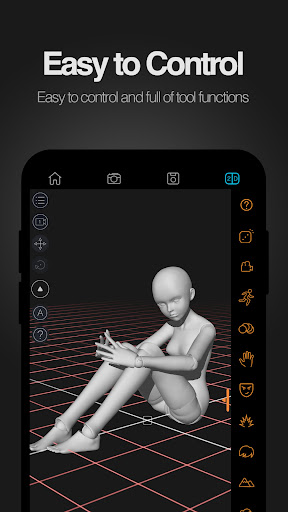
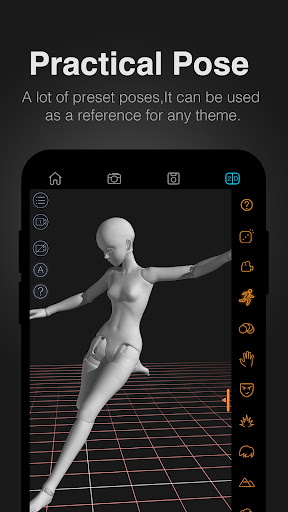
Pofi provides a rich variety of humanoid, animal, object/instrument, and landscape/scene figures for drawing and painting, freeing you from the troubles of finding references and model figures. Pofi also helps green-hand painting and drawing enthusiasts to get up to speed with these fundamental skills, offering you a vast collection of theme pose bundles to choose from.
Pofi Create is a drawing assistant mobile app that revolves around a multi-control-DOF 3D model figure system. Users can create and draw references from countless built-in 3D model figures. The capability to switch between 2D and 3D representations provides distinctive solutions for painters in terms of body dynamics, prop interaction, and scene perspective, among other creation issues.
※Unlimited Control
Observe and manipulate the actions of the 3D model figure from and at any angle. customize your model with our built-in presets from the figure library, and create manga/comic drafts, animation storyboards and movie scene compositions with simplicity and efficiency.
※ Doll Dynamics
Pofi offers model figures that come in a multitude of body proportions and styles, in addition to over 1,000 and counting editable preset motions and gestures, as well as frame-by-frame motion templates. We also upload new resources regularly.
※Props and Scenes
We have a plethora of regularly updated list of figures for animal parts, daily necessities and tools, as well as indoor and outdoor scenes, all of which are highly detailed and cover a wide area of fields. There are also proper references for perspectives, props and scenes for comic and animation creation and storyboard.
※ High-definition Images
Pofi's realistic lighting system and multiple texture mapping can help art students master lighting, shading, as well as other sketching essentials.
※ More Functions
Pofi Pro provides more advanced 3D functions, e.g. multiple panning angles, material textures, large perspective lenses, reference lines, and 3D rendering.
Use Pofi, draw effortlessly!
If there is any problem during the process of using or paying, please feel free to send an email to hi@pofiart.com, we will reply to you as soon as possible.
Also welcome to follow us for the latest information.
Twitter: @PoficreateEN
Instagram: @poficreate
Facebook: @Pofi Create
Please read our agreement carefully.
Privacy Policy: https://pofiart.com/docs/privacy.html
Terms of Use: https://pofiart.com/docs/agreement.html
Nhiều hơn

1. Tải trình cài đặt MEmu và hoàn tất cài đặt

2. Khởi động MEmu, sau đó mở Google Play trên trang chủ

3. Tìm kiếm Pofi Create - Art Pose & Paint trong Google Play
Install
4. Tải và Cài Đặt Pofi Create - Art Pose & Paint
5. Khi cài đặt hoàn tất, nhấp vào biểu tượng để bắt đầu

6. Trải nghiệm Pofi Create - Art Pose & Paint trên PC của bạn bằng MEmu
MEmu Play là trình giả lập Android miễn phí tốt nhất, với 50 triệu người dùng trải nghiệm ứng dụng Android tuyệt vời. Công nghệ ảo hóa của MEmu cho phép bạn chạy mượt mà hàng ngàn ứng dụng Android trên máy tính, ngay cả những ứng dụng đòi hỏi cấu hình cao nhất.
Màn hình lớn hơn cùng với đồ hoạ tốt hơn; thời lượng dài, không giới hạn về pin hoặc dữ liệu di động
Hỗ trợ đầy đủ Keymapping cho việc kiểm soát chính xác bàn phím và chuột hoặc gamepad
Nhiều tài khoản trò chơi hoặc tác vụ cùng lúc trên một PC với Quản lý Đa năng
Use Pofi Create - Art Pose & Paint on PC by following steps: