NetMirror: How to Download and Watch Movies & TV Shows on PC with MEmu Emulator
 |
|
Looking for a convenient way to browse movies and TV shows from different platforms in one place? NetMirror is a streaming-focused service designed to bring content discovery from multiple countries and OTT platforms into a single interface.
The service is available across different devices, including Android and PC browsers. For Android users who prefer watching on a computer, an Android emulator such as MEmu Play can provide another way to run compatible Android apps on a larger screen.
In this guide, we'll explain what NetMirror is, how it works, what to consider before using it, and how to run a compatible NetMirror Android APK on PC with MEmu.

NetMirror - Movies and Series
Important: Always use streaming services and apps only where they are legally available in your region, and make sure you have the right to access the content you watch. Because third-party APKs and changing domains can present security and copyright risks, download software only from a source you trust and avoid entering sensitive information into unverified websites.
What Is NetMirror?
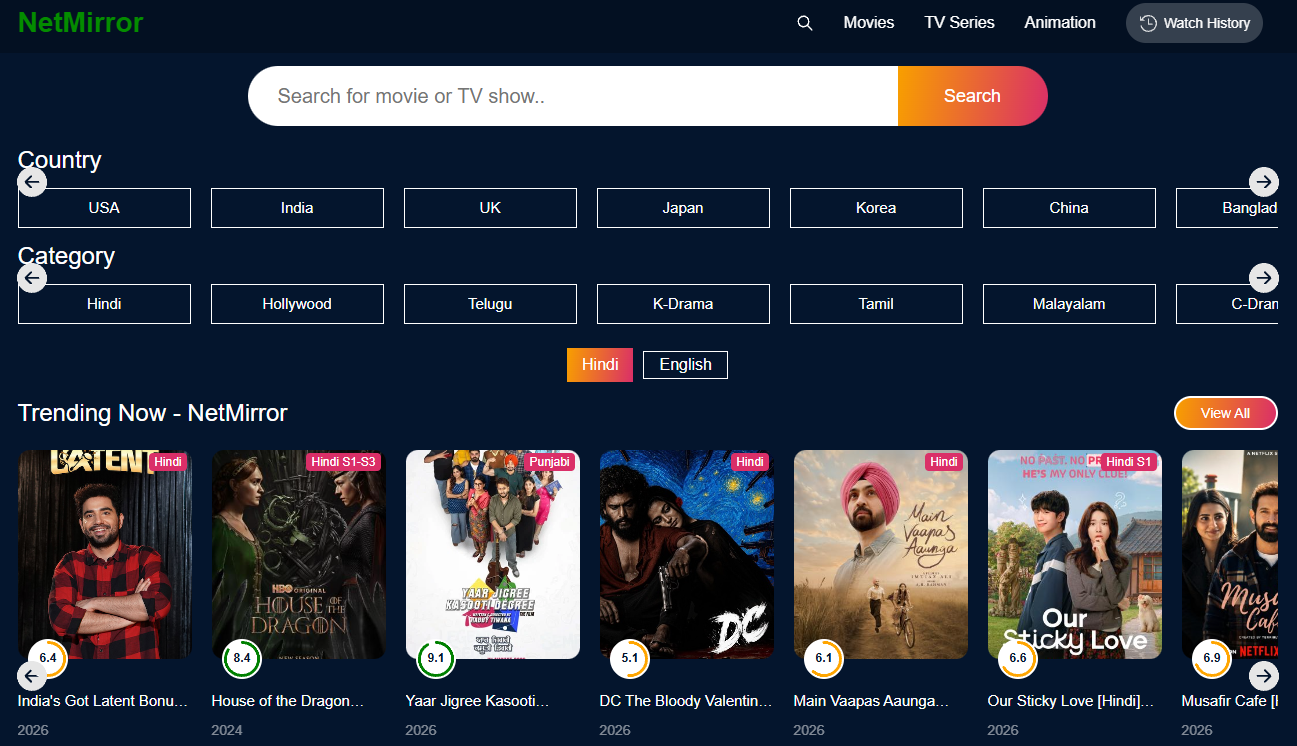
NetMirror is a web-based streaming and content-discovery service that presents movies and TV series from different sources in one interface. Information currently associated with the netmirror.center domain describes the service as allowing users to explore movies and TV shows from multiple countries and OTT platforms, with access intended for Android, iOS, and PC users.
The main appeal is convenience. Instead of switching between multiple websites or applications to browse available titles, users can use a single interface to search for and discover different types of entertainment content.
Depending on the version or access method available, the experience may differ between Android and desktop devices. Always check the current service information before installing an APK or signing in.
Why Do People Use NetMirror?
There are several reasons users may be interested in a service like NetMirror:
One Place to Discover Movies and TV Shows
NetMirror focuses on bringing movie and TV-show discovery into a single interface. This can make it easier to browse different types of entertainment without repeatedly switching between apps.
Content From Different Regions
The service describes content from multiple countries and OTT platforms, which can be useful for viewers interested in international movies and television series.
Flexible Device Access
NetMirror-related information indicates support for Android, iOS, and PC access. On desktop, a browser-based experience may be available, while Android users may have access to an APK depending on the current distribution method.
Simple Content Discovery
For users who mainly want to browse and find something interesting to watch, having titles collected in one interface can make content discovery more convenient.
How to Run NetMirror on PC with MEmu Emulator
If a legitimate, compatible Android APK is available from a source you trust, you can install it on MEmu Play and run it from your Windows desktop.
Step 1: Download and Install MEmu Play
First, download MEmu Play from the official MEmu website. Install the emulator on your Windows PC and launch it after installation. MEmu Play is an Android emulator designed to run Android applications on PC. Its current download page highlights features such as customizable controls and multiple instances.
Step 2: Prepare the NetMirror APK
If the Android version of NetMirror is legitimately available as an APK, download the installation file from a source you trust.
Before opening an APK, check:
- The download source and domain carefully.
- The application's requested permissions.
- Whether the APK matches the intended application.
- Whether your local laws and the service's terms allow its use.
- Whether the content you intend to access is legally available to you.
Avoid downloading modified APKs or files from suspicious pop-up pages.
Step 3: Install the APK in MEmu
NetMirror - Movies and Series
Launch MEmu Play and locate the APK file on your computer.
MEmu supports several APK installation methods. The easiest is to drag and drop the APK directly into the emulator window. You can also use MEmu's APK Install button to select the file manually.
After installation finishes, the NetMirror app icon should appear on the MEmu home screen.
Step 4: Launch NetMirror
Click the NetMirror icon inside MEmu to launch the application.

If the app requires an account, follow the application's normal sign-in process. Do not enter passwords, payment details, or other sensitive information if you are unsure whether the application or website is trustworthy.
Why Use MEmu to Run Android Apps on PC?
Using an Android emulator can provide several practical advantages for users who prefer a desktop environment.
1. Enjoy a Larger Screen
Watching video content on a PC monitor can be more comfortable than using a smartphone, especially during longer viewing sessions.
A larger display also makes menus, search results, subtitles, and other interface elements easier to see.
2. Use Your Keyboard and Mouse
MEmu allows Android applications to run inside a desktop environment, giving you access to your regular PC keyboard and mouse.
For applications with extensive menus or search functions, navigating with a physical keyboard and mouse can feel more convenient than using a touchscreen.
3. Keep Entertainment on Your PC
If you already spend most of your time on a Windows computer, running a compatible Android app through MEmu means you don't have to constantly switch between your phone and PC.
You can keep the Android application open in an emulator window alongside your other desktop tasks.
4. Better Desktop Multitasking
An emulator can make it easier to switch between an Android application and other Windows programs.
For example, you can browse information in your browser, communicate with friends, and return to the Android application without picking up another device.
5. Flexible Emulator Configuration
MEmu provides configurable emulator settings and features intended to help users customize their Android experience on PC. Its official site also highlights support for multiple instances, which can be useful for users who regularly work with several Android environments.
Is NetMirror Available on PC?
Yes, NetMirror-related information describes PC access through a web browser, meaning an emulator is not necessarily required for users who simply want to access the service from a computer.
However, if you specifically want to use an Android version of the application on Windows, MEmu can provide an Android environment in which a compatible APK can be installed.
This makes MEmu an alternative for users who prefer an Android-style interface rather than accessing everything through a traditional desktop browser.
NetMirror - Movies and Series
Final Thoughts
NetMirror is designed around convenient movie and TV-show discovery across different sources and regions. For users who prefer watching on a PC, the web experience may be the simplest option.
If you specifically want to run a compatible Android version, MEmu Play provides an easy way to install Android APK files on Windows. You can download MEmu, install a trusted compatible APK, and launch the application directly from the emulator.