DramaBox on PC: How to Download and Watch with MEmu Emulator
 |
|
DramaBox is a short-drama and mini-series app featuring a variety of entertainment content, including romance, comedy, family stories, mystery, action, and thriller series. If you prefer watching short-form dramas on a larger display, you can run DramaBox on your Windows PC using MEmu Emulator.

With MEmu, you can install the Android version of DramaBox on your computer and enjoy its content on a bigger screen.
Contents
What Is DramaBox?
DramaBox is an entertainment app designed for viewers who enjoy short dramas and mini-series. Its content covers multiple genres, making it possible to discover different types of stories from one app.
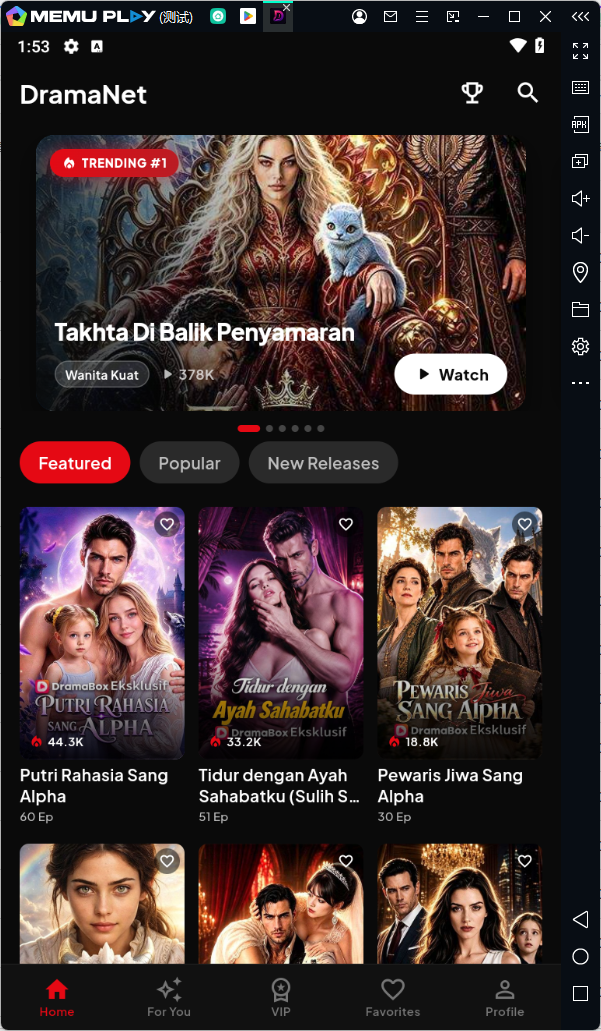
Depending on your interests, you can explore romance, emotional stories, family dramas, comedy, mystery, action, and thriller content.
DramaBox Features
Short Dramas and Mini-Series
DramaBox focuses on short-form video entertainment, making it suitable for viewers who want to watch compact episodes rather than traditional long-form series.
Multiple Drama Genres
The app offers different categories of entertainment, including:
- Romance
- Family dramas
- Comedy
- Mystery
- Action
- Thriller
- Emotional stories
Discover New Content
DramaBox provides ways to browse and discover different dramas, helping users find new stories and series based on their interests.
Convenient Mobile Viewing
As an Android app, DramaBox is designed for convenient viewing on mobile devices. With an emulator such as MEmu, you can also bring the Android experience to your PC.
Why Watch DramaBox on PC with MEmu?
Watching DramaBox through MEmu can provide a larger-screen viewing experience compared with a typical smartphone display.

MEmu also lets you run Android applications directly on your Windows PC, making it convenient to access DramaBox without switching between your computer and mobile device.
If you regularly watch short dramas, using DramaBox on PC can give you a more comfortable viewing environment.
How to Download DramaBox on PC with MEmu
Follow these steps to install DramaBox on your Windows computer.
Step 1: Download MEmu Emulator
Download and install the latest version of MEmu on your Windows PC.
Step 2: Launch MEmu
Open MEmu after installation and complete the initial Android setup.
Step 3: Open Google Play Store
Launch the Google Play Store inside MEmu and sign in with your Google account if necessary.
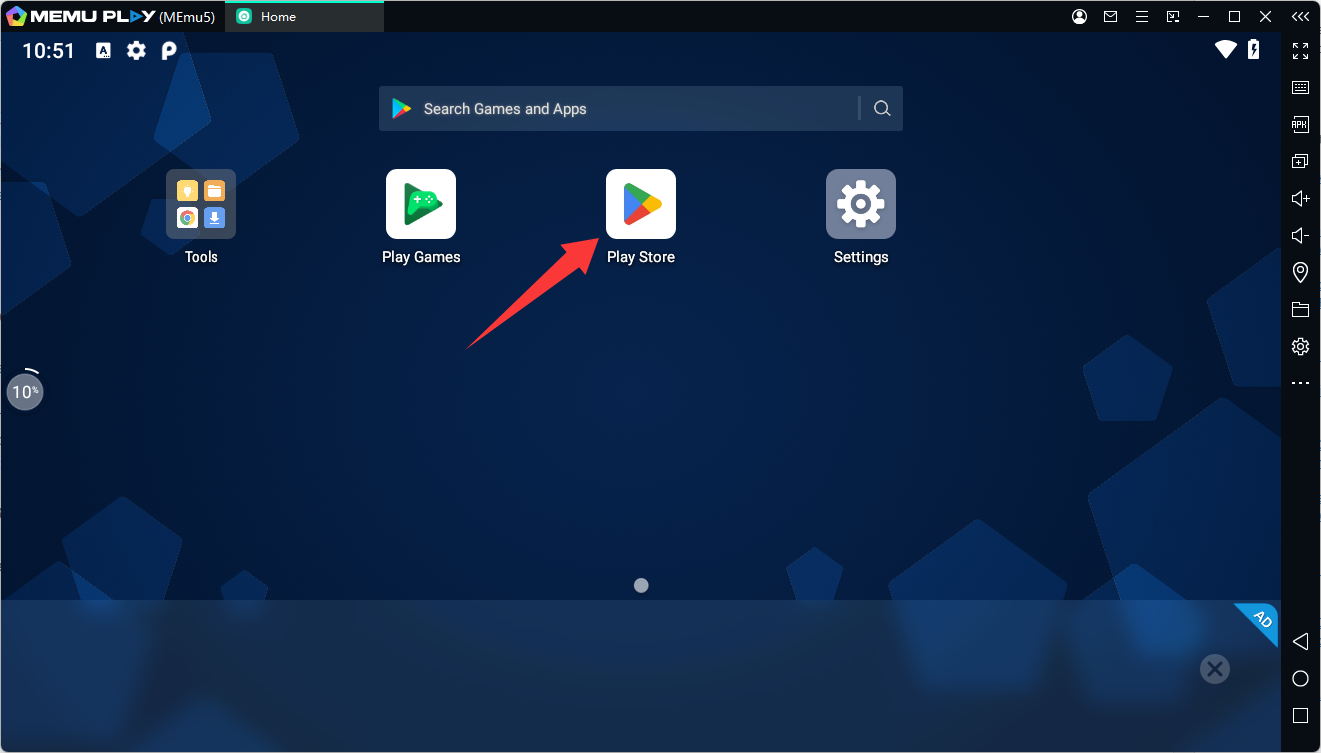
Step 4: Search for DramaBox
Search for DramaBox in Google Play. Make sure you select the official app with the package name
- com.dramatvasia.app
Step 5: Install DramaBox
Click Install and wait for the app to finish downloading and installing.
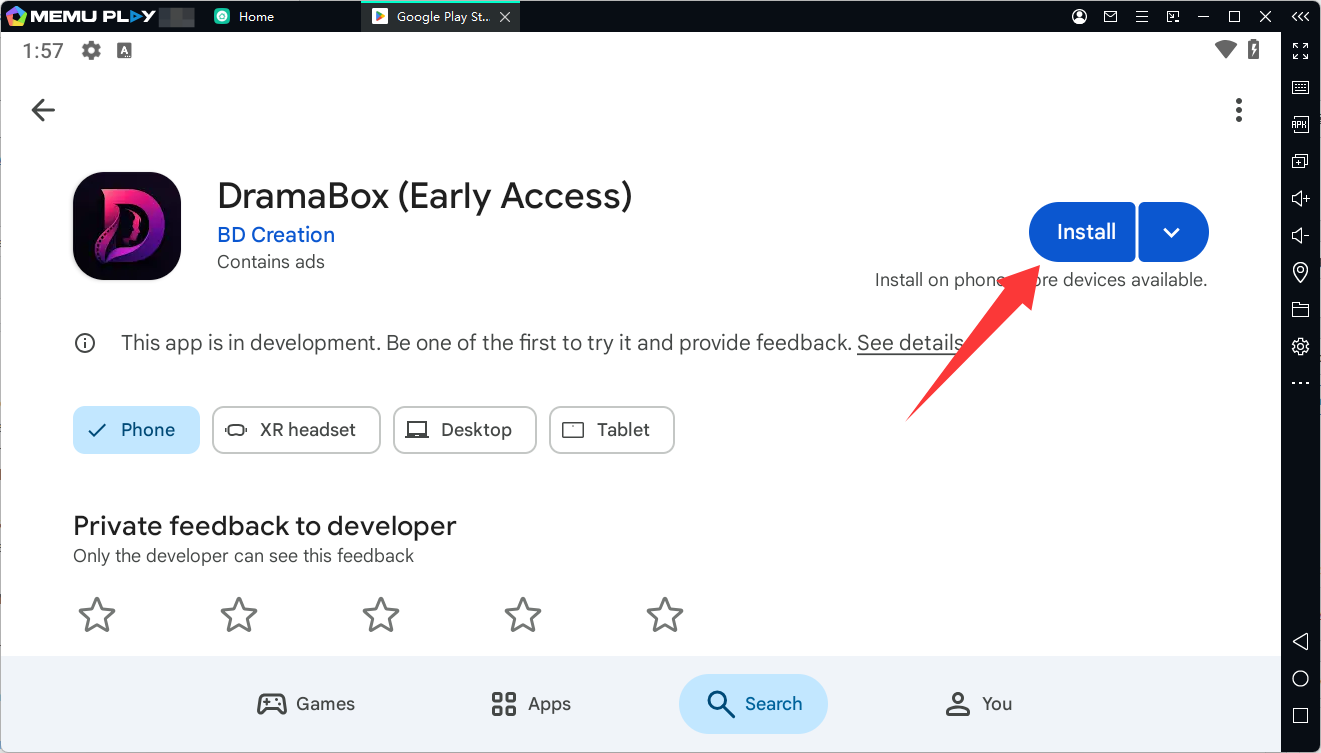
Step 6: Start DramaBox on PC
Open DramaBox from the MEmu home screen and start browsing available short dramas and mini-series on your PC.

How to Play DramaBox on PC with MEmu
Once DramaBox has been installed, you can launch it directly from MEmu whenever you want to watch its available content.
MEmu provides an Android environment on Windows, allowing you to use DramaBox in a familiar mobile-app interface while viewing it on your computer's larger screen.
Whether you want to watch romance, comedy, family, mystery, action, or thriller dramas, you can open DramaBox through MEmu and start watching.
DramaBox PC FAQs
Can I use DramaBox on PC?
Yes. You can run the Android version of DramaBox on a Windows PC using an Android emulator such as MEmu.
How do I download DramaBox on PC?
Install MEmu on your Windows PC, open Google Play Store, search for DramaBox, and install the app inside the emulator.
Is DramaBox available on Google Play?
Yes. DramaBox is available through Google Play. Its Android package name is
- com.dramatvasia.app
Can I watch DramaBox on a bigger screen?
Yes. Running DramaBox through MEmu allows you to use the app on your PC and view its content on a larger display.
Is MEmu free to download?
MEmu offers a free Android emulator for Windows PCs. You can download the latest version from the official MEmu website.