Ragnarok: Go Codes November 2026: All Working Redeem Codes
 |
Ragnarok: Go is an augmented reality mobile RPG where players explore the real world to catch monsters, battle in turn-based combat, and join guilds. You've come to the right place. Below you'll find every working code currently available, along with reward details and step-by-step redemption instructions.
*Update 11/04/2026
Contents
All Working Ragnarok: Go Codes
Here are all the latest working codes available right now.
| Code | Rewards | Expire |
| ROGOSTART | Diamond x200 | |
| HAPPYROGO | Magic Card Album x1 | |
| ROGOGO | Quick Idle Ticket x2 | |
| WELCOMEROGO | Pet Gacha Coin x10 | |
| ROGOVIP | Dead Branch x30 | |
| ROGO2026 | Weapon Gacha Coin x10 | |
| ROGO999 | Magic Card Album x1 | |
| ROGO888 | Pet Gacha Coin x10 | |
| ROGO777 | Diamond x200 |
If a code does not work, it may have expired or already been redeemed. Check back on this page for newly released codes.
How to Redeem Codes in Ragnarok: Go
Follow these simple steps to redeem your rewards:
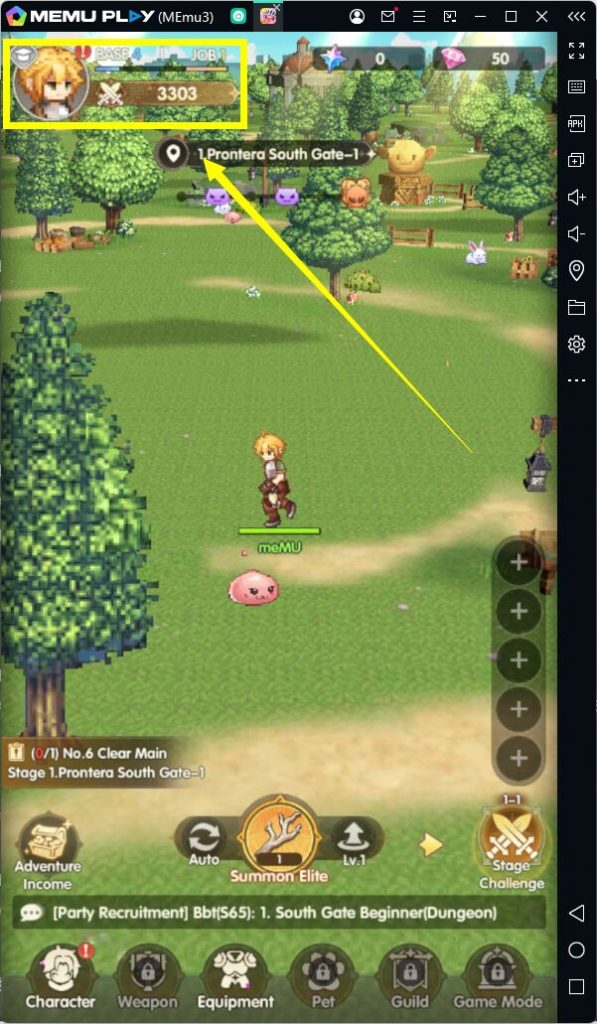
- Launch Ragnarok Go.
- Tap your profile icon in the top-left corner.
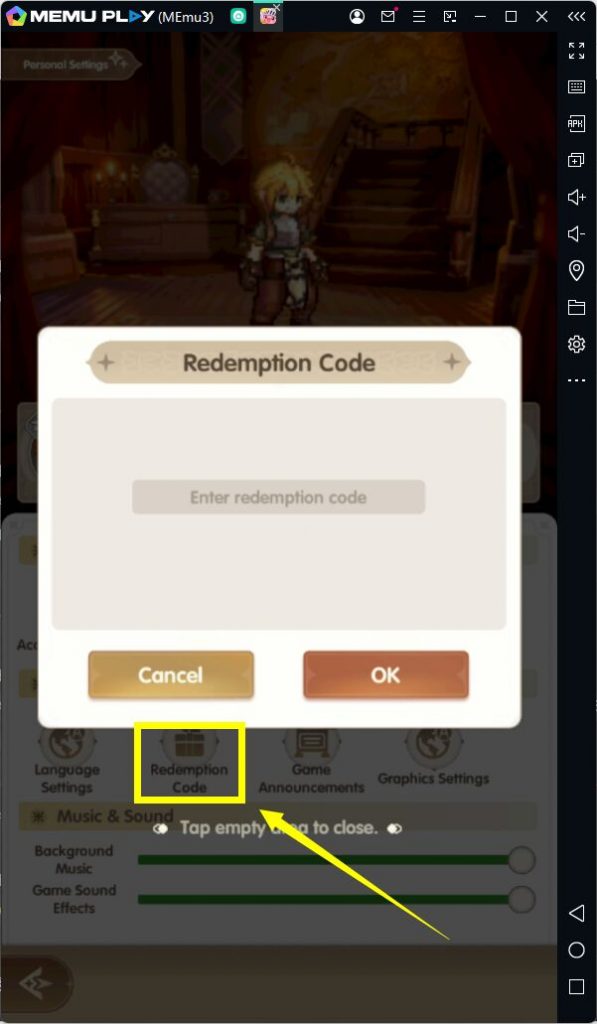
- Open Personal Settings.
- Under Other, tap Redemption Code.
- Type your code into the Enter redemption code field.
- Tap OK to get your rewards.
FAQ
How to get more Ragnarok: Go codes?
To save time, simply bookmark this page. We regularly check for new codes and update the list as soon as they are released.
How often is this page updated?
We monitor official announcements daily and update this page whenever new codes become available.
How often are new codes released?
New codes are typically released alongside major game updates, seasonal events, developer collaborations, and milestone celebrations such as anniversaries or subscriber/follower goals. The developers may also drop surprise codes during livestreams or on social media.
Why isn't my code working?
If a code won't redeem, it's usually due to one of a few common issues: the code has expired, it's already been used on your account, it was typed with a typo or extra space, or it's region/platform-restricted. Double-check the code against the source and make sure you're entering it exactly as shown, including capitalization.

Conclusion
Want a better gaming experience? Play Ragnarok: Go on PC with MEmu for smoother performance, precise keyboard controls, and an enhanced gameplay experience while redeeming the latest rewards. We'll continue updating this guide whenever new redeem codes are released. Check back regularly so you never miss free rewards.