Top Rainbow Six Mobile Settings for Ranked Matches in 2026
 |
|
If you want consistent gunfights in Rainbow Six Mobile, your settings are more important than your operator choice. The ideal 2026 setup prioritizes simplicity and manual control, built around precision. Disable auto features, enable toggle ADS and lean, and fine-tune your sensitivity for better control rather than raw speed.
Rainbow Six Mobile
Below is the exact configuration I run for ranked, tested on both mobile and emulator. Clean screen, sharp aim, zero random inputs.
Core Gameplay Tweaks That Actually Win Rounds
Start here before touching sensitivity. These toggles decide how much control you really have.
Competitive Control Settings
-
Auto Shoot (ADS): Off
-
Auto Shoot (Hipfire): Off
-
Aim Assist: On
-
Auto Vault While Sprinting: Off
-
Auto Swap Weapons on Empty: Off
-
Lean Input Behavior: Lean Only
-
Exit ADS Always Cancel Lean: Off
-
Cancel Lean Always Exit ADS: Off
Disabling Auto Shoot improves headshot consistency by giving you full trigger control. Setting Lean Input Behavior to Lean Only is especially important, as it separates leaning from ADS. This allows you to hold tighter angles and shoulder peek more effectively without being forced into scope—similar to tactical shooters like Siege.
ADS and Button Settings
-
ADS Button Behavior: Enabled
-
Lean Button Behavior: Enabled
-
Buttons Allow Camera Rotation: On
-
ADS Button Allows Camera Rotation: On
-
ADS Fire Button Allows Camera Rotation: On
-
Display Alternate Fire Button: On
-
Display Vault Button: On
-
Lean Slider Behavior: Off
Toggle ADS reduces fatigue during long holds. Lean slider belongs on touchscreen only, so remove it if you are serious.
Sensitivity That Balances Flicks and Tracking
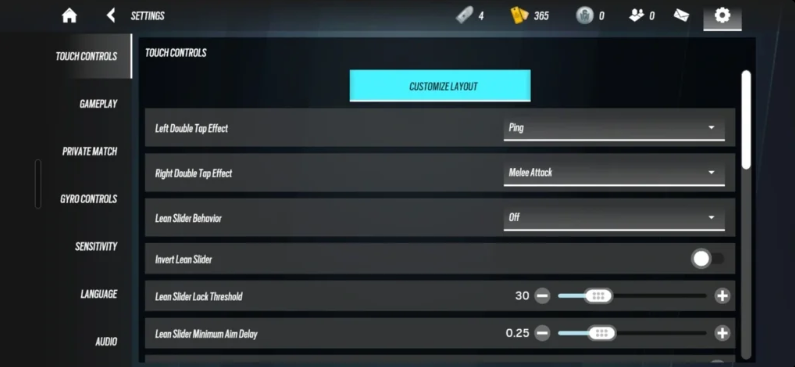
Sensitivity is personal, but most players overshoot. Start controlled, then scale up slowly.
Recommended Baseline Sensitivity Settings
-
Horizontal Touch Sensitivity: 0.60
-
Vertical Touch Sensitivity: 0.60
-
ADS Sensitivity: 0.65
-
Camera Horizontal: 0.75
-
Camera Vertical: 0.75
-
Input Smoothing: 0.05
-
Speed Acceleration Curve: Speed Excel
-
Touch Speed Acceleration Multiplier: 1.0
-
Touch Speed Acceleration Threshold: 1.0
For best results, keep your horizontal and vertical values the same to build muscle memory more efficiently. If you’re new, start at 0.60 and gradually increase by 0.05 after a few matches until it feels comfortable.
If using emulator with 800 DPI mouse, this range feels natural. Lower DPI may need slightly higher in game values.
Audio Settings That Give Free Information
Sound wins rounds in Rainbow Six Mobile. You should hear reloads before you see enemies.
Audio Settings
-
Master Volume: 100
-
Music Volume: 0
-
Sound Effects Volume: 100
-
Announcer Dialogue: 0.60
-
Operator Dialogue: 0.60
-
Audio Mix: Headphones
-
Dynamic Range: Night Mode
-
Ally & Enemy Status Sounds: On
-
Audio Compass: On
Night Mode compresses explosions so footsteps stay clear. Operator dialogue often calls out enemies before you visually confirm. That is free intel.
Graphics for Clarity and Stable Frames
You do not need pretty explosions. You need stable frames and sharp enemies.
Recommended Visual Performance Settings
-
Graphics Quality: Medium
-
Frame Rate: 65 FPS
-
Field of View: 75
-
Camera & Drone FOV: Max
-
Anti-Aliasing: Off
-
Bloom: Off
-
Graphic Style: Neutral
Medium gives better clarity than Low without heavy frame drops from High. FOV at 75 keeps enemies readable while giving decent peripheral vision.
Emulator Specific Advice for PC Players
If you are playing through MEmu emulator, remove mobile leftovers.
If you’re playing on MEmu emulator, make sure to remove any leftover mobile settings.
Turn off the left double-tap effect and disable all double-tap actions. Remove the lean slider, bind Vault to the Space key, set Gadget to your mouse thumb button, and assign Melee to F.
Use lean only with Q and E keybinds to make the gameplay feel closer to Siege. Most importantly, disable all auto-movement features—manual control will always give you the advantage.
Best Settings for Rainbow Six Mobile Ranked
Disable Auto Shoot and Auto Vault, enable Aim Assist, and switch to Toggle ADS and Toggle Lean. Set your sensitivity to around 0.65, use Night Mode audio, and run Medium graphics with FOV at 75 for stable and competitive performance.