Quibi: All New Original Shows
আপডেট করা হয়েছে
বর্তমান সংস্করণ
1.14.0
অফার করেছে

আপনার মোবাইলে Quibi: All New Original Shows ব্যবহার করার সময় অতিরিক্ত চার্জ নিয়ে চিন্তা করা বন্ধ করুন, নিজেকে ছোট পর্দা থেকে মুক্ত করুন এবং অনেক বড় ডিসপ্লেতে অ্যাপ ব্যবহার করে উপভোগ করুন। এখন থেকে, কীবোর্ড এবং মাউস দিয়ে আপনার অ্যাপের একটি পূর্ণ-স্ক্রীন অভিজ্ঞতা পান। MEmu আপনাকে সমস্ত আশ্চর্যজনক বৈশিষ্ট্যগুলি অফার করে যা আপনি আশা করেছিলেন: দ্রুত ইনস্টল এবং সহজ সেটআপ, স্বজ্ঞাত নিয়ন্ত্রণ, ব্যাটারির আর কোন সীমাবদ্ধতা নেই, মোবাইল ডেটা এবং বিরক্তিকর কল৷ একদম নতুন MEmu 9 হল আপনার কম্পিউটারে Quibi: All New Original Shows ব্যবহার করার সেরা পছন্দ। MEmu মাল্টি-ইনস্ট্যান্স ম্যানেজার একই সময়ে 2 বা তার বেশি অ্যাকাউন্ট খোলা সম্ভব করে তোলে। এবং সবচেয়ে গুরুত্বপূর্ণ, আমাদের একচেটিয়া ইমুলেশন ইঞ্জিন আপনার পিসির সম্পূর্ণ সম্ভাবনা প্রকাশ করতে পারে, সবকিছুকে মসৃণ এবং উপভোগ্য করে তুলতে পারে।
বেশি দেখান
Download Quibi: All New Original Shows on PC with MEmu Android Emulator. Enjoy playing on big screen. Quibi delivers quick-bite entertainment that fits into any moment of your day.
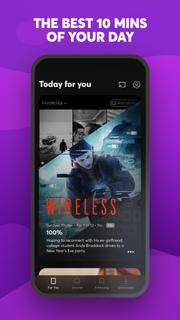
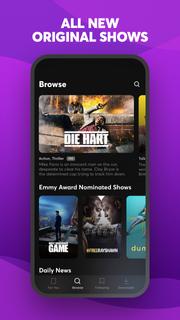

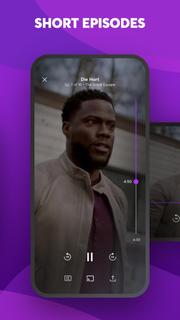
Quibi delivers quick-bite entertainment that fits into any moment of your day. Watch shows featuring the world's biggest stars. Episodes in 10 minutes or less. All designed for your phone. Download now to start watching. Your first 2 weeks are free.Enjoy original comedies, movie-quality action & drama, inspiring documentaries, and Daily Essentials to stay informed on news, sports, finance and culture. Fresh new shows premiere every week, with new episodes available every day.Check your personalized feed to see what’s new, discover trending episodes, or search for shows based on your mood. Download episodes to watch anytime, anywhere.You’re in full control of what you watch and how you watch it. Vertical, horizontal; no matter how you hold your phone, everything is framed to fit your screen. Want to watch Quibi on your TV? Use Chromecast to stream shows on the big screen directly from your phone. For more ways to watch, get the Quibi TV app on Apple TV, Android TV, and Amazon Fire TV and sign in with your Quibi account.More info on Quibi subscriptions:• Your subscription begins after your free trial, if applicable, and will auto-renew each month.• Have a change of heart? You can switch plans in your in-app settings. Or cancel your subscription anytime via the Play Store.• Payment will be charged to your Play Store account each month unless auto-renew is turned off at least 24 hours before the renewal date.• You can manage your subscription and auto-renewal by going to your Play Store account settings and selecting Subscriptions.• If your subscription is canceled, the cancellation will be effective at the end of the current subscription period.• No refunds will be offered, and any unused portion of a free trial will be forfeited when you change your existing subscription to Quibi (Ad-Free).https://quibi.com/privacy-policy/https://quibi.com/terms-of-service/
বেশি দেখান

1. MEmu ইনস্টলার ডাউনলোড করুন এবং সেটআপ শেষ করুন

2. MEmu শুরু করুন তারপর ডেস্কটপে Google Play খুলুন

3. Google Play এ Quibi: All New Original Shows খুঁজুন
Install
4. Quibi: All New Original Shows ডাউনলোড এবং ইনস্টল করুন
5. ইনস্টল সমাপ্তি শুরু করতে আইকনে ক্লিক করুন

6. MEmu ব্যবহার করে আপনার কম্পিউটারে Quibi: All New Original Shows উপভোগ করুন
MEmu Play হল সেরা অ্যান্ড্রয়েড এমুলেটর, যার ১০ কোটিরও বেশি ব্যবহারকারী এর উন্নত অ্যান্ড্রয়েড অ্যাপ অভিজ্ঞতা উপভোগ করছেন। MEmu 9 এর ভার্চুয়ালাইজেশন প্রযুক্তি আপনাকে আপনার কম্পিউটারে হাজার হাজার অ্যান্ড্রয়েড অ্যাপ মসৃণভাবে চালাতে দেয়, এমনকি সবচেয়ে চাহিদাসম্পন্ন অ্যাপগুলিও।
ভালো গ্রাফিক্সের সাথে বড় স্ক্রীন; লম্বা অবধি, ব্যাটারি বা মোবাইল ডাটা'র কোন সীমা ছাড়া।
কীবোর্ড এবং মাউস বা গেমপ্যাডের সুনির্দিষ্ট নিয়ন্ত্রণের জন্য সম্পূর্ণ কীম্যাপিং সমর্থন।
মাল্টি-ইনস্ট্যান্স ম্যানেজারের সাথে একটি পিসিতে একাধিক গেম অ্যাকাউন্ট বা কাজ।
নিম্নলিখিত ধাপগুলোর মাধ্যমে পিসি এ Quibi: All New Original Shows ব্যবহার করুন: