Lumi Master
Aktualizováno
Aktuální verze
1.2.2
Od vývojáře

With all your passion for playing Lumi Master, you hands are not supposed to be limited on a tiny screen of your phone. Play like a pro and get full control of your game with keyboard and mouse. MEmu offers you all the things that you are expecting. Download and play Lumi Master on PC. Play as long as you want, no more limitations of battery, mobile data and disturbing calls. The brand new MEmu 9 is the best choice of playing Lumi Master on PC. Prepared with our expertise, the exquisite preset keymapping system makes Lumi Master a real PC game. MEmu multi-instance manager makes playing 2 or more accounts on the same device possible. And the most important, our exclusive emulation engine can release full potential of your PC, make everything smooth.
Show more
Vychutnejte si vynikající zážitek z přehrávání Lumi Master na PC s MEMU App Player. Je to silný bezplatný emulátor pro Android, který vám umožní hrát tisíce her v systému Android. — Přihlašujte se denně a získejte bezplatnou energii!


— Přihlašujte se denně a získejte bezplatnou energii!
— Získejte duhové Lumi vejce a vylíhněte si mocného Lumiho, abyste zahájili svůj průzkum!
— Stáhněte si hru a získejte obrovské energetické odměny!
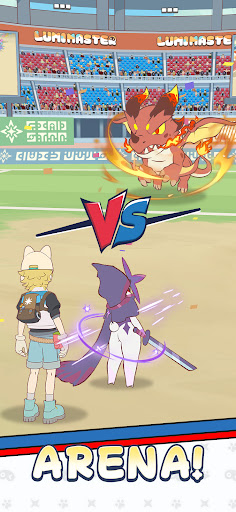
Lumi Master je neformální hra o sbírání a řízení monster. Vydejte se na bezstresovou a uklidňující cestu sbíráním monster v ručně kresleném světě se stovkami Lumiho.
Sbírejte miliony Lumiho zdarma!
Začněte prozkoumávat klepnutím! Stačí klepnout na obrazovku a volně se procházet deštnými pralesy, poušti a sopkami a narazit na stovky unikátních Lumiho. Jednoduchá mechanika chytání v kombinaci s rozmanitým systémem galerií dělá sbírání Lumiho snadným a zábavným.
Vychovávejte si vlastního Lumiho
Rostete bok po boku se svým Lumim!
Každý Lumi se může vyvíjet tréninkem a cestou odemykat nové formy a schopnosti. Sledujte, jak se váš rozkošný společník v každém okamžiku růstu promění v jedinečného bojového partnera.
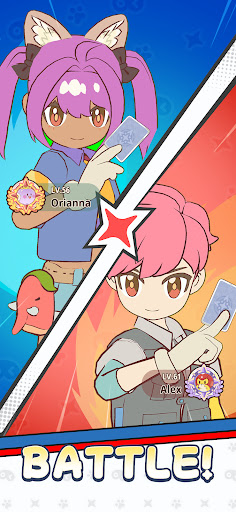
Neformální strategické bitvy
Vyhrajte se synergií a strategií! Žádná šílená komba ani silné statistiky nejsou k dispozici. Prozkoumejte zábavu s počítadly typů a kombinacemi dovedností, sestavte si svůj nejsilnější tým, zapojte se do uvolněných bitev a vychutnejte si čistou radost ze strategizace vaší cesty k vítězství.
Vyzdobte si svůj vysněný domov
Přizpůsobte si svůj domov volně
Umístěte a uspořádejte stavby přesně tak, jak chcete, a vytvořte si pohádkový ráj, který bude skutečně váš.
Automatizovaná domácí produkce
Pracujte s Lumi, sklízíte ovoce!
S vaším užitečným Lumi, který se stará o produkci ve vašem domě, si užijte pohodlí a uspokojení z stálého pokroku i offline.
Hrajte s přáteli
Sdílejte zábavu se svými novými kamarády!
Navštivte domovy svých přátel, obdivujte navzájem design a dekorace. Užijte si více tepla a přátelství.
Sledujte nás
Web: https://lumi.biligames.com/en
Facebook: lumimasteren
Discord: https://discord.gg/JF86YUP8tu
X: @lumimasterEN
YouTube: @LumiMaster
TikTok: @lumimasteren
Instagram: @lumimasteren
Show more

1. Stáhněte si instalační program MEmu a dokončete instalaci

2. Spusťte MEmu a poté otevřete Google Play na ploše

3. Vyhledejte Lumi Master v Google Play
Install
4. Stáhněte a nainstalujte Lumi Master
5. Po dokončení instalace klikněte na ikonu pro spuštění

6. Užijte si hraní Lumi Master na PC s MEmu
MEmu je zdarma a ten nejlepší Android emulátor. 50 milionů lidí si užívá jeho nejlepší herní zážitky. Technologie virtualizace MEmu ti dovolí plynule hrát Android hry na PC a to i ty nejnáročnější.
Větší obrazovka s lepší grafikou; Dlouhá výdrž bez omezení baterie nebo mobilních dat.
Plná podpora mapování kláves pro přesné ovládání klávesnice a myši nebo gamepadu.
Více herních účtů nebo úkolů na jednom počítači najednou s Multi-Instance Managerem.
Play Lumi Master on PC by following steps: