Lumi Master
Diupdate
Versi Saat Ini
1.5.3
Ditawarkan Oleh

Dengan sepenuh kebulatan hati Anda dalam memainkan Lumi Master, tangan Anda tak seharusnya hanya terbatas pada layar kecil handphone Anda.Bermainlah layaknya seorang profesional dan dapatkan kendali penuh dalam permainan Anda dengan papan ketik dan tetikus.MEmu menawarkan seluruh hal yang Anda harapkan.Unduh dan mainkan Lumi Master pada PC. Bermainlah selama yang Anda inginkan, tanpa keterbatasan dari baterai, data seluler dan panggilan yang mengganggu.MEmu 9 baru merupakan pilihan terbaik untuk memainkan Lumi Master pada PC. Dipersiapkan bersama teknologi ahli kami, sistem pemetaan kunci preset yang canggih menjadikan Lumi Master sebagai permainan PC sejati.Manajer banyak hal dari MEmu memungkinkan Anda untuk memainkan 2 atau banyak akun pada perangkat yang sama.Dan yang terpenting, mesin emulasi eksklusif kami bisa melepaskan potensi penuh PC Anda, membuat segalanya berjalan lancar.
Tampilkan Lebih banyak
Unduh Lumi Master di PC dengan Emulator Android MEmu. Nikmati permainan pada layar yang besar. Unduh sekarang untuk mendapatkan Telur Lumi Pelangi Utama & bonus Energi saat peluncuran!

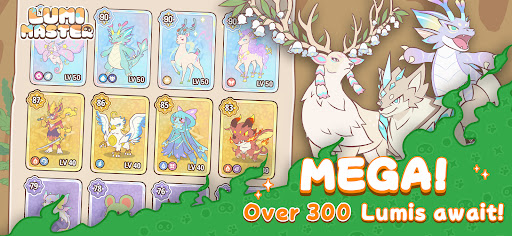

Unduh sekarang untuk mendapatkan Telur Lumi Pelangi Utama & bonus Energi saat peluncuran!
Lumi Master adalah petualangan mengumpulkan makhluk yang nyaman, berlatar dunia yang menawan dan digambar tangan. Dirancang untuk pemain yang sibuk, nikmati penemuan instan dengan kontrol satu tangan yang sederhana dalam sesi singkat 5 menit!
-Tangkap Ratusan Lumi Secara Gratis
Jelajahi hutan hujan, gurun, dan gunung berapi hanya dengan satu ketukan! Tangkap Lumi liar dan lengkapi Lumi-Dex utama Anda.
-Latih, Kembangkan & Jalin Ikatan
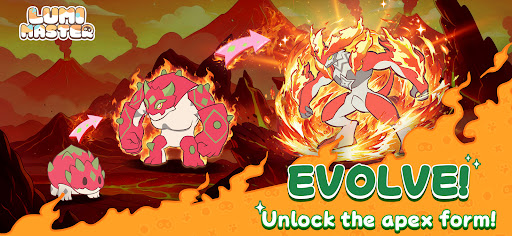
Saksikan teman-teman imut Anda berevolusi! Buka bentuk baru, keterampilan elemen, dan potensi pertempuran saat ikatan Anda semakin dalam.
-Eksplorasi Roguelike Singkat
Gunakan energi untuk memicu pertemuan acak instan—temukan harta karun, tantang Bos, dan tambang sumber daya langka hanya dalam 2 langkah.
-Berdagang untuk Menjadi Juara
Jalan menuju kejayaan yang benar-benar non-P2W! Lelang Lumi langka dan berdagang dengan pemain di seluruh dunia untuk membangun tim impian Anda.
-Hiasi Surga Anda
Bangun tempat perlindungan bak negeri dongeng di mana Lumi Anda dapat bersantai, bermain, dan hidup bersama Anda.
-Ringan & Terus Berkembang
Paket Global 200MB: Berjalan lancar di hampir semua perangkat. Minigame Mingguan: Pinball, Memberi Makan Lumi, Serangan Kooperatif & lainnya. Pembaruan Musiman: Peta baru setiap minggu, dengan 60–80 Lumi baru ditambahkan setiap musim!
Ikuti Kami
Situs web: https://lumi.biligames.com/en
Facebook: lumimasteren
Discord: https://discord.gg/JF86YUP8tu
X: @lumimasterEN
YouTube: @LumiMaster
TikTok: @lumimasteren
Instagram:@lumimasteren
Tampilkan Lebih banyak

1. Unduh dan instal MEmu APP

2. Menjalankan MEmu lalu buka Google Play di halaman

3. Cari Lumi Master di Google Play
Install
4. Unduh dan instal Lumi Master
5. Setelah insatl APP selesai,klik ikon untuk mulai

6. Nikmati bermain Lumi Master di PC dengan MEmu
MEmu App Player adalah emulator Android gratis terbaik dan 50 Juta orang sudah menikmati pengalaman luar biasa dalam bermain gim Android. Teknologi virtualisasi MEmu memberi kekuasaan untuk memainkan ribuan gim Android dengan lancar di PC anda, bahkan gim dengan grafis yang paling tinggi.
Layar lebih besar dengan grafis yang lebih baik; durasi panjang, tanpa batasan baterai atau data seluler.
Didukung penuh oleh Pemetaan tombol yang lengkap untuk keakuratan kontrol keyboard dan mouse maupun gamepad.
Membuka beberapa akun game atau tugas di waktu yang sama hanya pada satu PC, dengan Multi-Instance manager.
Play Lumi Master on PC by following steps: