Lumi Master
อัปเดตเมื่อ
เวอร์ชันปัจจุบัน
1.5.3
ให้บริการโดย

เวลาคุณเล่น Lumi Master, คุณอาจรู้สึกว่ามือคุณอาจบังจอแล้วทำให้ไม่ได้เล่นแบบเต็มที่. เล่นแบบไร้ขีดจำกัดด้วยเม้าส์และคีย์บอร์ด. MEmu มีตัวเลือกหลายอย่างให้คุณใช้งานเกมที่คุณเล่นแบบที่คุณต้องการ. ดาวน์โหลดและเล่น Lumi Master บน PC. เล่นนานแค่ไหนก็ได้, ไม่ต้องชาร์จแบตเตอรี่, หรือเจอคนโทรเข้ามาระหว่างเล่น. MEmu 9 เป็นตัวเลือกสำหรับการเล่น Lumi Master บน PC. ทางทีมงานเราได้ปรับแต่งเกม, ปรับให้เล่นเกมบางเกมได้เหมือนเล่น Lumi Master เป็นเกม PC เช่นเล็งด้วยเม้าส์หรือใช้คีย์บอร์ด. ระบบของเรายังทำให้คุณสามารถเปิดเล่นได้มากกว่า 2 เกมพร้อมๆกันในคอมของคุณ. และที่สำคัญที่สุด, ระบบโปรแกรมของเราสามารถทำให้คุณใช้ระบบของ PC ทำให้เกมลื่นเหมือนกับใช้โทรศัพท์รุ่นล่าสุด. เราไม่ได้ดูแลเรื่องการเล่นเกม, แต่เราดูแลถึงความสนุกสนานที่คุณได้จากการเล่นด้วย.
แสดงเพิ่มเติม
ดาวน์โหลด Lumi Master บน PC ด้วย MEmu Android Emulator สนุกกับการเล่นบนหน้าจอขนาดใหญ่ จับสัตว์เลี้ยงอัตโนมัติ สะสมอัลบั้มครบแบบสบายๆ!

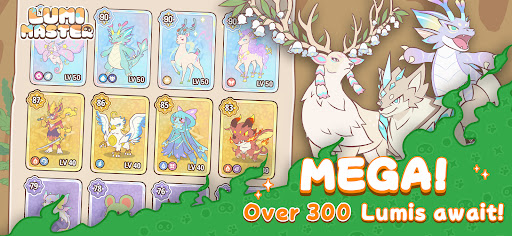

จับสัตว์เลี้ยงอัตโนมัติ สะสมอัลบั้มครบแบบสบายๆ!
ดาวน์โหลดเกมเลยตอนนี้ รับพลังกายมหาศาลและไข่ลูมิสีรุ้งฟรีเมื่อเข้าเกม! ฟักลูมิสุดแกร่ง พร้อมออกเดินทางผจญภัย!
Lumi Master เป็นเกมสะสมและจัดการมอนสเตอร์แนวสบาย ๆ อบอุ่นหัวใจ เริ่มต้นการผจญภัยสะสมมอนสเตอร์กันแบบปลอดความเครียดและผ่อนคลายในโลกที่วาดด้วยมือพร้อม Lumi หลายร้อยตัว
สะสม Lumi ผู้น่ารักได้ตามใจชอบ
เริ่มออกสำรวจได้ง่ายๆ เพียงปลายนิ้วแตะ!
เพียงแตะหน้าจอเพื่อเดินทางตามเสียงเรียกร้องของใจไปในป่า ทะเลทราย และภูเขาไฟ แล้วพบกับ Lumi ที่มีเอกลักษณ์เฉพาะตัวหลายร้อยตัว กลไกการจับที่เรียบง่ายผสมผสานกับระบบแกลเลอรีที่หลากหลายทำให้การสะสม Lumi เป็นเรื่องง่ายและสนุกขึ้นมา
การต่อสู้เชิงกลยุทธ์แบบสบาย ๆ
ชนะด้วยการประสานพลังและกลยุทธ์!
ไม่มีคอมโบสุดคลั่งหรือกระทั่งพลังที่โหดเกินไป สัมผัสความสนุกของการตีโต้ตามประเภทและการผสมผสานสกิล สร้างทีมที่แข็งแกร่งที่สุดของคุณ เข้าร่วมการต่อสู้แบบไม่ต้องเครียด และดื่มด่ำไปแต่ความสุขจากการวางกลยุทธ์เพื่อไปสู่ชัยชนะ
เลี้ยงดู Lumi ของคุณเอง
เติบโตไปด้วยกันกับ Lumi ของคุณ!
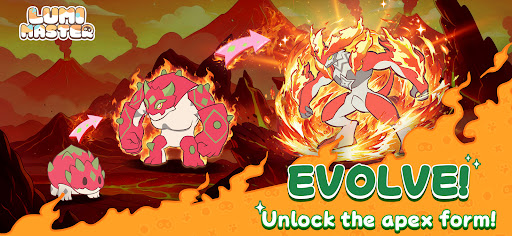
Lumi ทุกตัวสามารถวิวัฒนาการผ่านการฝึกฝน ปลดล็อกรูปแบบและความสามารถใหม่ ๆ เฝ้ามอง Lumi ของคุณเติบโตทีละขั้น จนกลายเป็นพันธมิตรในการต่อสู้ที่มีเอกลักษณ์ไม่เหมือนใคร
ตกแต่งบ้านในฝัน
ปรับแต่งบ้านของคุณได้ตามใจชอบ
วางและจัดเรียงสิ่งก่อสร้างตามที่คุณต้องการ เพื่อสร้างสรรค์สรวงสวรรค์ในเทพนิยายที่เป็นของคุณอย่างแท้จริง
การผลิตอัตโนมัติในบ้าน
Lumi ทำงาน คุณเก็บเกี่ยวผลตอบแทน!
เมื่อมี Lumi ผู้ช่วยเหลือคอยจัดการการผลิตในบ้าน คุณก็สามารถเพลิดเพลินใจไปกับความสะดวกสบายและความก้าวหน้าอย่างต่อเนื่องแม้ขณะออฟไลน์
เล่นกับเพื่อน ๆ
สร้างมิตรภาพ แบ่งปันความสุข!
แวะเยี่ยมบ้านของเพื่อน ชื่นชมการออกแบบและการตกแต่ง พร้อมใช้ช่วงเวลาดี ๆ ร่วมกันในบรรยากาศที่อบอุ่นและเป็นกันเอง
ติดตามเรา
เว็บไซต์: https://lumi.biligames.com/en
Facebook: @lumimasteren
Discord: https://discord.gg/JF86YUP8tu
X: @lumimasterEN
YouTube: @LumiMaster
TikTok: @lumimasteren
Instagram:@lumimasteren
แสดงเพิ่มเติม

1. ดาวน์โหลดตัวติดตั้ง MEmu และสิ้นสุดการติดตั้ง

2. เริ่ม MEmu จากนั้นเปิด Google Play บนหน้าแรก

3. ค้นหา Lumi Master ใน Google Play
Install
4. ดาวน์โหลดและติดตั้ง Lumi Master
5. เมื่อติดตั้งเสร็จให้คลิกที่ไอคอนเพื่อเริ่มใช้งาน

6. สนุกกับการเล่น Lumi Master บนพีซีด้วย MEmu
MEmu App Player เป็นอีมูเลเตอร์ Android ที่ดีที่สุดและผู้คนกว่า 50 ล้านคนเพลิดเพลินไปกับประสบการณ์การเล่นเกม Android ที่ยอดเยี่ยม เทคโนโลยีการจำลองเสมือนของ MEmu ช่วยให้คุณเล่นเกม Android หลายพันเกมได้อย่างราบรื่นบนพีซีของคุณแม้แต่เกมที่ต้องใช้กราฟิกมากที่สุด
จอใหญ่และกราฟฟิกสวยกว่า; เล่นได้นาน, ไม่ต้องใช้แบตเตอรี่โทรศัพท์หรือเน็ตโทรศัพท์.
ระบบปรับแต่งปุ่มคีย์บอร์ดและเม้าส์ตามที่คุณเลือก
เล่นมากกว่าหนึ่งเกมบน PC ในเวลาเดียวกันด้วยระบบหลายจอหรือ Multi-Instance manager.
Play Lumi Master on PC by following steps: