Lumi Master
अपडेट किया गया
वर्तमान वर्शन
1.5.3
संसाधन

अपने सेलफोन पर Lumi Master का उपयोग करते समय ओवरचार्ज के बारे में चिंता करना बंद करें, अपने आप को छोटी स्क्रीन से मुक्त करें और बहुत बड़े डिस्प्ले पर ऐप का उपयोग करने का आनंद लें। अब से, कीबोर्ड और माउस के साथ अपने ऐप का पूर्ण-स्क्रीन अनुभव प्राप्त करें। एमईएमयू आपको उन सभी आश्चर्यजनक सुविधाओं की पेशकश करता है जिनकी आपको उम्मीद थी: त्वरित इंस्टॉल और आसान सेटअप, सहज नियंत्रण, बैटरी की कोई सीमा नहीं, मोबाइल डेटा और परेशान कॉल। आपके कंप्यूटर पर Lumi Master का उपयोग करने का सबसे अच्छा विकल्प नया MEmu 9 है। हमारे अवशोषण के साथ कोडित, बहु-उदाहरण प्रबंधक एक ही समय में 2 या अधिक खाते खोलना संभव बनाता है। और सबसे महत्वपूर्ण, हमारा अनन्य उत्सर्जन इंजन आपके पीसी की पूरी क्षमता को जारी कर सकता है, सब कुछ सुचारू और सुखद बना सकता है।
और दिखाएं
डाउनलोड करें Lumi Master पीसी पर MEmu एंड्रॉयड एमुलेटर के साथ बड़े पर्दे पर खेलने का आनंद लें। लॉन्च के समय अल्टीमेट रेनबो लुमी एग और बोनस एनर्जी पाने के लिए अभी डाउनलोड करें!

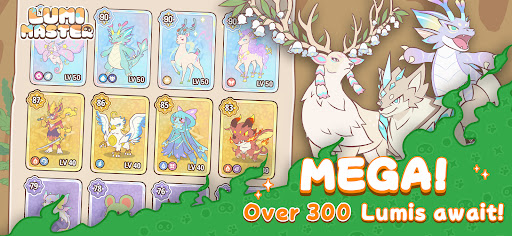
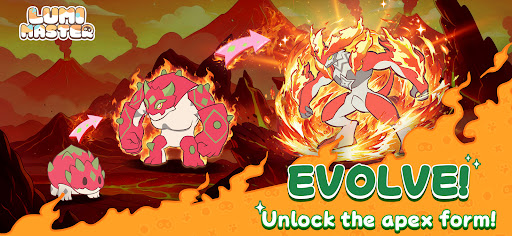

लॉन्च के समय अल्टीमेट रेनबो लुमी एग और बोनस एनर्जी पाने के लिए अभी डाउनलोड करें!
लुमी मास्टर एक आरामदायक, जीव-संग्रह का रोमांच है जो एक मनमोहक, हाथ से बनाए गए संसार में सेट है. व्यस्त खिलाड़ियों के लिए डिज़ाइन किया गया, 5 मिनट के छोटे-छोटे सत्रों में सरल एक-हाथ नियंत्रणों के साथ तुरंत खोज का आनंद लें!
-सैकड़ों लुमी मुफ्त में पकड़ें
एक साधारण टैप से वर्षावनों, रेगिस्तानों और ज्वालामुखियों का अन्वेषण करें! जंगली लुमी पकड़ें और अपना अल्टीमेट लुमी-डेक्स पूरा करें.
-प्रशिक्षण दें, विकसित करें और संबंध बनाएं
अपने प्यारे साथियों को विकसित होते हुए देखें! जैसे-जैसे आपका बंधन गहराता है, नए रूप, मौलिक कौशल और युद्ध क्षमता अनलॉक करें.
-छोटे-छोटे रोगलाइक अन्वेषण
तुरंत यादृच्छिक मुठभेड़ों को ट्रिगर करने के लिए ऊर्जा खर्च करें—खजाना खोजें, बॉस को चुनौती दें और केवल 2 चरणों में दुर्लभ संसाधनों का खनन करें.
-चैंपियन बनने के लिए व्यापार करें
गौरव का एक सच्चा गैर-पे-टू-विन रास्ता! दुर्लभ लुमी की नीलामी करें और अपनी सपनों की टीम बनाने के लिए दुनिया भर के खिलाड़ियों के साथ व्यापार करें.
- अपना स्वर्ग सजाएँ
एक जादुई परीलोक बनाएँ जहाँ आपके लुमीज़ आराम कर सकें, खेल सकें और आपके साथ रह सकें.
- हल्का और निरंतर विकसित होता हुआ
200MB का वैश्विक पैकेज: लगभग किसी भी डिवाइस पर सुचारू रूप से चलता है. साप्ताहिक मिनीगेम्स: पिनबॉल, लुमी फीडिंग, को-ऑप रेड्स और भी बहुत कुछ. मौसमी अपडेट: हर हफ्ते नए मैप, हर सीज़न में 60-80 नए लुमीज़ जोड़े जाते हैं!
हमें फ़ॉलो करें
वेबसाइट: https://lumi.biligames.com/en
फेसबुक: lumimasteren
डिस्कॉर्ड: https://discord.gg/JF86YUP8tu
X: @lumimasterEN
यूट्यूब: @LumiMaster
टिकटॉक: @lumimasteren
इंस्टाग्राम:@lumimasteren
और दिखाएं

1. MEmu इंस्टॉलर को डाउनलोड करें और इंस्टॉलेशन को पूरा करें

2. MEmu शुरू करें फिर होमपेज पर Google Play खोलें

3. Google Play में Lumi Master खोजें
Install
4. Lumi Master डाउनलोड कर इंस्टॉल करें
5. इंस्टॉल पूरा होने पर आइकन दबाएं

6. MEmu से पीसी पर Lumi Master खेलने का आनंद लें
MEmu Play सबसे बेहतरीन मुफ़्त Android एमुलेटर है और 5 करोड़ लोग पहले ही इसके शानदार Android गेमिंग अनुभव का आनंद ले चुके हैं। MEmu 9 वर्चुअलाइज़ेशन तकनीक आपको अपने PC पर हज़ारों Android गेम, यहाँ तक कि सबसे ज़्यादा ग्राफ़िक्स वाले गेम भी, आसानी से खेलने की सुविधा देती है।
असीमित बैटरी या मोबाइल डेटा के साथ बेहतर ग्राफिक्स के साथ बड़ी स्क्रीन; लंबी अवधि।
कीबोर्ड और माउस या गेमपैड के उत्तम नियंत्रण के लिए संपूर्ण कीमैपिंग का समर्थन करता हैं।
एक ही पीसी पर मल्टी-इंस्टेंस मैनेजर के साथ एक समय में कई गेम खाते या कार्य कर सकते हैं।
Play Lumi Master on PC by following steps: