Lumi Master
Zaktualizowano
Aktualna wersja
1.5.3
Sprzedawca

Przy całej swojej pasji do grania w Lumi Master, twoje ręce nie powinny być ograniczone na małym ekranie telefonu. Graj jak zawodowiec i uzyskaj pełną kontrolę nad grą za pomocą klawiatury i myszy. MEmu oferuje ci wszystko, czego oczekujesz. Pobierz i graj Lumi Master na PC. Graj tak długo, jak chcesz, bez ograniczeń baterii, danych komórkowych i niepokojących połączeń. Zupełnie nowy MEmu 9 to najlepszy wybór do grania w Lumi Master na PC. Przygotowany dzięki naszej wiedzy, znakomity, wstępnie ustawiony system mapowania klawiszy sprawia, że Lumi Master jest prawdziwą grą na PC. Zakodowany naszą absorpcją, menedżer wielu instancji umożliwia granie na 2 lub więcej kontach na tym samym urządzeniu. A co najważniejsze, nasz emulator może uwolnić pełny potencjał twojego komputera, sprawić, że wszystko będzie płynne. Dbamy nie tylko o to, jak grasz, ale także o cały proces czerpania radości z grania.
Pokaż więcej
Ciesz się wspaniałym doświadczeniem podczas grania w Lumi Master na komputerze z aplikacją MEMU App Player. Jest to potężny darmowy emulator Androida pozwalający grać w tysiące gier na Androida. Pobierz już teraz, aby odebrać Ultimate Rainbow Lumi Egg i bonusową energię w dniu premiery!

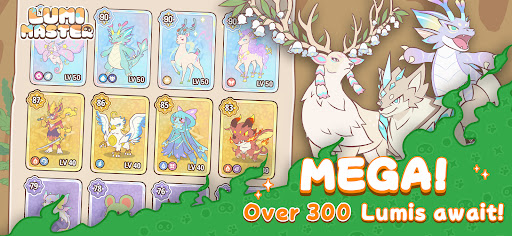

Pobierz już teraz, aby odebrać Ultimate Rainbow Lumi Egg i bonusową energię w dniu premiery!
Lumi Master to przytulna, kolekcjonerska przygoda, osadzona w uroczym, ręcznie rysowanym świecie. Stworzona dla zapracowanych graczy, ciesz się natychmiastowym odkrywaniem dzięki prostemu sterowaniu jedną ręką w 5-minutowych, krótkich sesjach!
- Złap setki Lumi za darmo
Eksploruj lasy deszczowe, pustynie i wulkany jednym dotknięciem! Złap dzikie Lumi i zdobądź swój ostateczny Lumi-Dex.
- Trenuj, ewoluuj i buduj więzi
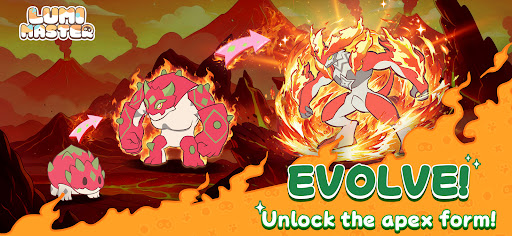
Obserwuj, jak ewoluują Twoi uroczy towarzysze! Odblokowuj nowe formy, umiejętności żywiołów i potencjał bojowy, gdy Wasza więź się pogłębia.
- Eksploracja w stylu roguelike w pigułce
Wydaj energię, aby aktywować natychmiastowe losowe spotkania — odkrywaj skarby, rzucaj wyzwania bossom i wydobywaj rzadkie zasoby w zaledwie 2 krokach.
- Handluj, aby zostać mistrzem
Prawdziwa, nie-P2W, droga do chwały! Licytuj rzadkie Lumi i wymieniaj się z graczami z całego świata, aby zbudować drużynę marzeń.
- Udekoruj swoją przystań
Zbuduj bajkową oazę, w której Twoje Lumi będą mogły odpoczywać, bawić się i żyć u Twojego boku.
- Lekki i stale rozwijający się
Pakiet globalny 200 MB: Działa płynnie na praktycznie każdym urządzeniu. Cotygodniowe minigry: Pinball, Karmienie Lumi, Rajdy kooperacyjne i wiele innych. Aktualizacje sezonowe: Nowe mapy co tydzień, z 60–80 nowymi Lumi dodawanymi w każdym sezonie!
Obserwuj nas
Strona internetowa: https://lumi.biligames.com/en
Facebook: lumimasteren
Discord: https://discord.gg/JF86YUP8tu
X: @lumimasterEN
YouTube: @LumiMaster
TikTok: @lumimasteren
Instagram:@lumimasteren
Pokaż więcej

1. Pobierz instalator MEmu i zakończ instalację

2. Uruchom MEmu, a następnie otwórz Google Play na pulpicie

3. Wyszukaj Lumi Master w Google Play
Install
4. Pobierz i zainstaluj Lumi Master
5. Po zakończeniu instalacji kliknij ikonę, aby rozpocząć

6. Ciesz się grą Lumi Master na PC z MEmu
MEmu Play to najlepszy emulator Androida, a 100 milionów ludzi już korzysta z jego i dosta doskonałe wrażenia z gier na Androida. Technologia wirtualizacji MEmu umożliwia płynne granie w tysiące gier Androida na komputerze, nawet tych najbardziej wymagających grafiki.
Większy ekran z lepszą grafiką; Długi czas, bez ograniczeń baterii lub danych mobilnych.
Pełna obsługa mapowania klawiszy dla precyzyjnego sterowania klawiaturą i myszą lub gamepadem.
Wiele kont gier lub zadań na jednym komputerze jednocześnie z menedżerem wielu instancji.
Play Lumi Master on PC by following steps: