League of Grimm: Idle RPG
Aktualisiert
Aktuelle Version
Angeboten von

Bei all Ihrer Leidenschaft für das Spielen von League of Grimm: Idle RPG sollten Ihre Hände nicht auf einen winzigen Bildschirm Ihres Telefons beschränkt sein. Spielen Sie wie ein Profi und übernehmen Sie die volle Kontrolle über Ihr Spiel mit Tastatur und Maus. MEmu bietet Ihnen all die Dinge, die Sie erwarten. Laden Sie League of Grimm: Idle RPG herunter und spielen Sie es auf dem PC. Spielen Sie so lange, wie Sie wollen, ohne Grenzwerte für Akku, mobile Daten und störende Anrufe. Das brandneue MEmu 9 ist die beste Wahl, um League of Grimm: Idle RPG auf dem PC zu spielen. Das exquisite voreingestellte Tastaturbelegungssystem, das mit unserem Fachwissen vorbereitet wurde, macht League of Grimm: Idle RPG zu einem echten PC-Spiel. Der MEmu Multi-Instanz-Manager ermöglicht das Spielen von 2 oder mehr Konten auf demselben Gerät. Und das Wichtigste: Unsere exklusive Emulations-Engine kann das volle Potenzial Ihres PCs freisetzen und für reibungslose Abläufe sorgen.
Mehr anzeigen
Laden Sie Play League of Grimm: Idle RPG auf dem PC mit MEmu Android Emulator. Viel Spaß beim Spielen auf großmundieren. The mirror has shattered.
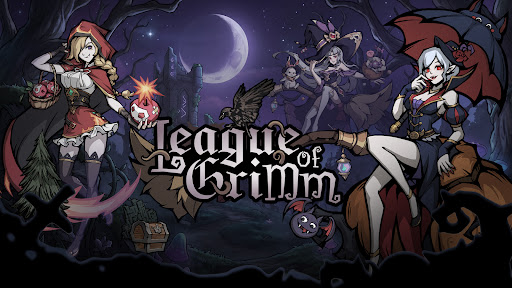
The mirror has shattered.
The fairytales you once knew are no longer innocent.
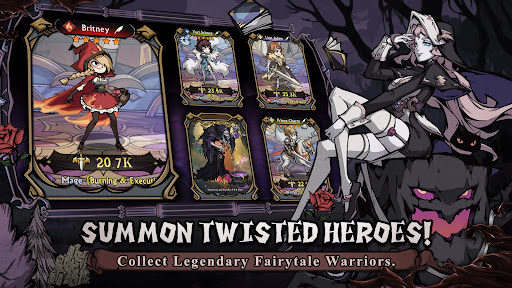
Step into a twisted dreamworld as a Mirrorbreaker and summon legendary heroes from corrupted tales. Snow White, Red Riding Hood, Aladdin, the Genie, and many more familiar characters return in darker, stronger, and more rebellious forms.
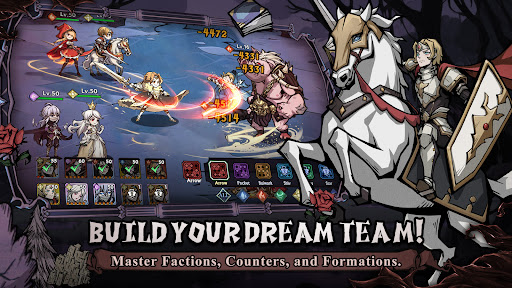
Build your dream team, master elemental counters, collect powerful spirits, and challenge endless adventures in a beautifully illustrated dark fantasy world.
Launch Rewards Are Waiting!
① Summon powerful fairytale heroes and build your ultimate team!
② Log in to claim rare heroes, upgrade materials, and exclusive rewards!
③ Enjoy idle rewards even while offline!
④ Challenge dungeons, arenas, guild wars, and limited-time events!
Game Features
----Twisted Fairytale Heroes----
Collect dark versions of classic fairytale characters and unlock their hidden powers. Each hero has unique skills, roles, and battle styles.
----Strategic Idle Battles----
Form your lineup and let your heroes fight automatically. Choose the right heroes, positions, and factions to defeat stronger enemies.
----Five Element Factions----
Water, Fire, Wind, Light, and Dark factions create deep strategic counters. Use faction advantages to gain bonus damage and higher hit rates in battle.
----Build Your Dream Team----
Activate powerful team bonuses through same-faction lineups, mixed-element teams, and advanced formations. Every choice can change the result of battle.
----Hero Growth System----
Upgrade, advance, awaken, and equip your heroes. Strengthen them with gear, runes, talents, and spirits to unlock their full potential.
----Spirit Companion System----
Equip up to four magical spirits to support your heroes in battle. Spirits can unleash active or passive abilities and turn the tide at key moments.
----Endless Idle Rewards----
Collect resources even when you are offline. Return anytime to claim rewards and keep growing stronger.
----Multiple Game Modes----
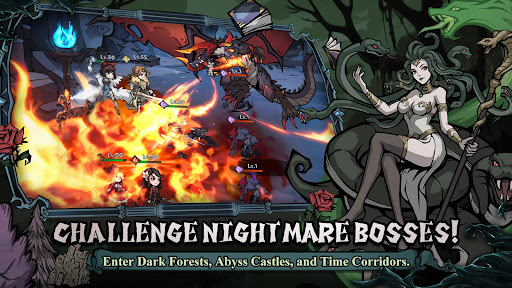
Explore story chapters, adventure stages, arena battles, guild wars, alliance battles, time-limited missions, and mysterious dungeons such as enchanted forests, abyss castles, moonlit springs, and time corridors.
The mirror is broken.
The nightmare has begun.
Will you rewrite the ending?
Short Description
Collect dark fairytale heroes in a strategic idle RPG.
Mehr anzeigen

1. Laden das MEmu-Installationsprogramm herunter und beenden die Installation

2. MEmu starten und Google Play auf der Homepage öffnen

3. Suchen League of Grimm: Idle RPG in Google Play
Install
4. Herunterladen und Installieren League of Grimm: Idle RPG
5. Klicken nach Abschluss der Installation auf das Symbol, um es zu starten

6. Viel Spaß beim Spielen von League of Grimm: Idle RPG auf dem PC mit MEmu
MEmu App Player ist der beste kostenlose Android-Emulator und 50 Millionen Menschen genießen bereits seine hervorragende Android-Gaming-Erfahrung. Mit der MEmu-Virtualisierungstechnologie können Sie Tausende von Android-Spielen problemlos auf Ihrem PC spielen, selbst bei grafikintensiven Spielen.
BGrößeres Bild mit besserer Grafik; Keine unterbrechungen, keine sorgen um Akku
Komplette Tastenbelegung unterstützt mit Maus und Tastatur oder Controller
Mit dem „Multi-Instance-Manager“ können Sie mehrere Spielkonten oder Spiele gleichzeitig auf einem PC ausführen.
Play League of Grimm: Idle RPG on PC by following steps: