League of Grimm: Idle RPG
อัปเดตเมื่อ
เวอร์ชันปัจจุบัน
ให้บริการโดย

เวลาคุณเล่น League of Grimm: Idle RPG, คุณอาจรู้สึกว่ามือคุณอาจบังจอแล้วทำให้ไม่ได้เล่นแบบเต็มที่. เล่นแบบไร้ขีดจำกัดด้วยเม้าส์และคีย์บอร์ด. MEmu มีตัวเลือกหลายอย่างให้คุณใช้งานเกมที่คุณเล่นแบบที่คุณต้องการ. ดาวน์โหลดและเล่น League of Grimm: Idle RPG บน PC. เล่นนานแค่ไหนก็ได้, ไม่ต้องชาร์จแบตเตอรี่, หรือเจอคนโทรเข้ามาระหว่างเล่น. MEmu 9 เป็นตัวเลือกสำหรับการเล่น League of Grimm: Idle RPG บน PC. ทางทีมงานเราได้ปรับแต่งเกม, ปรับให้เล่นเกมบางเกมได้เหมือนเล่น League of Grimm: Idle RPG เป็นเกม PC เช่นเล็งด้วยเม้าส์หรือใช้คีย์บอร์ด. ระบบของเรายังทำให้คุณสามารถเปิดเล่นได้มากกว่า 2 เกมพร้อมๆกันในคอมของคุณ. และที่สำคัญที่สุด, ระบบโปรแกรมของเราสามารถทำให้คุณใช้ระบบของ PC ทำให้เกมลื่นเหมือนกับใช้โทรศัพท์รุ่นล่าสุด. เราไม่ได้ดูแลเรื่องการเล่นเกม, แต่เราดูแลถึงความสนุกสนานที่คุณได้จากการเล่นด้วย.
แสดงเพิ่มเติม
ดาวน์โหลด League of Grimm: Idle RPG บน PC ด้วย MEmu Android Emulator สนุกกับการเล่นบนหน้าจอขนาดใหญ่ The mirror has shattered.
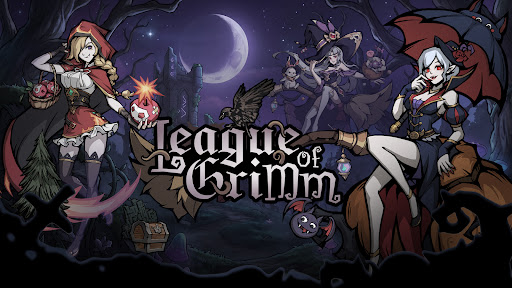
The mirror has shattered.
The fairytales you once knew are no longer innocent.
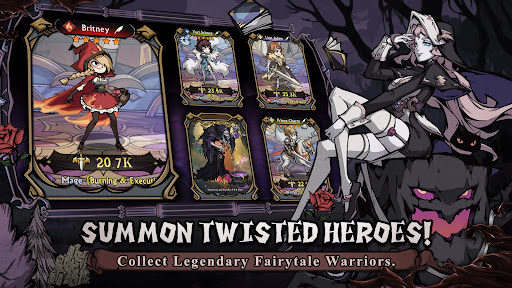
Step into a twisted dreamworld as a Mirrorbreaker and summon legendary heroes from corrupted tales. Snow White, Red Riding Hood, Aladdin, the Genie, and many more familiar characters return in darker, stronger, and more rebellious forms.
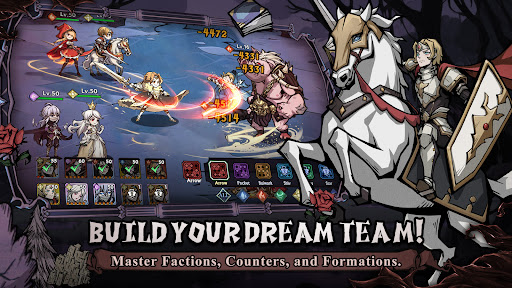
Build your dream team, master elemental counters, collect powerful spirits, and challenge endless adventures in a beautifully illustrated dark fantasy world.
Launch Rewards Are Waiting!
① Summon powerful fairytale heroes and build your ultimate team!
② Log in to claim rare heroes, upgrade materials, and exclusive rewards!
③ Enjoy idle rewards even while offline!
④ Challenge dungeons, arenas, guild wars, and limited-time events!
Game Features
----Twisted Fairytale Heroes----
Collect dark versions of classic fairytale characters and unlock their hidden powers. Each hero has unique skills, roles, and battle styles.
----Strategic Idle Battles----
Form your lineup and let your heroes fight automatically. Choose the right heroes, positions, and factions to defeat stronger enemies.
----Five Element Factions----
Water, Fire, Wind, Light, and Dark factions create deep strategic counters. Use faction advantages to gain bonus damage and higher hit rates in battle.
----Build Your Dream Team----
Activate powerful team bonuses through same-faction lineups, mixed-element teams, and advanced formations. Every choice can change the result of battle.
----Hero Growth System----
Upgrade, advance, awaken, and equip your heroes. Strengthen them with gear, runes, talents, and spirits to unlock their full potential.
----Spirit Companion System----
Equip up to four magical spirits to support your heroes in battle. Spirits can unleash active or passive abilities and turn the tide at key moments.
----Endless Idle Rewards----
Collect resources even when you are offline. Return anytime to claim rewards and keep growing stronger.
----Multiple Game Modes----
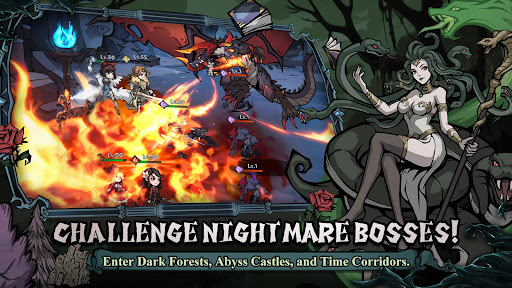
Explore story chapters, adventure stages, arena battles, guild wars, alliance battles, time-limited missions, and mysterious dungeons such as enchanted forests, abyss castles, moonlit springs, and time corridors.
The mirror is broken.
The nightmare has begun.
Will you rewrite the ending?
Short Description
Collect dark fairytale heroes in a strategic idle RPG.
แสดงเพิ่มเติม

1. ดาวน์โหลดตัวติดตั้ง MEmu และสิ้นสุดการติดตั้ง

2. เริ่ม MEmu จากนั้นเปิด Google Play บนหน้าแรก

3. ค้นหา League of Grimm: Idle RPG ใน Google Play
Install
4. ดาวน์โหลดและติดตั้ง League of Grimm: Idle RPG
5. เมื่อติดตั้งเสร็จให้คลิกที่ไอคอนเพื่อเริ่มใช้งาน

6. สนุกกับการเล่น League of Grimm: Idle RPG บนพีซีด้วย MEmu
MEmu App Player เป็นอีมูเลเตอร์ Android ที่ดีที่สุดและผู้คนกว่า 50 ล้านคนเพลิดเพลินไปกับประสบการณ์การเล่นเกม Android ที่ยอดเยี่ยม เทคโนโลยีการจำลองเสมือนของ MEmu ช่วยให้คุณเล่นเกม Android หลายพันเกมได้อย่างราบรื่นบนพีซีของคุณแม้แต่เกมที่ต้องใช้กราฟิกมากที่สุด
จอใหญ่และกราฟฟิกสวยกว่า; เล่นได้นาน, ไม่ต้องใช้แบตเตอรี่โทรศัพท์หรือเน็ตโทรศัพท์.
ระบบปรับแต่งปุ่มคีย์บอร์ดและเม้าส์ตามที่คุณเลือก
เล่นมากกว่าหนึ่งเกมบน PC ในเวลาเดียวกันด้วยระบบหลายจอหรือ Multi-Instance manager.
Play League of Grimm: Idle RPG on PC by following steps: